{source}
<?php  require_once JPATH_SITE.'/TTcustom/TT_contentparser.php';\(parameters = array("topicname" => "math/Fields_Vector", "modelname" => "ejss_model_e_Homog_EB_field");echo generateSimHTML(\)parameters, "EJSS");
?>
{/source}
Executive Summary:
This document reviews a JavaScript simulation applet designed to visualize the path of a charged particle (specifically an electron by default) moving within a homogeneous three-dimensional electromagnetic field. The simulation allows users to manipulate the electric and magnetic field components, as well as the initial velocity of the particle, and observe the resulting trajectory in a 3D environment. The resource provides explanatory text detailing the underlying physics, formulas, and suggested experiments, making it a valuable tool for learning and teaching electromagnetism and vector concepts.
Main Themes and Important Ideas/Facts:
- Visualization of Charged Particle Motion: The primary function of the applet is to visually demonstrate the complex paths a charged particle can take under the influence of electric and magnetic fields. The simulation operates in a 3D homogeneous field where values are normalized to a maximum of 1.
- "This simulation shows the path of a charged particle in a three dimensional homogeneous field, that may have electric and magnetic components."
- Interactive Parameter Control: Users can actively control various parameters through on-screen sliders, including the components of the velocity vector (v), the electric field vector (E), and the magnetic field vector (B). This interactivity allows for direct observation of how changes in these parameters affect the particle's trajectory.
- "At the right side of the window a number of sliders are positioned, which determine the vectors of velocity (v), electric (E) and magnetic (B) field."
- "Field components can be varied while the electron is orbiting."
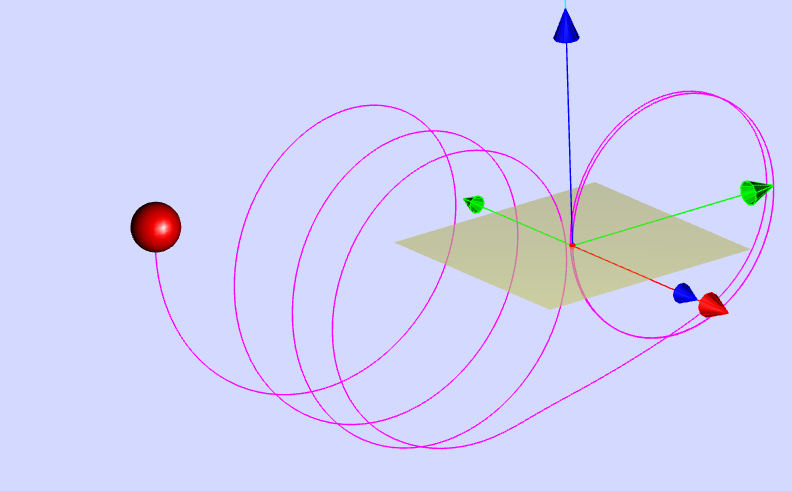
- Default Scenario and Initial Conditions: The simulation initializes with a specific default scenario: a homogeneous magnetic field of value 1 oriented along the x-axis, no electric field, an electron initially at the origin, and an initial velocity vector in the z-direction of value 1/2. This setup results in a circular path around the x-axis.
- "At default a homogenous magnetic field of value 1 is oriented along the x axis. There is no electric field. The electron, initially positioned at the origin, starts with an initial velocity vector in the z direction of value 1/2. With these initial conditions it will follow a circular path around an axis parallel to that of the magnetic field (x axis)."
- Visual Representation of Fields: The magnetic field vector is displayed as a thick red arrow, and when electric field components are introduced, the electric field vector is shown as a green arrow. This visual cue helps users understand the direction and magnitude of the applied fields.
- "The vector of the magnetic field is shown as a thick, red arrow."
- "When electric field components are chosen by means of the corresponding sliders, the electric field vector is shown as a green arrow."
- Simulation Controls: The applet includes standard simulation controls:
- Start/Stop: To begin or pause the particle's motion.
- Reset: To return to the default settings and stop the simulation.
- ResetObject: To reposition the electron to the origin while keeping the current parameter settings and the previous orbit visible. This is also triggered automatically when the object leaves the coordinate range.
- Clear: To delete all displayed orbits.
- Underlying Physics and Formulas: The resource provides a "Background" section explaining the relationship between the fields, the particle's velocity, and its resulting acceleration. Key concepts are outlined for different field configurations:
- No fields: Constant velocity, zero acceleration.
- Electric field only: Constant acceleration in the direction of the electric field, linearly increasing velocity.
- "With constant electric field a particle has constant acceleration in direction of the electric field vector. Its velocity will increase linearly."
- Magnetic field only: Acceleration is the cross product of velocity and magnetic field ( v x B ), perpendicular to both, and proportional to the sine of the angle between them. A stationary charge or a charge moving parallel to the magnetic field experiences no magnetic force. Oblique velocity results in a helical path, while perpendicular velocity results in circular motion.
- "The acceleration vector is determined by the vector product of velocity vector and magnetic field vector . It is perpendicular to the planeof both vectors. Its value is proportional to the sine of the angle between the velocity vector and the field vector."
- "When the velocity vector is oblique to the field vector, the particle path will be a screw of constant pitch around an axis parallel to the magnetic field vector. When the velocity vector is perpendicular to the magnetic field vector, the path will be a circle in a plane perpendicular to the field vector."
- Both electric and magnetic fields: Accelerations due to both fields add vectorially, generally resulting in a screw path with changing pitch. The text highlights a surprising observation: with perpendicular electric and magnetic fields, the particle appears to circle the magnetic field while drifting perpendicular to the electric field.
- Suggested Experiments: The resource includes a section with suggested experiments (E1 to E7) designed to guide users in exploring the effects of different field and velocity components. These experiments encourage observation from various 3D projection angles.
- "In all experiments rotate the 3D projection and study the movement under different angles of view."
- Examples include adding velocity components, introducing electric fields, changing the starting position, varying magnetic field components, and setting perpendicular electric and magnetic fields.
- Technical Details: The simulation is a JavaScript applet using HTML5, making it embeddable in web pages via an iframe. Sliders control the vector components, and the "speed of calculation" slider adjusts the time interval and thus the animation speed.
- "Embed this model in a webpage:" followed by the iframe code.
- "Slider speed of calculation defines the time interval of calculation and thus influences the demonstrated speed of movement."
- Educational Value: The applet is presented as an open educational resource suitable for learning and teaching mathematics (specifically vectors) and physics (electromagnetism). It offers a visual and interactive way to understand abstract concepts.
- The resource is categorized under "Learning and Teaching Mathematics using Simulations – Plus 2000 Examples from Physics."
- Credits and Licensing: The applet is credited to Dieter Roess, Fremont Teng, and Loo Kang Wee. The content is licensed under the Creative Commons Attribution-Share Alike 4.0 Singapore License. Commercial use of the EasyJavaScriptSimulations Library requires a separate license.
Conclusion:
The "Path of a Charged Particle in a Homogeneous Electromagnetic Field JavaScript Simulation Applet HTML5" is a well-designed and informative resource for visualizing and understanding the motion of charged particles in electromagnetic fields. Its interactive nature, clear explanations of the underlying physics, and suggested experiments make it a valuable tool for both students and educators in physics and mathematics. The ability to manipulate field and velocity components and observe the resulting 3D trajectories provides an intuitive and engaging learning experience.
Study Guide: Charged Particle in Electromagnetic Field Simulation
Key Concepts:
- Homogeneous Electromagnetic Field: A region where both the electric and magnetic fields have the same magnitude and direction at every point.
- Charged Particle Motion: The behavior of a particle with an electric charge when subjected to electric and/or magnetic forces.
- Electric Force: The force exerted on a charged particle by an electric field, given by F = qE, where q is the charge and E is the electric field vector. This force is in the direction of the electric field for a positive charge and opposite for a negative charge, causing acceleration.
- Magnetic Force (Lorentz Force): The force exerted on a moving charged particle by a magnetic field, given by F = q(v x B), where q is the charge, v is the velocity vector, and B is the magnetic field vector. This force is perpendicular to both the velocity and the magnetic field, causing a change in the direction of motion but not the speed.
- Vector Product (Cross Product): A mathematical operation between two vectors that results in a third vector perpendicular to both, with a magnitude proportional to the product of their magnitudes and the sine of the angle between them. It determines the direction of the magnetic force.
- Superposition of Forces: When both electric and magnetic fields are present, the net force on the charged particle is the vector sum of the electric and magnetic forces.
- Circular Motion: The path of a charged particle moving perpendicular to a uniform magnetic field. The magnetic force provides the centripetal force required for this motion.
- Helical Motion (Screw Path): The path of a charged particle with a velocity component parallel to a uniform magnetic field. The parallel component results in constant velocity, while the perpendicular component results in circular motion, combining to form a helix.
- Acceleration: The rate of change of velocity of the charged particle, determined by the net force acting on it according to Newton's second law (F = ma).
- Velocity Vector: A vector representing the speed and direction of the charged particle's motion.
- Field Vector: A vector representing the magnitude and direction of the electric or magnetic field.
Simulation Controls and Features:
- 3D Perspective Projection: Allows viewing the particle's path from different angles by dragging the mouse.
- Camera Menu: (Right mouse button) Provides specific preset views of the simulation.
- Sliders: Used to adjust the components of the velocity vector (v), electric field vector (E), and magnetic field vector (B).
- Thick Red Arrow: Visual representation of the magnetic field vector.
- Green Arrow: Visual representation of the electric field vector.
- Start/Stop Button: Initiates and pauses the simulation of the particle's motion.
- Reset Button: Returns the simulation to the default settings (magnetic field along x-axis, initial velocity along z-axis, no electric field) and stops the movement.
- ResetObject Button: Repositions the electron to the origin while keeping the current field parameters and the previously traced path visible. This action occurs automatically when the particle leaves the coordinate range.
- Clear Button: Erases all traced orbits of the particle.
- Speed of Calculation Slider: Controls the time interval between calculations, affecting the apparent speed of the particle's movement in the simulation.
- Embed Feature: Provides an iframe code to integrate the simulation into other web pages.
Observed Movement Patterns:
- No Fields: Particle moves in a straight line at a constant velocity.
- Electric Field Only: Particle accelerates in the direction of the electric field (for a positive charge) or opposite to it (for a negative charge), resulting in a parabolic trajectory if there's an initial velocity perpendicular to the field.
- Magnetic Field Only:Velocity parallel to B: Particle moves in a straight line with constant velocity.
- Velocity perpendicular to B: Particle moves in a circle in a plane perpendicular to B.
- Velocity oblique to B: Particle moves in a helix (screw path) around an axis parallel to B.
- Combined Electric and Magnetic Fields: The motion is more complex, generally resulting in a screw path with changing pitch or a drift velocity perpendicular to both fields when E is perpendicular to B.
Quiz
Answer the following questions in 2-3 sentences each.
- Describe the motion of a charged particle in a homogeneous magnetic field when its initial velocity is parallel to the magnetic field lines.
- What is the direction of the magnetic force acting on a moving charged particle relative to its velocity and the magnetic field? How does this affect the particle's speed?
- Explain how the electric field affects the motion of a charged particle. What happens to the particle's velocity when it is subjected to a constant electric field?
- In the simulation, what is the default configuration of the electric and magnetic fields, and what is the initial condition of the electron?
- What type of motion does a charged particle exhibit when its velocity is perpendicular to a uniform magnetic field? Why does this occur?
- Describe the trajectory of a charged particle in a uniform magnetic field when its initial velocity has components both parallel and perpendicular to the field. What is this type of path called?
- In the simulation, what is the purpose of the "Reset" button, and how does it differ from the "ResetObject" button?
- When both a uniform electric field and a uniform magnetic field are present and perpendicular to each other, what general type of motion might the charged particle exhibit?
- According to the text, what should one do while the electron is orbiting if they want to obtain easily interpretable results when changing field components?
- What does the "speed of calculation" slider in the simulation control, and how does it affect the visualization of the particle's movement?
Quiz Answer Key
- If a charged particle's initial velocity is parallel to a homogeneous magnetic field, it will experience no magnetic force because the angle between the velocity and magnetic field vectors is 0 degrees (sin(0) = 0). Therefore, the particle will continue to move in a straight line with a constant velocity.
- The magnetic force on a moving charged particle is perpendicular to both its velocity vector and the magnetic field vector, as determined by the vector product v x B. This force causes the particle to change its direction of motion but does no work on it, thus keeping its speed constant.
- The electric field exerts a force on a charged particle in the direction of the field (for positive charges) or opposite to it (for negative charges), causing the particle to accelerate. Under a constant electric field, the charged particle will experience a constant acceleration, leading to a linearly increasing velocity in the direction of the force.
- In the default setting of the simulation, there is a homogeneous magnetic field of value 1 oriented along the x-axis, and there is no electric field present. The electron is initially positioned at the origin with an initial velocity vector in the z-direction of value 1/2.
- When a charged particle's velocity is perpendicular to a uniform magnetic field, it will move in a circular path in a plane perpendicular to the field. This occurs because the magnetic force is always perpendicular to the velocity, acting as a centripetal force that continuously changes the direction of the velocity without changing its magnitude.
- If a charged particle's initial velocity has a component parallel to a uniform magnetic field, it will continue to move at a constant velocity along the field lines. Simultaneously, the perpendicular component of the velocity will cause circular motion. The combination of these two motions results in a helical path, also known as a screw path, around an axis parallel to the magnetic field.
- The "Reset" button returns the simulation to its original default settings, including the field configurations and the particle's initial conditions, and it also stops the particle's movement. The "ResetObject" button, on the other hand, only repositions the electron back to the origin, while leaving the current field parameters and the previously drawn orbit visible.
- With a uniform electric field perpendicular to a uniform magnetic field, a charged particle can exhibit a complex motion characterized by a drift velocity perpendicular to both fields, often appearing as a circling motion around the magnetic field vector but slowly wandering in the direction perpendicular to the electric field. This occurs due to the interplay of acceleration from the electric field and the velocity-dependent force from the magnetic field.
- According to the text, if one wants to achieve easily interpretable results while the electron is orbiting and varying field components, only the zero components of the velocity vector should be changed during the orbiting motion.
- The "speed of calculation" slider defines the time interval used in the simulation's calculations of the particle's motion. A smaller time interval (slower speed of calculation) results in a more detailed and potentially smoother representation of the path, while a larger time interval (faster speed of calculation) shows a quicker, but possibly less precise, visualization of the movement.
Essay Format Questions
- Discuss in detail the factors that influence the trajectory of a charged particle moving in a homogeneous magnetic field. Explain how the initial velocity of the particle relative to the magnetic field direction determines whether the path will be a straight line, a circle, or a helix.
- Explain the effect of a homogeneous electric field on a charged particle's motion. How does the particle's charge and the orientation of its initial velocity relative to the electric field lines affect its trajectory? Consider cases with and without an initial velocity component perpendicular to the field.
- Describe and explain the motion of a charged particle in a region containing both a homogeneous electric field and a homogeneous magnetic field. Analyze the cases where the fields are parallel and perpendicular to each other, and discuss how the forces exerted by each field contribute to the overall trajectory.
- Using the provided simulation as a conceptual tool, discuss the significance of vector quantities (velocity, electric field, magnetic field, and force) in understanding the motion of charged particles in electromagnetic fields. Explain how the vector nature of these quantities determines the direction and magnitude of the forces and the resulting acceleration and trajectory of the particle.
- Analyze the "Experiments" section of the text. Choose two of the suggested experiments (E1-E7) and describe the procedure, the expected observations based on the principles of electromagnetism, and the insights these experiments provide into the behavior of charged particles in homogeneous electromagnetic fields.
Glossary of Key Terms
- Charged Particle: A subatomic or atomic entity that possesses a net electric charge, either positive or negative (e.g., electron, proton, ion).
- Homogeneous Field: A field (either electric or magnetic) that has the same magnitude and direction at every point within a given region of space.
- Electromagnetic Field: A physical field produced by electrically charged objects. It encompasses both electric and magnetic fields, which are interconnected and exert forces on charged particles.
- Vector: A quantity that has both magnitude and direction, often represented graphically as an arrow. Examples in this context include velocity, force, electric field, and magnetic field.
- Acceleration: The rate at which the velocity of an object changes with time, a vector quantity with both magnitude and direction. According to Newton's second law, acceleration is directly proportional to the net force acting on the object and inversely proportional to its mass.
- Velocity: The rate of change of an object's position with respect to time, a vector quantity specifying both the speed and the direction of motion.
- Electric Field (E): A region of space around an electrically charged object in which another charged object would experience an electric force. It is a vector quantity with units of Newtons per Coulomb (N/C).
- Magnetic Field (B): A region of space around a magnet or a moving electric charge in which a magnetic force is exerted on other moving electric charges. It is a vector quantity with units of Tesla (T).
- Force (F): An interaction that, when unopposed, will change the motion of an object. It is a vector quantity with units of Newtons (N). In the context of electromagnetism, we consider electric force and magnetic force.
- Trajectory: The path followed by a moving object through space as a function of time. For a charged particle in an electromagnetic field, the trajectory is determined by the net force acting on it.
- Vector Product (Cross Product): A binary operation on two vectors in three-dimensional space that results in a third vector perpendicular to both of them. The magnitude of the resultant vector is proportional to the product of the magnitudes of the input vectors and the sine of the angle between them. It is crucial for determining the direction and magnitude of the magnetic force.
- Superposition: The principle that the net effect of multiple causes is the sum of the effects of the individual causes. In this context, the net force on a charged particle in combined electric and magnetic fields is the vector sum of the electric force and the magnetic force.
- Lorentz Force: The total electromagnetic force exerted on a point charge. It is the vector sum of the electric force due to the electric field and the magnetic force due to the magnetic field.
- Centripetal Force: A net force that acts on an object to keep it moving along a circular path. The centripetal force is directed inward towards the center of the circle and is perpendicular to the velocity of the object. In the case of a charged particle moving perpendicular to a magnetic field, the magnetic force provides the centripetal force.
- Helix: A three-dimensional curve that takes the form of a spiral around a straight line axis. This is the path followed by a charged particle when its velocity has components both parallel and perpendicular to a uniform magnetic field.
- Drift Velocity: The average velocity attained by charged particles (e.g., electrons) in a material due to an electric field. In the context of crossed electric and magnetic fields, it can also refer to the net velocity component perpendicular to both fields.
Sample Learning Goals
[text]
For Teachers
Path of a Charged Particle in a Homogeneous Electromagnetic Field JavaScript Simulation Applet HTML5
Instructions
Combo Box and Functions




Toggling Full Screen
Play/Pause, Initialise and Reset Buttons

Research
[text]
Video
[text]
Version:
Other Resources
[text]