{source}
<?php  require_once JPATH_SITE.'/TTcustom/TT_contentparser.php';\(parameters = array("topicname" => "math", "modelname" => "ejss_model_pythagoras");echo generateSimHTML(\)parameters, "EJSS");
?>
{/source}
Briefing Document: Pythagoras' Theorem JavaScript Simulation Applet HTML5
This document provides a briefing on the "Pythagoras' Theorem JavaScript Simulation Applet HTML5" resource found on the Open Educational Resources / Open Source Physics @ Singapore website. The resource is an interactive simulation designed to help students understand Pythagoras' Theorem.
{source}<iframe style="border-radius:12px" src="https://open.spotify.com/embed/episode/3MGRXVo39JEeOTt9LtW9ZW?utm_source=generator" width="100%" height="352" frameBorder="0" allowfullscreen="" allow="autoplay; clipboard-write; encrypted-media; fullscreen; picture-in-picture" loading="lazy"></iframe>{/source}
Main Themes:
- Interactive Learning: The resource utilizes a JavaScript HTML5 applet to provide an interactive learning experience for users exploring Pythagoras' Theorem.
- Visualization: It allows users to visually manipulate a right-angled triangle and observe the relationship between the sides, as implied by the theorem.
- Accessibility: The applet is designed to be embedded within webpages and accessible on multiple devices.
- Open Educational Resource: This is an openly available educational tool, encouraging wider distribution and modification.
- Versatility: The document is rich with links to other learning tools such as "Earth and Bar Magnet JavaScript HTML5 Applet Simulation Model", "Bungee Jump JavaScript Simulation Applet HTML5", "Black-body radiation JavaScript HTML5 Applet Simulation Model" and many others.
Most Important Ideas/Facts:
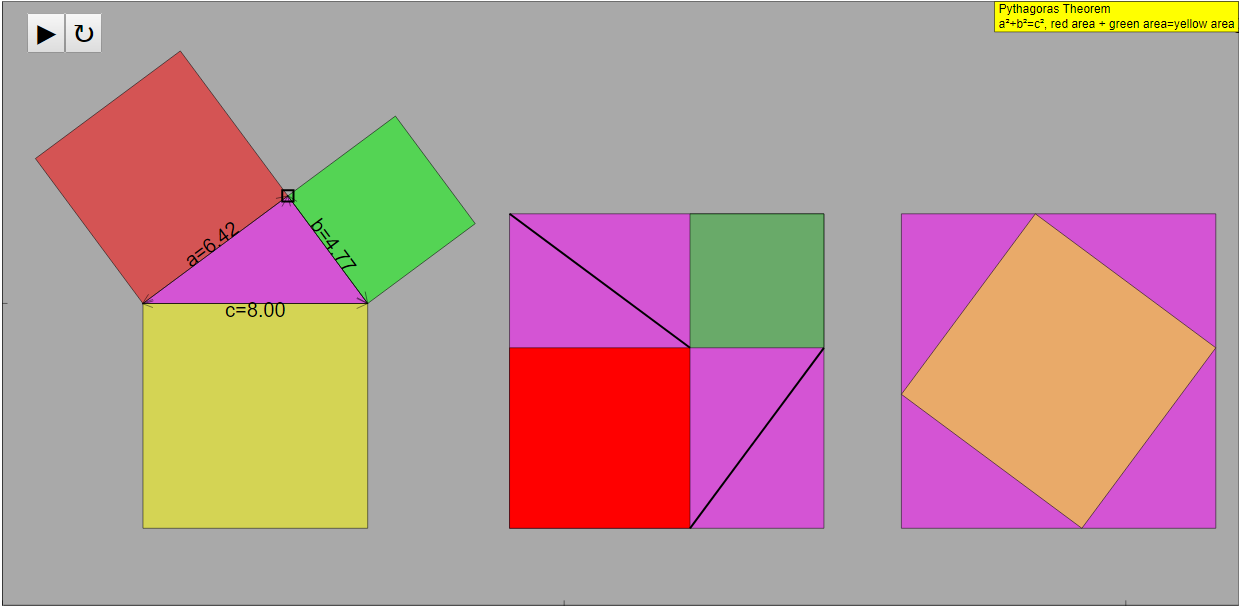
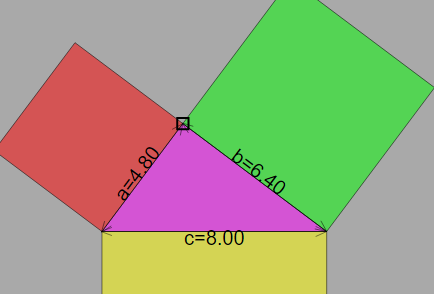
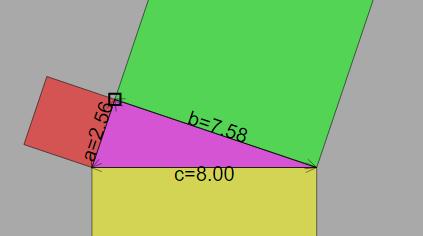
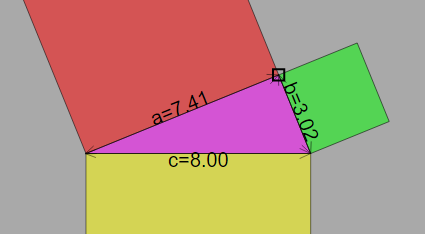
- Simulation Functionality: Users can drag a box to adjust the shape of the pink triangle, directly visualizing the relationship between the sides in Pythagoras' Theorem.
- "Drag the box left or right to adjust the shape of the pink triangle."
- Full-Screen Mode: The applet supports a full-screen mode for better visibility and user experience.
- "Double click anywhere on the screen to toggle full screen."
- Play/Pause/Reset: Standard simulation controls (Play/Pause/Reset) are included for user control.
- "Plays/Pauses and Resets the simulation respectively."
- Credits: The applet was developed by Fu-Kwun Hwang, Fremont Teng, and lookang.
- "Credits: Fu-Kwun Hwang - Dept. of Physics, National Taiwan Normal Univ.; Fremont Teng; lookang"
- Embeddable: The applet is designed to be easily embedded in web pages using an iframe code snippet.
- "Embed this model in a webpage: "
- OER Licensing: The content is licensed under the Creative Commons Attribution-Share Alike 4.0 Singapore License.
- Related Resources: The document includes a link to a similar resource on GeoGebra, suggesting alternative or complementary learning tools.
Quotes:
- (Referring to controlling the simulation): "Drag the box left or right to adjust the shape of the pink triangle."
- (Referring to Full Screen Mode): "Double click anywhere on the screen to toggle full screen."
- (Referring to the Simulation controls): "Plays/Pauses and Resets the simulation respectively."
- (Referring to credits): "Credits: Fu-Kwun Hwang - Dept. of Physics, National Taiwan Normal Univ.; Fremont Teng; lookang"
Key Takeaways:
The "Pythagoras' Theorem JavaScript Simulation Applet HTML5" is a valuable, openly accessible resource for teaching and learning Pythagoras' Theorem. Its interactive nature, ease of embedding, and availability on multiple devices make it a useful tool for educators and students alike. The resource encourages a hands-on approach to understanding mathematical concepts, promoting deeper learning.
Pythagoras' Theorem: A Study Guide
I. Review of Key Concepts
This section aims to help you consolidate your understanding of Pythagoras' Theorem, its applications, and the associated simulation applet. The focus will be on extracting information from the text provided and using it to improve your understanding of the theorem.
- Pythagoras' Theorem: Recall the fundamental relationship between the sides of a right-angled triangle: a² + b² = c², where 'a' and 'b' are the lengths of the two shorter sides (legs or cathetus) and 'c' is the length of the longest side (hypotenuse).
- Right-Angled Triangle: A triangle containing one angle that is exactly 90 degrees. Pythagoras' Theorem only applies to right-angled triangles.
- Simulation Applet Functionality: This simulation allows users to manipulate a right-angled triangle and visually observe how the sides relate to Pythagoras' Theorem. Understand the interactive elements:
- Drag-able Box: Allows for changing the shape of the triangle, which in turn changes the side lengths.
- Full Screen Toggle: Provides a larger, more immersive view of the simulation.
- Play/Pause and Reset: Allows controlling the simulation state.
- HTML5 and JavaScript: The simulation is built using these technologies, making it accessible on modern web browsers without the need for plugins. This is important for accessibility and ease of use.
- Educational Applications: The applet is designed to help students visualize and understand the theorem, reinforcing their learning through interactive exploration.
II. Quiz: Short Answer Questions
Answer the following questions in 2-3 sentences each, based on the provided text.
- What type of triangle does Pythagoras' Theorem apply to?
- State the formula for Pythagoras' Theorem.
- What is the primary function of the "Drag-able Box" in the simulation applet?
- What programming languages is the Pythagoras' Theorem simulation applet built with?
- Why is it useful to have the simulation applet as a web-based tool?
- What is the purpose of the "Play/Pause" button in the simulation?
- Besides the simulation applet itself, what other resources about magnetism and electromagnetism does this website provide?
- What license does the website use for its contents?
- What is the main learning goal of the simulation applet?
- What is the intended audience for the simulation applet?
III. Quiz Answer Key
- Pythagoras' Theorem applies specifically to right-angled triangles. These triangles have one angle measuring exactly 90 degrees.
- The formula for Pythagoras' Theorem is a² + b² = c², where 'a' and 'b' represent the lengths of the two shorter sides (legs), and 'c' represents the length of the longest side (hypotenuse).
- The "Drag-able Box" allows users to dynamically adjust the shape of the pink triangle in the simulation. This manipulation alters the lengths of the triangle's sides and demonstrates the theorem.
- The Pythagoras' Theorem simulation applet is built using HTML5 and JavaScript. These technologies allow the applet to be run on modern web browsers without plugins.
- Web-based tools are accessible on many devices. This ensures it's easily available for educational use.
- The "Play/Pause" button starts or stops the dynamic demonstration within the simulation. This lets users control the pace of the visualization.
- The website also provides many resources about magnetism and electromagnetism. These resources include simulations of magnetic fields, magnets on various surfaces, and more.
- The website content is licensed under the Creative Commons Attribution-Share Alike 4.0 Singapore License. This license lets others use and share the content as long as they give attribution and share it under the same license.
- The main learning goal is to help students visualize and understand Pythagoras' Theorem. The simulation reinforces their learning through interactive exploration.
- The simulation applet is primarily intended for mathematics teachers and their students. It is designed to help with the study of the theorem.
IV. Essay Questions
Consider the following essay questions. Develop well-structured essays that incorporate evidence from the provided text and your understanding of Pythagoras' Theorem.
- Discuss the benefits of using interactive simulations, such as the Pythagoras' Theorem applet, in mathematics education. How do they enhance understanding compared to traditional teaching methods?
- Analyze the design and functionality of the Pythagoras' Theorem simulation applet. How does each interactive element contribute to the user's learning experience?
- Explain how the use of HTML5 and JavaScript contributes to the accessibility and usability of the Pythagoras' Theorem simulation applet in diverse educational settings.
- Relate Pythagoras' Theorem to real-world applications in fields such as engineering, architecture, or navigation. Provide specific examples.
- Based on the resources listed alongside the Pythagoras' Theorem applet, discuss the broader aims and objectives of the "Open Educational Resources / Open Source Physics @ Singapore" project.
V. Glossary of Key Terms
- Pythagoras' Theorem: A fundamental theorem in geometry stating that in a right-angled triangle, the square of the length of the hypotenuse (the side opposite the right angle) is equal to the sum of the squares of the lengths of the other two sides (legs).
- Right-Angled Triangle: A triangle in which one of the angles is a right angle (90 degrees).
- Hypotenuse: The longest side of a right-angled triangle, opposite the right angle.
- Legs (or Cathetus): The two shorter sides of a right-angled triangle that form the right angle.
- Simulation Applet: A small, self-contained application designed to simulate a real-world process or concept, often used for educational purposes.
- HTML5: The latest evolution of the standard HTML markup language, used for structuring and presenting content on the World Wide Web.
- JavaScript: A programming language primarily used to enable interactive and dynamic content on websites.
- Open Educational Resources (OER): Teaching, learning, and research materials that are freely available for anyone to use, adapt, and share.
- Interactive Simulation: A computer-based model allowing users to manipulate variables and observe the resulting changes in the simulated environment.
- Visualization: A technique for creating images, diagrams, or animations to communicate a message or concept in a visual form.
Sample Learning Goals
[text]
For Teachers
Pythagoras' Theorem JavaScript Simulation Applet HTML5
Instructions to using Simulation Applet
Drag-able Box
Toggling Full Screen
Play/Pause and Reset Button

Research
[text]
Video
[text]
Version:
Other Resources
https://www.geogebra.org/m/X5mmy9s9
Pythagoras' Theorem JavaScript Simulation Applet FAQ
What is the Pythagoras' Theorem JavaScript Simulation Applet HTML5?
It's an interactive tool designed to help users understand and visualize the Pythagoras' theorem. It allows manipulation of a right-angled triangle and demonstrates the relationship between its sides.
How can I interact with the Simulation Applet?
You can drag the box left or right to adjust the shape of the pink triangle. Double-clicking on the screen toggles full-screen mode. There are also play/pause and reset buttons to control the simulation.
Who created this simulation?
The simulation was created by Fu-Kwun Hwang from the Dept. of Physics, National Taiwan Normal Univ., Fremont Teng, and lookang.
What are the learning goals associated with this simulation?
The provided text only states "[texthttps://iwant2study.org/lookangejss/math/ejss_model_pythagoras/pythagoras_Simulation.xhtml " frameborder="0"></iframe>
Is there a GeoGebra resource related to this topic?
Yes, a related resource can be found at https://www.geogebra.org/m/X5mmy9s9.
What other types of simulations are available on this site?
The site offers a wide range of physics and mathematics simulations, including topics like magnetism, electromagnetism, optics, mechanics, wave phenomena, circuits, and even simulations related to other subjects like biology and chemistry.
Under what license is this resource available?
The contents are licensed under the Creative Commons Attribution-Share Alike 4.0 Singapore License. For commercial use of the EasyJavaScriptSimulations Library, contact This email address is being protected from spambots. You need JavaScript enabled to view it. directly and review the license at https://www.um.es/fem/EjsWiki/Main/EJSLicense.