{source}
<?php  require_once JPATH_SITE.'/TTcustom/TT_contentparser.php';\(parameters = array("topicname" => "math", "modelname" => "ejss_model_circlesplusquestion02");echo generateSimHTML(\)parameters, "EJSS");
?>
{/source}
riefing Document: Circle Plus Question 02 - Interactive Mathematics Resource
This briefing document reviews the main themes and important information found in the provided sources related to "Circle Plus Question 02." The sources describe an interactive HTML5 applet designed for learning mathematics, specifically focusing on area and perimeter calculations involving circles and other geometric shapes.
1. Identification and Authorship:
- Title: Circle Plus Question 02
- Authors/Contributors: The applet is credited to multiple individuals: This email address is being protected from spambots. You need JavaScript enabled to view it., Francisco Esquembre, Felix J. Garcia Clemente, and Siti, based on ShiXiong's ideas.
- Copyright: © 2020, This email address is being protected from spambots. You need JavaScript enabled to view it.; Francisco Esquembre; Felix J. Garcia Clemente; Siti; based on ShiXiong ideas.
- Compilation: Compiled with EJS 6.1 BETA (200424).
- License: Released under a license (unspecified in the excerpts, but the second source mentions "Creative Commons Attribution-Share Alike 4.0 Singapore License" for the website content and directs to a separate license for commercial use of the EasyJavaScriptSimulations Library).
2. Purpose and Functionality:
- "Circle Plus Question 02" is an interactive HTML5 applet designed as an Open Educational Resource (OER) for learning mathematics.
- It falls under the broader category of "Interactive Resources" on the "Open Educational Resources / Open Source Physics @ Singapore" website.
- The applet is specifically categorized under "Mathematics," "Area and Perimeter," and "Circles." It is also linked to "Siti and Coco," likely characters or a theme within the learning activity, and "ShiXiong," the originator of the underlying ideas.
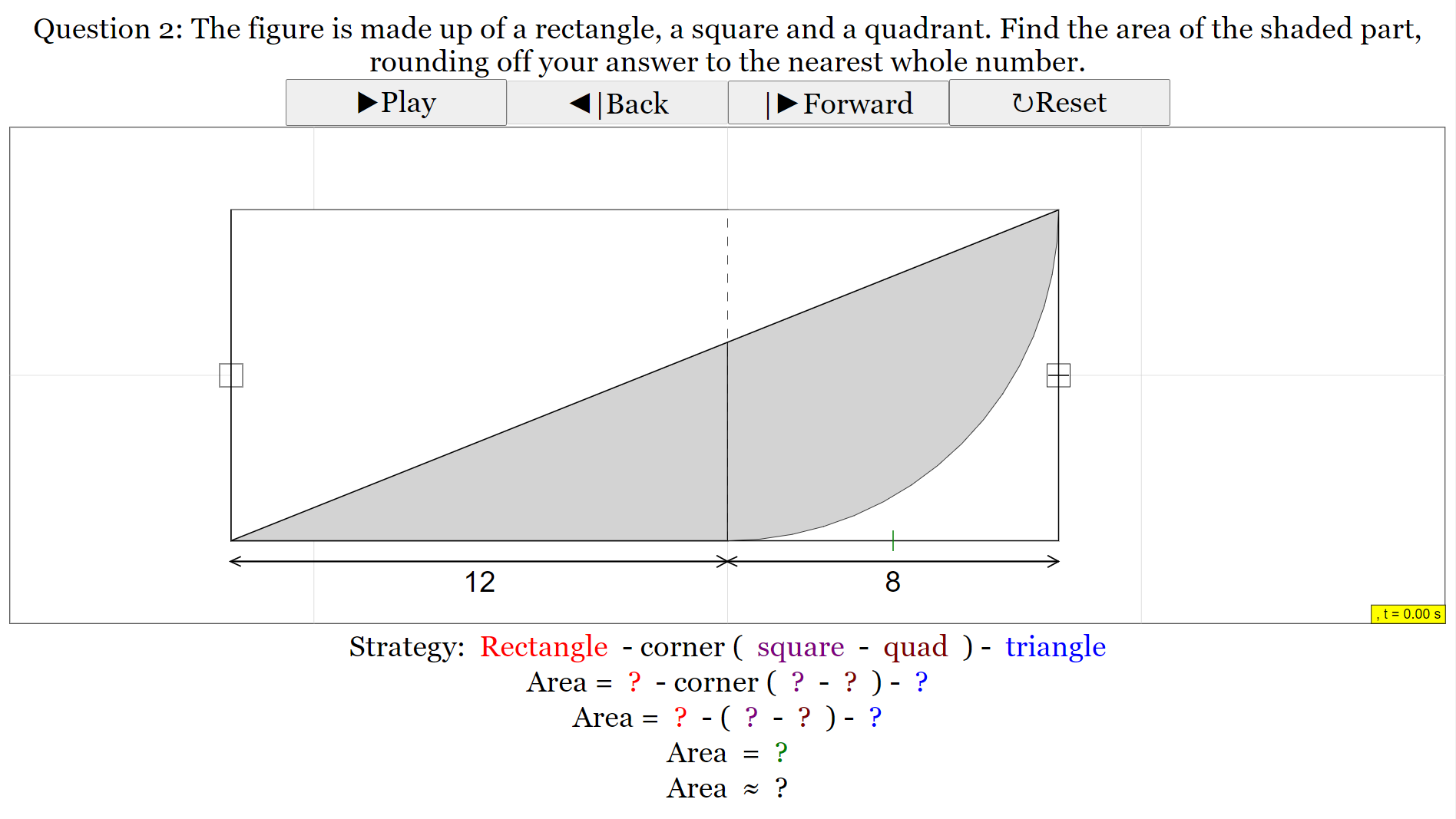
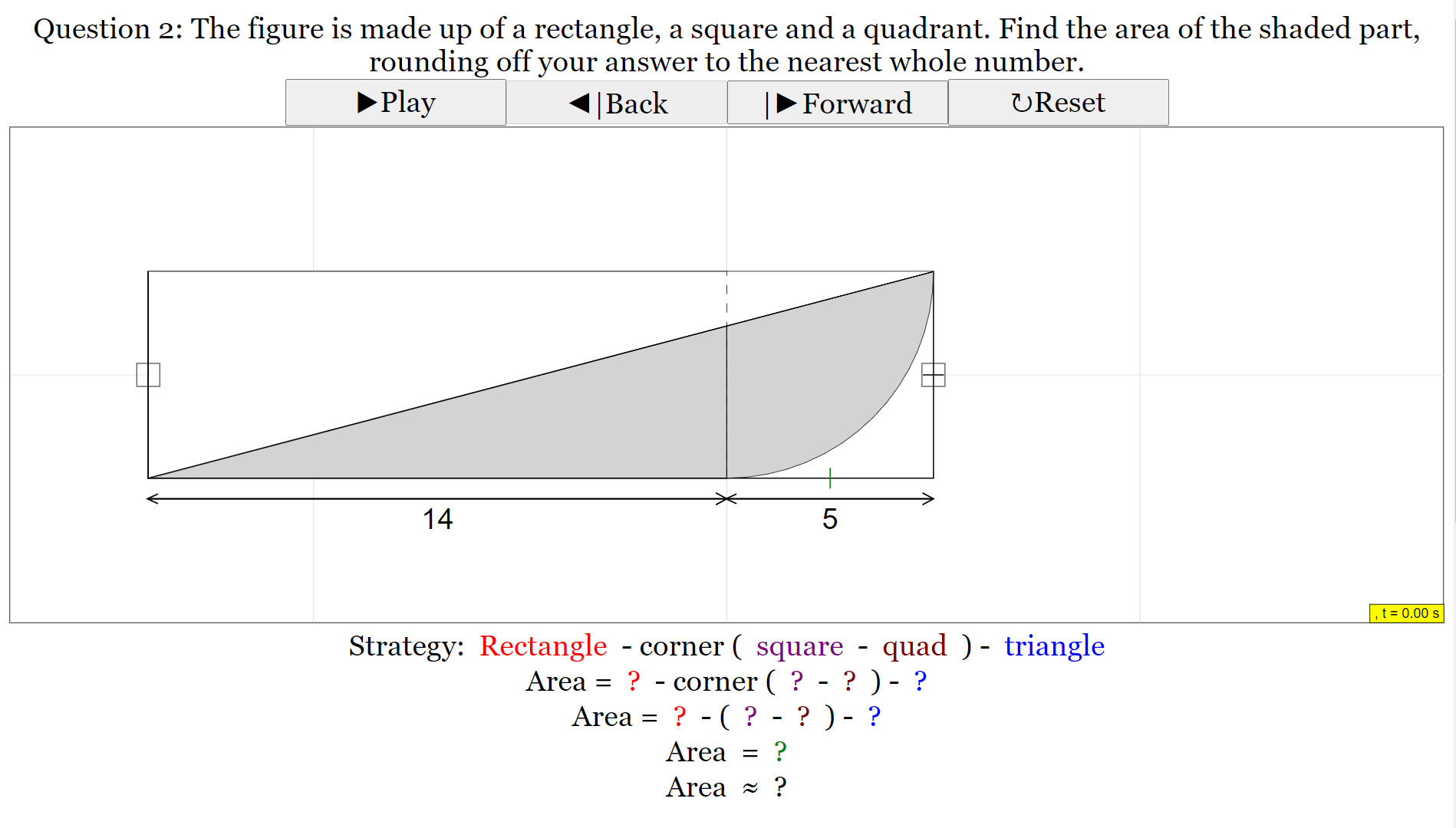
- The core functionality involves guiding the user to calculate a shaded area composed of different geometric shapes.
- The "For Teachers" section provides insight into how the simulation works:
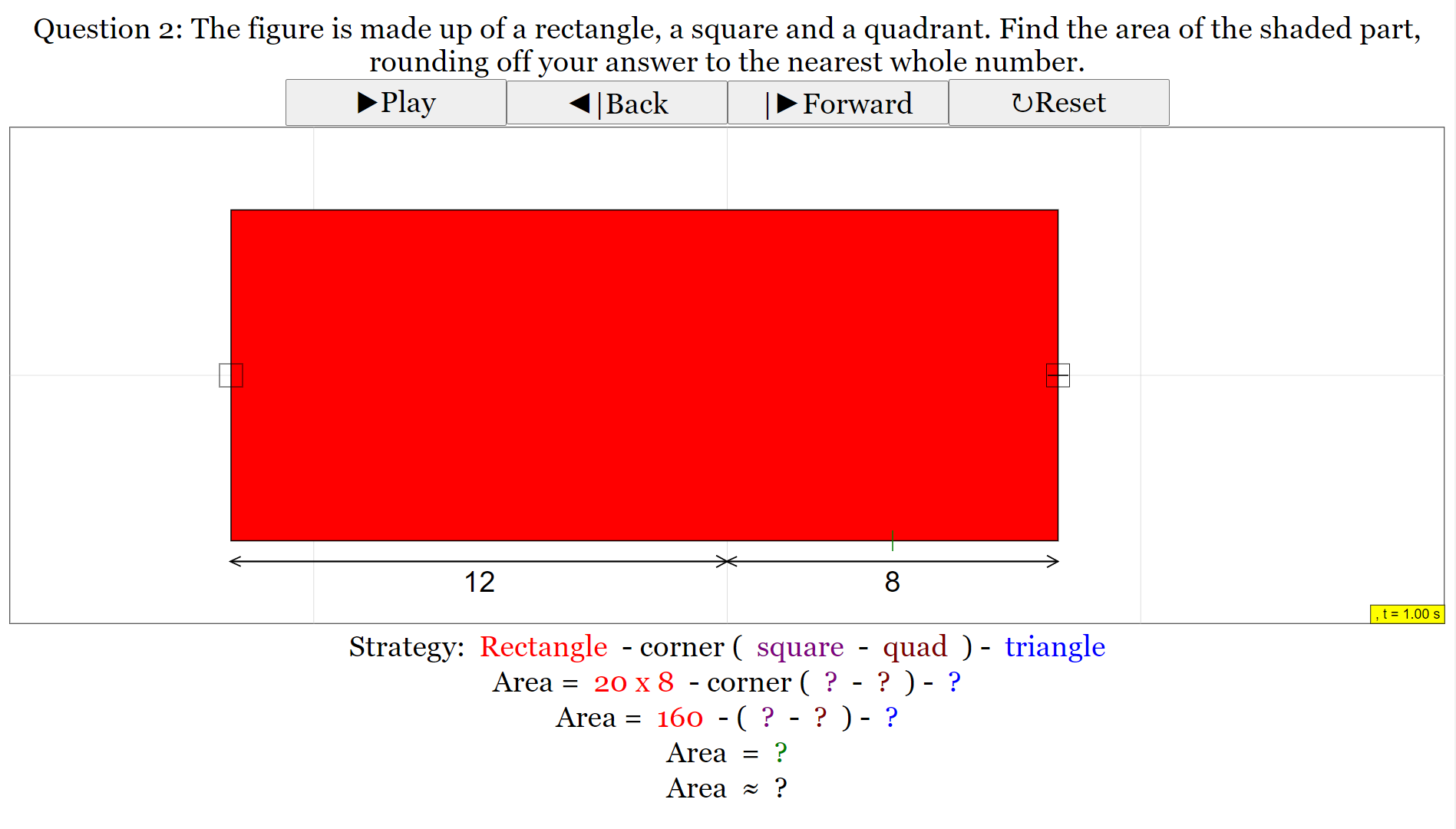
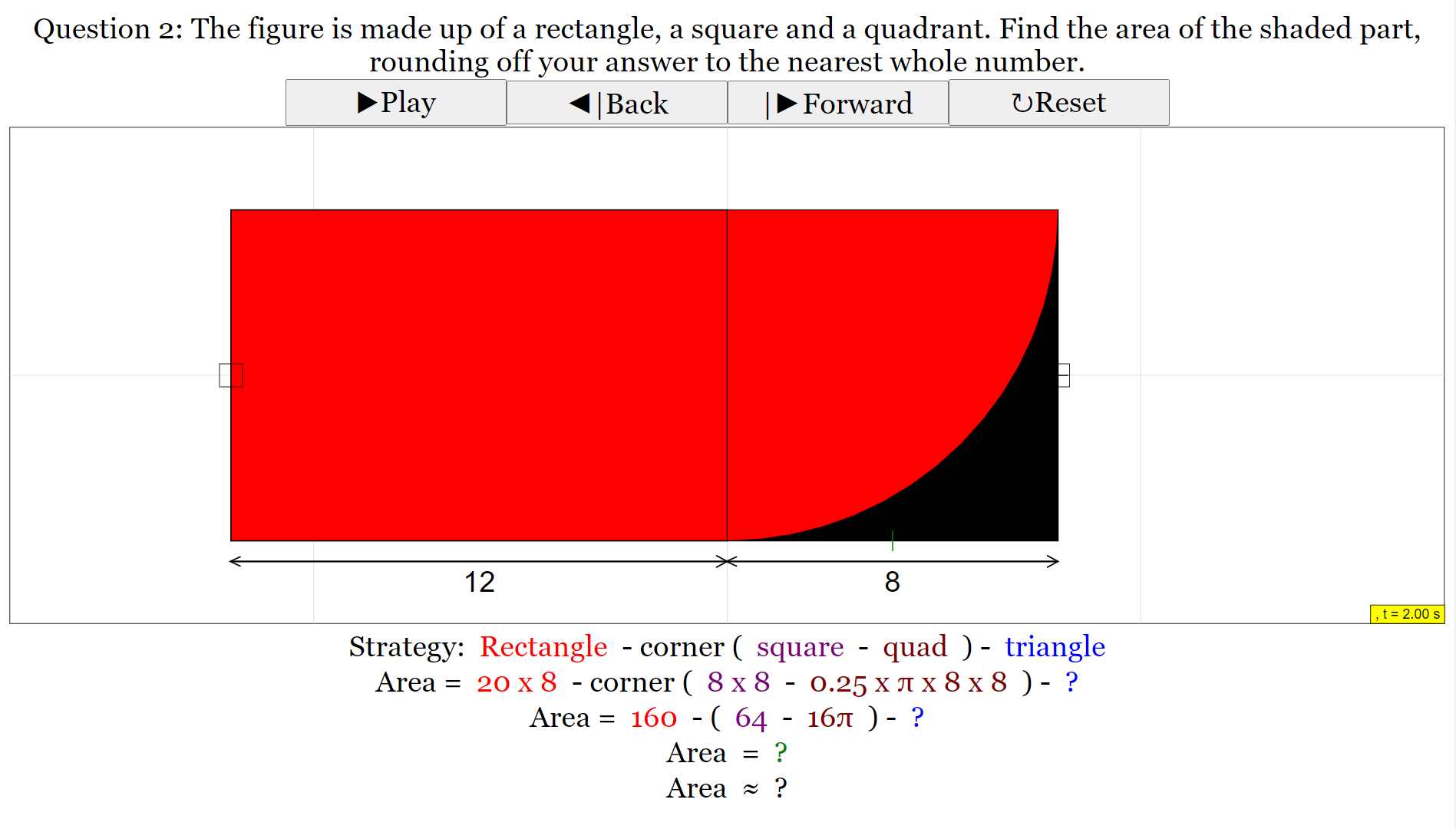
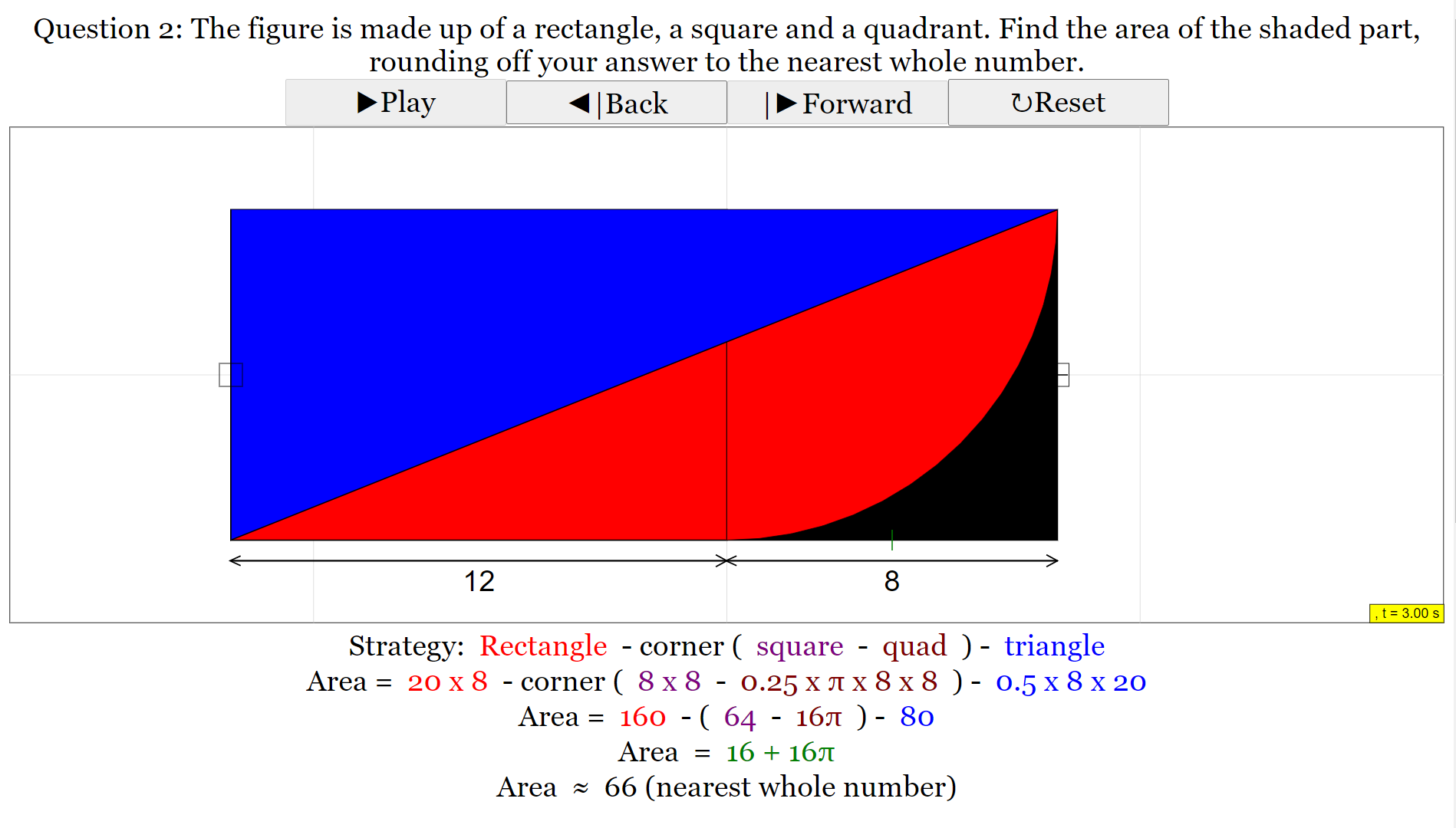
- The simulation progresses by displaying "guiding shapes" one by one.
- The example provided focuses on calculating:
- A red rectangle.
- A black corner (calculated by subtracting the area of a square and a quadrant).
- A triangle.
- These individual shape calculations build up to the final calculation of the "shaded area as indicated in the initial view."
- The applet includes interactive elements: "a small little box at the right side which changes the length within the square and the small box at the left side corner to change the length of the rectangle." This allows users to explore how changing dimensions affects the areas.
3. Technical Details and Accessibility:
- The applet is built using HTML5 and Javascript, making it accessible through web browsers without the need for additional plugins.
- It is compiled with EJS 6.1 BETA, indicating the use of the Easy Java/JavaScript Simulations toolkit.
- An embed code is provided, allowing educators to easily integrate the applet into their own webpages using an iframe:
- <iframe width="100%" height="100%" src="https://iwant2study.org/lookangejss/math/ejss_model_circlesplusquestion02/circlesplusquestion02_Simulation.xhtml " frameborder="0"></iframe>
- A YouTube link to "Circle Plus Question 01 HTML5 Applet Javascript" is provided, suggesting a series of related learning resources.
4. Pedagogical Implications and Features for Teachers:
- The applet supports guided learning by revealing shapes sequentially to aid understanding.
- It provides a visual and interactive approach to understanding area calculations of complex shapes by breaking them down into simpler components.
- The ability to change dimensions interactively allows for exploration and a deeper understanding of the relationship between dimensions and area.
- The inclusion of "Sample Learning Goals" (text not provided in the excerpt) suggests that the resource is designed with specific educational objectives in mind.
- The "For Teachers" section explicitly outlines the intended learning progression and highlights the interactive features for manipulation.
5. Context within the Open Educational Resources Platform:
- "Circle Plus Question 02" is part of a larger collection of OER available on the "Open Source Physics @ Singapore" platform.
- It is categorized within "Mother Tongue Languages" and "Chinese Language," under a project related to a "webEJS workshop Game for Chinese words by Tan ZL." This suggests that while the core content is mathematical, it might be integrated within a Chinese language learning context or the platform hosts resources across various subjects.
- The website features a wide range of other interactive simulations and resources spanning various subjects like physics, mathematics, and even language learning games (as evidenced by the extensive list of related resources).
- The platform emphasizes the use of open-source tools and promotes the creation and sharing of interactive learning materials.
6. Credits and Licensing:
- The development team includes individuals from different institutions or backgrounds, indicating a collaborative effort in creating these educational resources.
- The platform content is licensed under a "Creative Commons Attribution-Share Alike 4.0 Singapore License," promoting sharing and adaptation with proper attribution.
- Commercial use of the underlying "EasyJavaScriptSimulations Library" requires a separate license agreement.
In summary, "Circle Plus Question 02" is an interactive HTML5 applet designed to teach area calculations involving circles and other geometric shapes. It utilizes a guided, step-by-step approach, allowing users to visualize how complex shapes are composed of simpler ones and explore the impact of changing dimensions. As part of the "Open Educational Resources / Open Source Physics @ Singapore" platform, it contributes to a broader initiative of providing freely accessible, interactive learning materials across various subjects.
Circle Plus Question 02 Study Guide
Overview: This study guide is designed to help you review and understand the concepts and information related to the "Circle Plus Question 02" interactive resource, based on the provided excerpts.
Key Concepts:
- Interactive Simulations: Understanding how interactive applets can be used as learning tools.
- Mathematics Education: Focusing on the specific mathematical concepts addressed by the simulation (area, perimeter, circles, geometry).
- Open Educational Resources (OER): Recognizing the nature and purpose of OER in education.
- Guiding Shapes: Understanding how visual elements within the simulation aid in problem-solving.
- User Interaction: Identifying the ways a user can interact with and manipulate the simulation.
- Problem Decomposition: Recognizing how complex shapes can be broken down into simpler components for calculation.
Quiz: Short Answer Questions
- What is the primary mathematical focus of the "Circle Plus Question 02" simulation as indicated in the breadcrumbs and teacher description?
- According to the "For Teachers" section, what is the initial view of the simulation, and how might a user typically begin interacting with it?
- Describe one of the features mentioned in the "For Teachers" section that allows for user manipulation of the geometric shapes within the simulation.
- Based on the teacher description, what are the first three guiding shapes that appear in the simulation to help users understand the question?
- What is the ultimate goal of the simulation in terms of calculation, as mentioned in the "For Teachers" section?
- Who are the individuals credited with the ideas and compilation of "Circle Plus Question 02"?
- Under what type of license is the content of the Open Educational Resources / Open Source Physics @ Singapore website licensed?
- Where might a user find the embedded version of the "Circle Plus Question 02 HTML5 Applet Javascript" to include it in a webpage?
- What is the purpose of the YouTube link provided in the "Video" section related to "Circle Plus Question 02"?
- Besides mathematical simulations, what other subject areas have interactive resources listed on the Open Educational Resources / Open Source Physics @ Singapore website, based on the provided list?
Quiz: Answer Key
- The primary mathematical focus of the simulation is on area and perimeter, specifically in the context of circles and geometry, as suggested by the breadcrumbs ("Area and Perimeter," "Circles") and the teacher description's focus on calculating areas of shapes.
- The initial view presents the default question. A user may typically begin interacting with it by using the Play Button or the Forward/Back button to observe the guiding shapes and understand the problem.
- One feature allowing user manipulation is the small box on the right side of the simulation that changes the length within the square, and another is the small box on the left side corner to change the length of the rectangle.
- The first three guiding shapes that appear are a red rectangle, followed by the black corner (calculated by subtraction), and then a triangle.
- The ultimate goal of the simulation is for the user to be able to calculate the shaded area indicated in the initial view by understanding how the guiding shapes build up the whole structure.
- The individuals credited are This email address is being protected from spambots. You need JavaScript enabled to view it., Francisco Esquembre, Felix J. Garcia Clemente, and Siti, based on ShiXiong's ideas.
- The content is licensed under the Creative Commons Attribution-Share Alike 4.0 Singapore License.
- A user can find the embed code (iframe) directly below the title "Circle Plus Question 02 HTML5 Applet Javascript."
- The YouTube link in the "Video" section likely provides a video demonstration or explanation of how to use or understand the "Circle Plus Question 02" applet.
- Based on the list, other subject areas with interactive resources include Mother Tongue Languages (Chinese), Physics (Newtonian Mechanics, Oscillations, Electromagnetism), Chemistry, Computer Science (related to simulations and applet development), and even games for English and Malay language learning.
Essay Format Questions
- Discuss the pedagogical benefits of using interactive simulations like "Circle Plus Question 02" in mathematics education. How can the features described in the excerpts contribute to student learning?
- Analyze the structure and content of the Open Educational Resources / Open Source Physics @ Singapore webpage. What does the organization and variety of resources suggest about its goals and target audience?
- Based on the description in the "For Teachers" section, explain how the "Circle Plus Question 02" simulation employs scaffolding to guide users towards the solution. Provide specific examples from the text.
- Considering the licensing information provided, discuss the implications of using Open Educational Resources like "Circle Plus Question 02" for educators and the wider educational community.
- Explore the potential connections between mathematics education and other subject areas based on the range of interactive resources listed alongside "Circle Plus Question 02." How might interdisciplinary learning be facilitated through such resources?
Glossary of Key Terms
- HTML5 Applet: A small, interactive program embedded in a webpage, written using HTML5, CSS, and JavaScript, designed to perform a specific function or provide a learning experience.
- Open Educational Resources (OER): Teaching, learning, and research materials that are freely available online for anyone to use, adapt, and share, often under specific licenses.
- Javascript: A programming language commonly used to create interactive effects within web browsers.
- Simulation: A computer-based model of a real-world system or process, often allowing users to manipulate variables and observe the outcomes.
- Area: The amount of two-dimensional space enclosed by a boundary.
- Perimeter: The total length of the boundary of a two-dimensional shape.
- Quadrant: One of four equal parts into which a plane is divided by two perpendicular lines.
- Scaffolding (in education): A teaching method where a more knowledgeable person helps a learner understand or perform a task they could not do on their own, with the support gradually withdrawn as the learner becomes more independent.
- Interactive Resource: A learning material that allows the user to actively engage with the content, often through manipulation or responding to prompts.
- Breadcrumbs (on a webpage): A navigational aid that shows the user's path through a website, indicating the current page's location within the site hierarchy.
Sample Learning Goals
[text]
For Teachers
Research
[text]
Video
{source}<iframe width="560" height="315" src="https://www.youtube.com/embed/30lED3Tps_4" frameborder="0" allow="accelerometer; autoplay; encrypted-media; gyroscope; picture-in-picture" allowfullscreen></iframe>{/source}
Version:
Other Resources
[text]
Frequently Asked Questions: Circle Plus Question 02
1. What is "Circle Plus Question 02"? "Circle Plus Question 02" is an interactive HTML5 applet designed for educational purposes, specifically within the realm of mathematics. It appears to be a tool that helps users understand and solve geometry problems involving areas, perimeters, and circles. The applet guides users through a step-by-step process to calculate shaded areas of complex shapes built from simpler geometric figures.
2. What subjects and topics does this applet cover? Based on the provided information, "Circle Plus Question 02" primarily focuses on Mathematics, specifically the concepts of Area and Perimeter, with a strong emphasis on Circles. It seems to involve problem-solving related to calculating the area of combined shapes like rectangles, squares, quadrants of circles, and triangles.
3. Who are the creators and contributors of "Circle Plus Question 02"? The applet is credited to This email address is being protected from spambots. You need JavaScript enabled to view it., Francisco Esquembre, Felix J. Garcia Clemente, and Siti, based on ideas by ShiXiong. The development and compilation were done using EJS 6.1 BETA.
4. What are the main learning goals of this simulation? The primary learning goal appears to be guiding users to understand how to break down a complex shaded area into simpler geometric shapes (red rectangle, black corner formed by subtracting a square and a quadrant, and a triangle) to calculate the total shaded area. The simulation visually guides the user through these individual calculations.
5. How does the "Circle Plus Question 02" applet work? The applet presents a geometric question visually. It uses a simulation that can be played step-by-step using a Play button or Forward/Back buttons. During the simulation, guiding shapes appear one by one, illustrating how to dissect the problem. It starts by focusing on calculating the area of a red rectangle, followed by a black corner (square minus quadrant), and then a triangle. These areas are then used to find the total shaded area.
6. What interactive features does the applet offer? The applet includes interactive elements such as a Play/Pause function and Forward/Backward buttons to control the simulation flow. Additionally, it features small adjustable boxes on the right side to change the length within the square and on the left side to modify the length of the rectangle, allowing users to explore different variations of the problem.
7. In what educational context can "Circle Plus Question 02" be used? This applet seems suitable for mathematics education at a level where students are learning about area, perimeter, and properties of circles. It could be used in classrooms or for self-study to help students visualize and understand how to approach complex area calculation problems by decomposing them into simpler components. It is also part of the Open Educational Resources / Open Source Physics @ Singapore project, suggesting its use in a broader open educational setting.
8. Where can I access and potentially embed this applet? The applet can be accessed and run via an embedded iframe, with the source URL provided as "https://iwant2study.org/lookangejss/math/ejss_model_circlesplusquestion02/circlesplusquestion02_Simulation.xhtml". This embed code allows educators or users to integrate the interactive simulation directly into webpages or learning platforms.