{source}
<?php  require_once JPATH_SITE.'/TTcustom/TT_contentparser.php';\(parameters = array("topicname" => "02_newtonianmechanics_6pressure", "modelname" => "ejss_model_buoyancy");echo generateSimHTML(\)parameters, "EJSS");
?>
{/source}
Briefing Document: Float Or Sink Simulator and OER Physics Resources
1. Overview:
This document summarizes information about a JavaScript HTML5 simulation applet called "Float Or Sink Simulator" and related open educational resources (OER) available from the Open Source Physics @ Singapore initiative. The simulator focuses on buoyancy and density concepts in physics. The broader website offers a wide array of interactive simulations and resources for physics education.
{source}<iframe style="border-radius:12px" src="https://open.spotify.com/embed/episode/0JheNC2kaBZAQjaPQtL0jD?utm_source=generator" width="100%" height="352" frameBorder="0" allowfullscreen="" allow="autoplay; clipboard-write; encrypted-media; fullscreen; picture-in-picture" loading="lazy"></iframe>{/source}
2. Main Themes and Key Ideas:
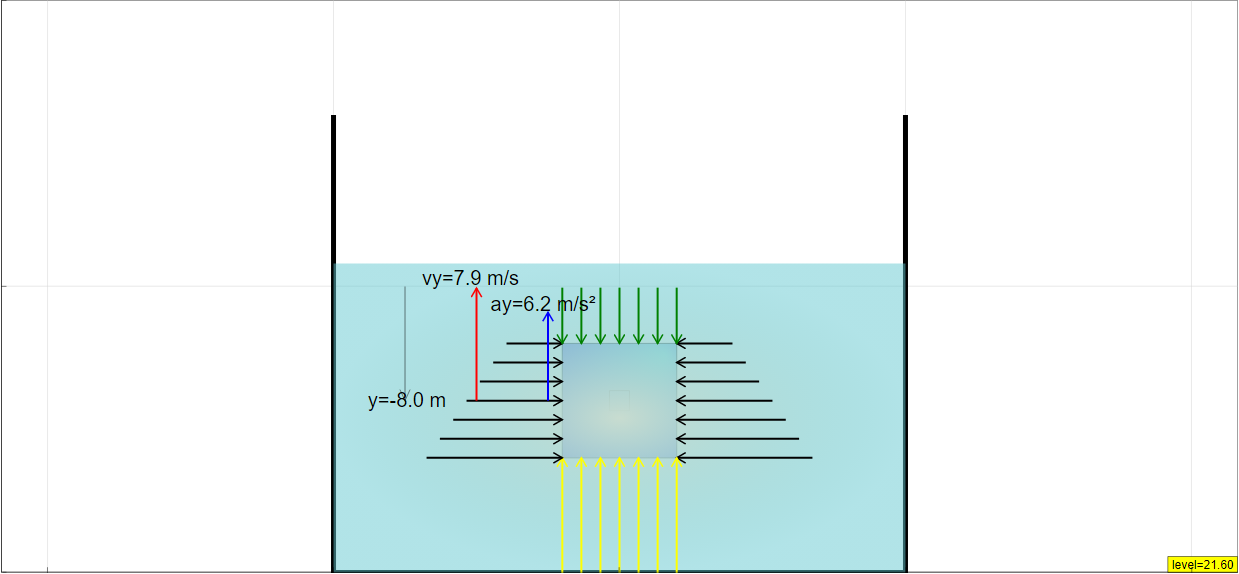
- Interactive Physics Learning: The core theme is leveraging interactive simulations (specifically JavaScript/HTML5 applets) to enhance physics education. The "Float Or Sink Simulator" is a prime example of this, allowing users to manipulate variables (liquid density, object density) and observe the real-time effects on whether an object floats or sinks.
- Buoyancy and Density: The "Float Or Sink Simulator" is specifically designed to explore the principles of buoyancy and density. The description mentions "Pressure" indicating the relationship between pressure, buoyancy and whether an object floats or sinks.
- Open Educational Resources (OER): The initiative is committed to providing free and openly accessible educational materials. The website explicitly uses the term "Open Educational Resources / Open Source Physics @ Singapore." Resources are licensed under Creative Commons Attribution-Share Alike 4.0 Singapore License, encouraging sharing and adaptation.
- Accessibility and Embeddability: The resources are designed to be easily accessible and integrated into other platforms. The "Embed this model in a webpage" section provides an <iframe> code snippet for embedding the simulation.
- Hands-on Exploration: The simulations encourage active learning. The description notes that the block is "Draggable...vertically in the simulation" and that the simulation will run in "real-time" upon release.
- Teacher Resources: The website acknowledges the needs of educators by including sections such as "For Teachers" and "Sample Learning Goals," suggesting lesson plan integration.
- Extensive Collection of Simulations: The website offers a very broad range of physics simulations beyond just buoyancy, spanning topics like:
- Electricity and Magnetism (Electric Fields, Magnetic Fields, Faraday's Law)
- Mechanics (Kinematics, Dynamics, Collisions, Projectile Motion)
- Waves and Optics (Refraction, Interference, Electromagnetic Waves)
- Thermodynamics (Black-body Radiation)
- Quantum Physics (Atomic Spectra)
- And many more (including simulations related to math, biology, and even games).
- Focus on HTML5 and JavaScript: The simulations are primarily developed using JavaScript and HTML5, making them cross-platform compatible and accessible on modern web browsers without requiring plugins.
- Use of AI in Content Creation: The site mentions simulations created using AI models like GPTo1, Gemini, Claude, and DeepSeek, suggesting an exploration of AI's role in generating educational content. Examples: "Bar Magnet Field Line Simulator JavaScript Simulation Applet HTML5 created using AI GPTo1" and "Surprising interactive is made in 2 prompts under 10 minutes : Revolutionizing Interactive Content Creation with AI, G1 Science Example".
- Integration with Singapore's Educational System: There are multiple references to the Singapore Student Learning Space (SLS) and workshops for teachers, indicating integration with the national curriculum. Example: "Teachers UG - Singapore Student Learning Space (SLS)".
3. Key Features and Functionality (Float Or Sink Simulator):
- Interactive Controls: Users can adjust parameters like "Liquid Density," "Object Density," and a variable "b" (likely related to buoyancy force or object properties) using sliders.
- Draggable Block: The user can drag the object vertically, providing a tactile interaction with the simulation.
- Real-time Simulation: The simulation updates dynamically as parameters are changed or the block is moved.
- Full-Screen Mode: Double-clicking the panel toggles full-screen mode (when paused).
- Standard Controls: Includes Play/Pause, Step, and Reset buttons for controlling the simulation flow.
4. Notable Quotes and References:
- "You can drag the block vertically in the simulation as well. The simulation will also be carried out in real-time, and will auto-play upon release." (Highlights the interactive and dynamic nature of the simulation).
- "Embed this model in a webpage: <iframe width="100%" height="100%" src="https://iwant2study.org/lookangejss/02_newtonianmechanics_6pressure/ejss_model_buoyancy/Buoyancy_Simulation.xhtml " frameborder="0"></iframe>" (Demonstrates the ease of embedding the resource).
- "Contents are licensed Creative Commons Attribution-Share Alike 4.0 Singapore License" (Emphasizes the open nature of the resources).
5. Potential Use Cases:
- Classroom Demonstrations: Teachers can use the "Float Or Sink Simulator" to visually demonstrate the principles of buoyancy and density.
- Student Exploration: Students can use the simulator to conduct virtual experiments and explore the relationship between different variables.
- Homework Assignments: Simulations can be assigned as interactive homework to reinforce concepts learned in class.
- Online Learning Modules: The simulations can be integrated into online learning platforms and courses.
- Research: Some simulations are designed to support research and data analysis, as indicated by the mention of export functions for use with spreadsheets.
6. Areas for Further Investigation:
- The specific learning goals associated with the "Float Or Sink Simulator." The site mentions "Sample Learning Goals" but doesn't provide them directly.
- The research basis for the simulations (the website includes a "Research" section, but its content is not provided in the excerpt).
- The variable "b" in the simulator. Understanding its meaning would provide more insight into the simulation's mechanics.
- The specific details of how AI is being used in content creation and its impact on the quality and effectiveness of the simulations.
7. Conclusion:
The Open Source Physics @ Singapore initiative provides a valuable collection of interactive simulations and open educational resources for physics education. The "Float Or Sink Simulator" exemplifies the approach of using engaging, hands-on simulations to promote deeper understanding of physics concepts. The site's extensive collection of simulations, commitment to open access, and integration with educational frameworks make it a noteworthy resource for educators and students alike.
Buoyancy Simulation Study Guide
I. Overview
This study guide focuses on the "Float Or Sink Simulator JavaScript Simulation Applet HTML5" resource from Open Educational Resources / Open Source Physics @ Singapore. The resource is an interactive simulation designed to explore the principles of buoyancy and density.
II. Key Concepts
- Buoyancy: The upward force exerted by a fluid that opposes the weight of an immersed object.
- Density: Mass per unit volume (ρ = m/V).
- Archimedes' Principle: The buoyant force on an object is equal to the weight of the fluid that the object displaces.
- Floating: An object floats when the buoyant force equals the object's weight. This occurs when the object's density is less than or equal to the fluid's density.
- Sinking: An object sinks when its weight is greater than the buoyant force. This occurs when the object's density is greater than the fluid's density.
- Pressure: Force exerted per unit area. In fluids, pressure increases with depth.
III. Simulation Features
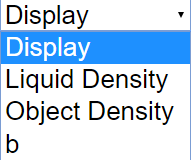
- Combo Box Functions: The "Display" combo box likely controls what parameters are shown on the screen, such as buoyant force, weight, etc.
- Sliders: Sliders for Liquid Density, Object Density, and a variable "b" (likely related to buoyant force or depth) allow for dynamic adjustments of these parameters.
- Draggable Block: Vertical dragging of the block allows for observation of how buoyant force changes as the block is submerged to different depths.
- Real-time Simulation: The simulation updates automatically upon release of the dragged block.
- Full Screen Toggle: Double-clicking pauses and expands the display.
- Play/Pause, Step, and Reset Buttons: These controls allow users to control the flow of the simulation.
IV. Quiz
Answer the following questions in 2-3 sentences each.
- What two primary physical properties does this simulation explore?
- According to Archimedes' Principle, what determines the buoyant force on an object?
- Under what conditions will an object float in the simulation?
- How can users change the density of the liquid in the simulation?
- What happens to the buoyant force as you drag the block deeper into the fluid?
- What does the "Display" combo box likely control in the simulation?
- What is the purpose of the Play/Pause button in the simulation?
- How does this simulation help visualize the relationship between density and buoyancy?
- What other simulations are listed in the given text? Name at least two.
- The given text mentions multiple science concepts outside of mechanics. What is an example of one?
V. Quiz Answer Key
- The simulation primarily explores buoyancy and density and their interrelationship. It demonstrates how the density of an object and the density of the fluid it is in determine whether the object will float or sink.
- Archimedes' Principle states that the buoyant force on an object is equal to the weight of the fluid that the object displaces. Therefore, the volume of the object submerged and the density of the fluid are key factors.
- An object will float in the simulation if its density is less than or equal to the density of the fluid. In this scenario, the upward buoyant force will be equal to or greater than the object's weight.
- Users can change the density of the liquid using the "Liquid Density" slider. Adjusting the slider will change the value, thus altering the density of the simulated fluid.
- As you drag the block deeper into the fluid, the buoyant force will likely increase up to a certain point. The increase stops when the object is fully submerged.
- The "Display" combo box likely controls the display of parameters related to buoyancy, density, and forces. Checkboxes may allow the user to select which values are shown in the simulation.
- The Play/Pause button allows users to start, stop, and observe the simulation at any point. Pausing the simulation allows for detailed observation of the forces and parameters at a specific moment.
- The simulation allows users to manipulate the density of both the object and the fluid. By visualizing how these changes affect the block's behavior, the user gains a better understanding of the relationship between density and buoyancy.
- The given text lists many other simulations, including "Buoyancy Force on Mass JavaScript Simulation Applet HTML5" and "Push a Block JavaScript Simulation Applet HTML5."
- The given text mentions multiple science concepts outside of mechanics. One example is "Factors Affecting Photosynthesis JavaScript HTML5 Applet Simulation Model."
VI. Essay Questions
- Discuss how the "Float or Sink" simulation can be used to illustrate Archimedes' Principle to students with varying levels of prior knowledge in physics. What aspects of the simulation make it particularly effective for teaching this concept?
- Analyze the role of interactive simulations, like the "Float or Sink Simulator," in promoting conceptual understanding in science education compared to traditional lecture-based teaching methods.
- Design an experiment using the "Float or Sink Simulator" to investigate the relationship between the density of a liquid and the volume of an object submerged when floating. What variables would you manipulate, and how would you analyze the results?
- Critique the design and functionality of the "Float or Sink Simulator" in terms of its user-friendliness, educational value, and potential limitations. Suggest improvements that could enhance its effectiveness as a learning tool.
- Compare and contrast the "Float or Sink Simulator" with another simulation from the provided list, focusing on their respective strengths and weaknesses in teaching different physics concepts.
VII. Glossary of Key Terms
- Buoyancy Force: The upward force exerted on an object submerged or partially submerged in a fluid. It opposes the weight of the object.
- Density (ρ): A measure of mass per unit volume, typically expressed in kg/m³ or g/cm³. Density determines whether an object will float or sink in a given fluid.
- Archimedes' Principle: States that the buoyant force acting on an object submerged in a fluid is equal to the weight of the fluid displaced by the object.
- Fluid: A substance that can flow and conform to the shape of its container. Includes liquids and gases.
- Displacement: The volume of fluid that is pushed aside by an object submerged in the fluid.
Sample Learning Goals
[text]
For Teachers
Float Or Sink Simulator JavaScript Simulation Applet HTML5
Instructions
Combo Box and their Functions




Draggable Block
Toggling Full Screen
Play/Pause, Step and Reset Buttons
Research
[text]
Video
[text]
Version:
Other Resources
[text]
FAQ: Float or Sink Simulator and Related Physics Simulations
- What is the "Float Or Sink Simulator" and what does it demonstrate?
- The "Float Or Sink Simulator JavaScript Simulation Applet HTML5" is an interactive tool designed to explore the principles of buoyancy and density. Users can manipulate variables like liquid density and object density, and observe whether the object floats or sinks. It also allows you to drag the block vertically in the simulation. The simulation then carries out in real-time and auto-plays upon release. This helps visualize the relationship between these factors and the resulting buoyancy force on the object.
- How can I interact with the "Float Or Sink Simulator"?
- The simulator features several interactive elements:
- Combo Box: Use checkboxes to control the display.
- Sliders: Adjust Liquid Density, Object Density, and the 'b' value (likely related to a specific parameter in the buoyancy calculation).
- Draggable Block: You can drag the block vertically within the simulation environment to observe real-time changes.
- Play/Pause, Step and Reset Buttons: Control the simulation's progress.
- Full Screen Toggling: Double click anywhere on the panel to toggle full screen, but only when the simulation is paused.
- Where can I find other physics simulations like the "Float Or Sink Simulator"?
- The Open Educational Resources / Open Source Physics @ Singapore website hosts a large collection of JavaScript HTML5 applet simulations covering various physics topics, including Newtonian mechanics, electricity and magnetism, kinematics, electromagnetism, optics, and more. The website is a repository of simulations that have been created on many topics in STEM, not just physics. A list of available simulations appears towards the bottom of the provided source.
- What other topics are covered by the available simulations?
- Besides buoyancy and density, the simulations cover a very wide range of physics topics including: kinematics, gravitation, collisions, oscillations, electromagnetism, optics, wave phenomena, and more. The website includes interactive simulations and virtual labs on a wide variety of STEM topics that extend past Physics.
- Are these simulations only for physics, or do they cover other subjects?
- While many simulations focus on physics concepts, there are also simulations related to mathematics, biology, chemistry, geography and more. These simulations are often related to the Singapore Student Learning Space (SLS).
- Are the simulations free to use, and how can I embed them in my own webpage?
- The simulations are generally available as Open Educational Resources (OER) under a Creative Commons Attribution-Share Alike 4.0 Singapore License. This means they are free to use and share, as long as proper attribution is given. The provided extract also shows an iframe tag allowing you to embed the simulation on a webpage. However, for commercial use of the EasyJavaScriptSimulations Library, it is necessary to read the EJS License and contact This email address is being protected from spambots. You need JavaScript enabled to view it. directly.
- Can these simulations be used in a classroom setting, and what resources are available for teachers?
- Yes, the simulations are explicitly intended for use in educational settings. Some simulations come with sample learning goals and specific instructions or resources designed for teachers to use in their lesson plans.
- Are there simulations related to the Singapore education system (e.g., SLS)?
- Yes, the website mentions simulations related to the Singapore Student Learning Space (SLS) and projects involving collaborations with the Ministry of Education (MOE). This suggests that some simulations are specifically designed to align with the Singaporean curriculum and educational initiatives.