{source}
<?php  require_once JPATH_SITE.'/TTcustom/TT_contentparser.php';\(parameters = array("topicname" => "02_newtonianmechanics_6pressure", "modelname" => "ejss_model_buoyancy2level");echo generateSimHTML(\)parameters, "EJSS");
?>
{/source}
Briefing Document: "Green Cube Floating in 2 Fluids Simulator JavaScript Simulation Applet HTML5"
1. Overview:
This document describes a JavaScript simulation applet designed to illustrate the principles of buoyancy and pressure, specifically focusing on a "Green Cube Floating in 2 Fluids." It is part of the Open Educational Resources / Open Source Physics @ Singapore project, which provides interactive physics resources.
{source}<iframe style="border-radius:12px" src="https://open.spotify.com/embed/episode/2D90AoPoT4eV4vRcGRYcss?utm_source=generator" width="100%" height="352" frameBorder="0" allowfullscreen="" allow="autoplay; clipboard-write; encrypted-media; fullscreen; picture-in-picture" loading="lazy"></iframe>{/source}
2. Key Themes and Concepts:
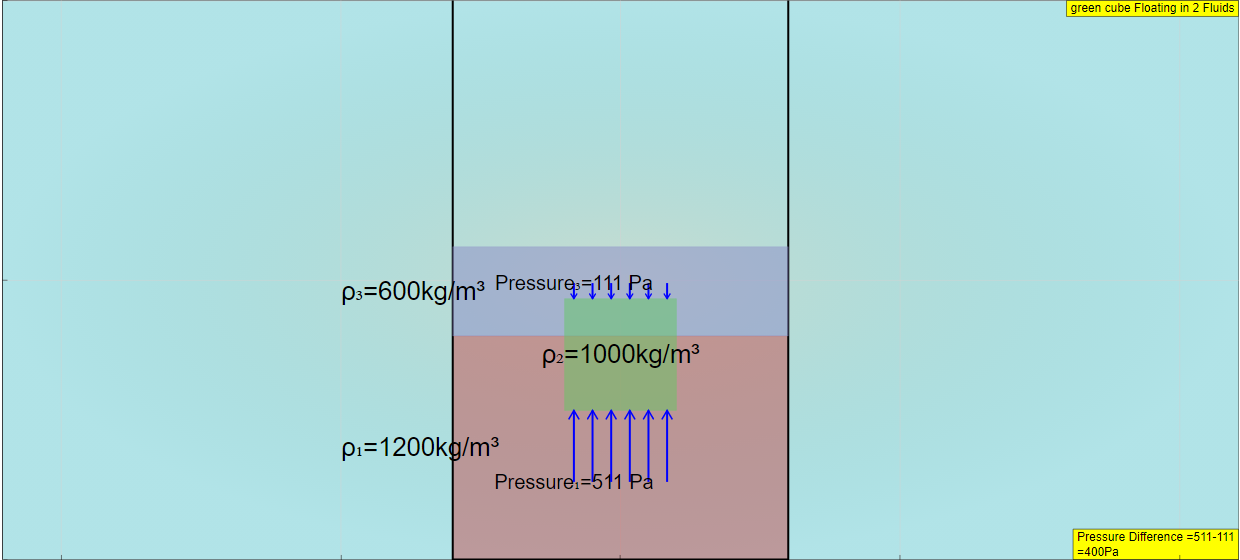
- Buoyancy: The primary focus is on demonstrating buoyancy, the upward force exerted by a fluid that opposes the weight of an immersed object. The simulation likely allows users to manipulate variables (like fluid densities, cube size, etc.) to observe the resulting changes in the buoyant force and the cube's floating position.
- Pressure: Pressure is explicitly mentioned as a relevant concept ("Pressure"). The simulation likely visually represents pressure differences within the two fluids and their effect on the cube.
- Interactive Learning: The resource is designed to be interactive, allowing users to directly engage with the concepts through sliders and toggles. The page emphasizes its use as a teaching tool, with sections "For Teachers" and "Sample Learning Goals" (though the specific content of those sections is not provided in the excerpt).
- JavaScript Simulation (HTML5 Applet): The simulation is built using JavaScript and is an HTML5 applet, meaning it can be run directly in web browsers without the need for plugins.
- Accessibility and Embeddability: The applet is designed to be easily embedded in other webpages, as shown by the "Embed this model in a webpage" code.
- Open Educational Resource: The resource is freely available and licensed under a Creative Commons Attribution-Share Alike 4.0 Singapore License, promoting its use and adaptation for educational purposes.
3. Important Features and Functionality (based on the description):
- Tabbed Panel and Sliders: Users can likely manipulate parameters using sliders organized within a tabbed interface. This would allow exploration of different scenarios.
- Full Screen Toggle: Double-clicking allows users to view the simulation in full-screen mode for better visibility.
- Reset Button: Resets the simulation to its default state, enabling repeated experimentation.
4. Intended Audience:
The resource is primarily intended for:
- Physics Students: To visualize and understand the principles of buoyancy and pressure.
- Teachers: As a tool to demonstrate these concepts in the classroom.
5. Related Resources and Context:
The source page is part of a larger collection of physics simulations and resources. The excerpt lists many other interactive simulations covering a wide range of physics topics, including:
- Motion and Forces
- Dynamics
- Waves
- Electromagnetism
- Optics
- Thermodynamics
The sheer number of listed simulations highlights the breadth of the Open Educational Resources / Open Source Physics @ Singapore project. The listed titles suggest that the project employs a range of techniques, including simulations created with AI assistance ("Simulation created using Claude and GPT4o and GPTo1-preview", "Bar Magnet Field Line Simulator JavaScript Simulation Applet HTML5 created using AI GPTo1", "Surprising interactive is made in 2 prompts under 10 minutes : Revolutionizing Interactive Content Creation with AI, G1 Science Example", "Unlocking Interactive Learning: A Tale of Accuracy, Precision, and AI Magic! 🎯✨💡using Google Gemini Thinking Model", etc.).
6. Key Quotes:
- "Green Cube Floating in 2 Fluids Simulator JavaScript Simulation Applet HTML5" (Title, emphasizing the specific topic and format)
- "Embed this model in a webpage: " (Highlights the reusability of the resource)
- "Contents are licensed Creative Commons Attribution-Share Alike 4.0 Singapore License" (Emphasizes the open educational nature of the resource)
7. Conclusion:
The "Green Cube Floating in 2 Fluids Simulator" is a valuable interactive tool for teaching and learning about buoyancy and pressure. Its accessibility, embeddability, and open licensing make it a useful resource for both students and educators. The context of the resource within the larger Open Educational Resources / Open Source Physics @ Singapore project showcases a commitment to providing a wide array of freely available physics simulations.
Buoyancy Simulation Study Guide
Quiz
Answer the following questions in 2-3 sentences each.
- What physical phenomenon does the "Green Cube Floating in 2 Fluids Simulator" primarily demonstrate?
- What adjustments can users make using the sliders in the simulation?
- Where can the Green Cube simulation be embedded, according to the provided source?
- What are the listed credits for the creation of the simulator?
- Besides the Green Cube simulation, name three other interactive resources available on the website.
- What is the stated license for the contents of the website?
- What is the suggestion for commercial use of the EasyJavaScriptSimulations Library?
- What function does double-clicking on the screen perform in the simulation?
- What button allows you to revert the simulation to its initial state?
- According to the Breadcrumbs, what subject is the Green Cube simulation related to?
Quiz Answer Key
- The simulation primarily demonstrates the principles of buoyancy and pressure by showing how a green cube floats in two different fluids based on their densities.
- Users can adjust parameters related to the fluids and the cube itself, likely including density, volume, and depth, using the sliders within the simulation.
- According to the source, the simulation can be embedded in a webpage using an iframe.
- The simulation is credited to Fu-Kwun Hwang, Fremont Teng, and Loo Kang Wee.
- Three other interactive resources include "Floating Block Stability Simulator," "Float Or Sink Simulator," and "A Baffling Balloon Behavior."
- The contents are licensed under Creative Commons Attribution-Share Alike 4.0 Singapore License.
- For commercial use of the EasyJavaScriptSimulations Library, the user should read the license at https://www.um.es/fem/EjsWiki/Main/EJSLicense and contact This email address is being protected from spambots. You need JavaScript enabled to view it. directly.
- Double-clicking on the screen toggles the simulation between full screen and the normal view.
- The "Reset Button" allows users to revert the simulation to its initial state.
- The Green Cube simulation is related to Physics, Foundations of Physics, Motion & Forces, and Dynamics.
Essay Questions
Consider these questions and construct well-supported essays addressing them.
- Discuss the educational value of interactive physics simulations, using the "Green Cube Floating in 2 Fluids Simulator" as a specific example. How can simulations enhance understanding compared to traditional teaching methods?
- Analyze the design and functionality of the "Green Cube Floating in 2 Fluids Simulator." What are its strengths and weaknesses as a learning tool? Suggest potential improvements to the simulation.
- Explain how the principle of buoyancy is demonstrated in the "Green Cube Floating in 2 Fluids Simulator." Discuss the relevant physical laws and how the simulation visualizes them.
- Explore the role of open educational resources (OER) in science education. How does the "Green Cube Floating in 2 Fluids Simulator" fit into the broader landscape of OER, and what are the benefits and challenges of using OER in the classroom?
- Describe the potential applications of the EasyJavaScriptSimulations Library, considering its use in the "Green Cube Floating in 2 Fluids Simulator." How can educators leverage this library to create custom simulations for their students?
Glossary of Key Terms
- Buoyancy: The upward force exerted by a fluid that opposes the weight of an immersed object.
- Pressure: The force exerted per unit area by a fluid.
- Density: The mass per unit volume of a substance.
- Simulation: A computer-based model that mimics a real-world system or process.
- Applet: A small application designed to run within another application, typically a web browser.
- JavaScript: A programming language commonly used to create interactive effects within web browsers.
- HTML5: The latest version of the Hypertext Markup Language, used for structuring and presenting content on the web.
- Open Educational Resources (OER): Freely accessible, openly licensed text, media, and other digital assets that are useful for teaching, learning, and assessing, as well as for research purposes.
- IFrame: An HTML element that allows you to embed another HTML document within the current page.
- Creative Commons License: A public copyright license that enables the free distribution of an otherwise copyrighted work.
Sample Learning Goals
[text]
For Teachers
Green Cube Floating in 2 Fluids Simulator JavaScript Simulation Applet HTML5
Instructions
Tabbed Panel and Sliders


Toggling Full Screen
Reset Button

Research
[text]
Video
[text]
Version:
Other Resources
[text]
Physics Simulation FAQ
- What is the "Green Cube Floating in 2 Fluids Simulator"?
- It is a JavaScript simulation, potentially created using tools like Claude and GPT4o, that allows users to explore the principles of buoyancy and pressure by observing a green cube floating in two different fluids. The simulation is designed for educational purposes.
- Where can I find other physics simulations like the "Green Cube Floating in 2 Fluids Simulator"?
- This resource is part of a larger collection of Open Educational Resources / Open Source Physics @ Singapore. You can explore other interactive simulations on topics ranging from mechanics and electromagnetism to optics and waves, including simulations of buoyancy, collisions, circuits, and more.
- Can I embed the "Green Cube Floating in 2 Fluids Simulator" on my own webpage?
- Yes, the resource provides an embed code (an iframe) that you can use to include the simulation directly on your website. This allows you to easily integrate the interactive tool into your online educational materials.
- Are these simulations only for physics?
- While many simulations focus on physics concepts, there are simulations available for other subjects like mathematics and chemistry. Examples include balancing chemical equations, graphing lines, and exploring geometric concepts.
- Are these resources free to use?
- The educational resources themselves are licensed under the Creative Commons Attribution-Share Alike 4.0 Singapore License, meaning they are free to use and share for non-commercial purposes as long as you give appropriate credit and share any adaptations under the same license. However, commercial use of the EasyJavaScriptSimulations Library may require a separate license obtained from the specified source.
- What tools are used to create these simulations?
- The simulations are often created using Easy JavaScript Simulations (EJS) and sometimes with the assistance of AI models such as Claude, GPT4o, and GPTo1.
- Are the simulations accessible on different devices?
- Many of the simulations are created using HTML5 and JavaScript, making them accessible on a variety of devices, including computers, tablets, and smartphones.
- Are there resources for teachers to use these simulations in the classroom?
- Yes, there are resources designed specifically for teachers, including sample learning goals and instructions on how to use the simulations in the classroom. These resources are intended to help educators integrate the simulations into their lesson plans effectively.