{source}
<?php  require_once JPATH_SITE.'/TTcustom/TT_contentparser.php';\(parameters = array("topicname" => "02_newtonianmechanics_7gravity", "modelname" => "ejss_model_periodic");echo generateSimHTML(\)parameters, "EJSS");
?>
{/source}
Briefing Document: Periodic Orbits JavaScript Simulation Applet HTML5
1. Overview:
This document describes a JavaScript-based HTML5 simulation applet focused on visualizing and interacting with periodic orbits in a gravitational context. The applet is part of the Open Educational Resources / Open Source Physics @ Singapore project, aiming to provide interactive learning tools for physics education. The simulation allows users to manipulate parameters and observe the resulting orbital behavior.
{source}<iframe style="border-radius:12px" src="https://open.spotify.com/embed/episode/0fTnkbNXLZnhp6TXEbnYHz?utm_source=generator" width="100%" height="352" frameBorder="0" allowfullscreen="" allow="autoplay; clipboard-write; encrypted-media; fullscreen; picture-in-picture" loading="lazy"></iframe>{/source}
2. Main Themes and Ideas:
- Interactive Physics Learning: The core idea is to provide an engaging and interactive way for students (and others) to learn about gravity and orbital mechanics. The simulation allows for direct manipulation and observation, promoting a hands-on learning experience.
- Open Educational Resource: The resource is freely available and intended for educational purposes, promoting accessibility and wider dissemination of physics learning materials. This aligns with the goals of Open Educational Resources / Open Source Physics @ Singapore.
- HTML5 and JavaScript: The applet is built using modern web technologies (HTML5 and JavaScript), ensuring cross-platform compatibility (works in web browsers on various devices) without requiring plugins.
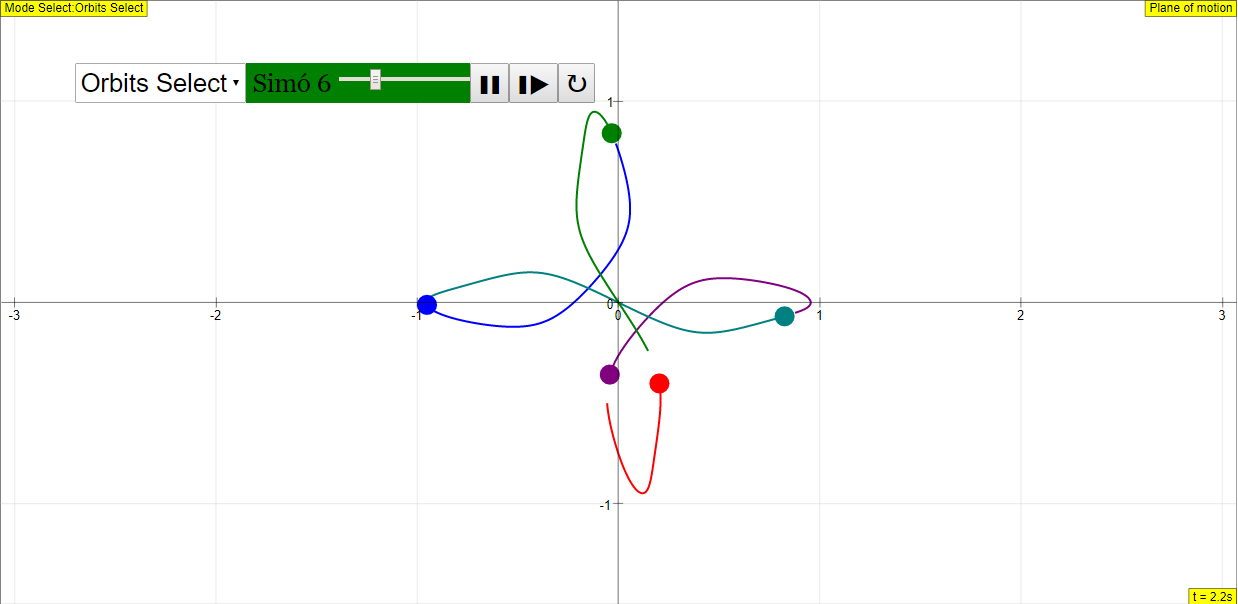
- Simulation Features: The applet offers several key features, as detailed in the instructions:
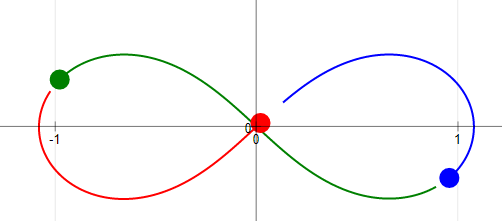
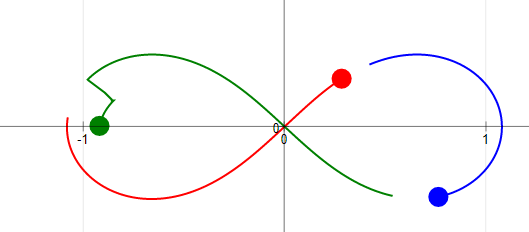
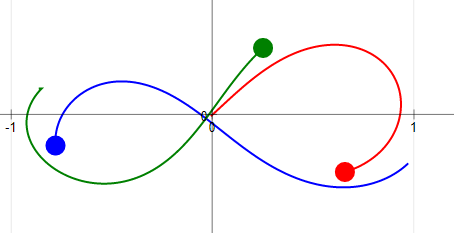
- Draggable Spheres: Users can reposition the spheres, dynamically recalculating the orbits. This allows exploration of different initial conditions. "Drag the spheres to re-position them Watch as the orbits re calculate their selves accordingly"
- Zooming: Users can zoom in and out, using a slider or two-finger gestures (on touch devices). "Zooming with dragging This can be either done using the slider, or using two fingers to drag the screen."
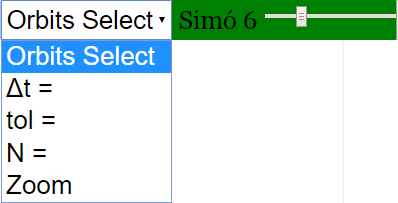
- Combo Box Options: Allows for selection of different orbit options and zoom functionality.
- Controls: Play/Pause, Step and Reset buttons to control the simulation flow.
- Editable Fields: dt (time step), tol (tolerance), and N (number of steps) provide finer control over the simulation.
- Modularity and Embeddability: The applet can be embedded in other webpages using an iframe. This promotes integration with other online learning resources. The provided code snippet is: <iframe width="100%" height="100%" src="https://iwant2study.org/lookangejss/02_newtonianmechanics_7gravity/ejss_model_periodic/periodic_Simulation.xhtml " frameborder="0"></iframe>
3. Important Facts and Details:
- Creators: Juan M. Aguirregabiria, Fremont Teng, and lookang are credited with the development of the applet. Juan M. Aguirregabiria is listed with a link to their website.
- License: The content is licensed under the Creative Commons Attribution-Share Alike 4.0 Singapore License. Commercial use of the EasyJavaScriptSimulations Library requires separate licensing (contact information provided).
- Learning Goals: Sample learning goals are referenced, suggesting the applet is designed to teach specific concepts related to periodic orbits and gravitational interactions, although the specific goals are not detailed in this snippet.
- Translations: The applet supports translations, potentially making it accessible to a wider audience.
- Related Resources: A lengthy list of related simulation applets and resources is provided, covering a wide range of physics and science topics. This shows the context of the "Periodic Orbits" applet within a larger collection of educational tools. These resources also cover related fields of study like Mathematics and Biology, along with tools to facilitate learning at the Primary school level.
- Student Learning Space (SLS): Many of the related resources are connected to the Singapore Student Learning Space, indicating the applet's integration within the national education system.
4. Potential Uses:
- Classroom Demonstrations: Teachers can use the applet to visually demonstrate periodic orbits and the effects of changing parameters like initial positions.
- Student Exploration: Students can use the applet to explore orbital mechanics independently, conducting virtual experiments.
- Homework Assignments: The applet could be incorporated into homework assignments to provide a more interactive learning experience.
- Online Learning Modules: The embeddable nature of the applet makes it suitable for integration into online learning platforms.
5. Key Takeaways:
The "Periodic Orbits JavaScript Simulation Applet HTML5" is a valuable tool for physics education, providing an interactive and accessible way to visualize and explore the principles of orbital mechanics. Its open-source nature, embeddability, and user-friendly interface make it a useful resource for both teachers and students. The applet is part of a larger ecosystem of open educational resources developed by Open Source Physics @ Singapore.
Periodic Orbits Simulation Study Guide
Review Topics
- Periodic Orbits: Understanding the concept of periodic motion in the context of gravitational interactions.
- Gravitational Interactions: How gravity affects the motion of objects, leading to predictable orbital paths.
- Simulation Parameters: Recognizing and manipulating parameters within the simulation, such as initial positions, velocities, and time increments (dt), tolerance (tol), and number of steps (N).
- Using the Simulation: Learning to use the interactive features of the applet: dragging spheres, zooming, toggling full screen, and using the play/pause, step, and reset buttons.
- Educational Applications: Thinking about the applications of this simulation for teaching and learning physics concepts related to orbits, gravity, and dynamics.
Quiz
- What does the "Periodic Orbits JavaScript Simulation Applet HTML5" allow users to visualize and manipulate?
- Describe two ways users can interact with the spheres in the simulation to alter the orbits.
- What is the purpose of the "dt" parameter in the simulation?
- How can a user zoom in and out within the simulation? Describe two methods mentioned in the text.
- Explain the function of the "Reset" button in the simulation.
- What physics concept is the primary focus of this simulation?
- Besides the main simulation, what other physics-related simulations are listed on the same webpage? List two examples.
- Name one group of people listed in the credits for the Periodic Orbits simulation.
- Name one kind of device that can be used to run the Periodic Orbits simulation.
- According to the final paragraph, what license protects the contents of the website?
Quiz Answer Key
- The simulation allows users to visualize and manipulate the motion of objects in periodic orbits under the influence of gravity. Users can change initial conditions to observe how orbits change over time.
- Users can drag the spheres to re-position them, causing the orbits to recalculate. They can also use a slider or a two-finger drag gesture to zoom in and out.
- The "dt" parameter represents the time increment used in the simulation, controlling the precision and speed of the calculations. It can be edited to alter the smoothness of the orbit's animation.
- Users can zoom by using the provided slider or by using a two-finger drag gesture on the screen. Both of these methods allow for dynamic scaling of the simulation view.
- The "Reset" button restarts the simulation to its initial conditions, allowing users to begin a new experiment with predefined parameters.
- The primary physics concept illustrated by this simulation is the dynamics of periodic orbits under the influence of gravity, demonstrating Kepler's Laws and Newtonian Mechanics.
- Examples of other simulations listed on the same webpage include "Earth and Bar Magnet JavaScript HTML5 Applet Simulation Model" and "Bar Magnet Field Line Simulator JavaScript Simulation Applet HTML5."
- The credits list Juan M. Aguirregabiria, Fremont Teng, and lookang as contributors to the simulation.
- The simulation can be run on laptops, desktops, and Chromebook laptops.
- The contents of the website are licensed under the Creative Commons Attribution-Share Alike 4.0 Singapore License.
Essay Questions
- Discuss the ways in which the "Periodic Orbits JavaScript Simulation Applet HTML5" can be used as a tool for teaching and learning about gravitational interactions and orbital mechanics. How does the interactive nature of the simulation enhance understanding compared to traditional methods?
- Explain the significance of the parameters that can be adjusted within the simulation (dt, tol, N, initial positions/velocities) and how manipulating these parameters can deepen a student's understanding of the underlying physics.
- Describe the potential benefits and drawbacks of using simulations like the "Periodic Orbits JavaScript Simulation Applet HTML5" in a physics curriculum. Consider factors such as accessibility, engagement, and the potential for misconceptions.
- Compare and contrast the "Periodic Orbits JavaScript Simulation Applet HTML5" with other types of educational resources (e.g., textbook explanations, laboratory experiments) for teaching orbital mechanics. What unique advantages does the simulation offer?
- How can teachers integrate the "Periodic Orbits JavaScript Simulation Applet HTML5" into lesson plans to effectively address common student misconceptions about gravity and orbital motion? Provide specific examples of activities or assignments.
Glossary of Key Terms
- Periodic Orbit: An orbit in which an object repeatedly returns to the same position after a fixed period of time.
- Gravitational Interaction: The attractive force between objects with mass, as described by Newton's Law of Universal Gravitation.
- dt (Time Increment): A parameter representing the discrete step size used in numerical simulations to approximate continuous physical processes.
- Tol (Tolerance): A parameter that defines the acceptable level of error in numerical calculations within the simulation.
- N (Number of Steps): A parameter indicating the number of iterations or calculations the simulation will perform.
- HTML5: The latest evolution of the standard that defines HTML. It's used for structuring and presenting content on the web.
- JavaScript: A programming language commonly used to create interactive effects within web browsers.
- Applet: A small application designed to run within another application, typically a web browser.
- Simulation: A computer program that models a real-world system or phenomenon, allowing users to interact with and observe its behavior.
- Open Educational Resources (OER): Teaching, learning, and research materials that are freely available for everyone to use, adapt, and share.
Sample Learning Goals
[text]
For Teachers
Periodic Orbits JavaScript Simulation Applet HTML5
Instructions
Combo Box and their Options





Drag-able Spheres
Zooming with dragging
Toggling Full Screen
Play/Pause, Step and Reset Buttons
Research
[text]
Video
[text]
Version:
Other Resources
[text]
FAQ: Periodic Orbits JavaScript Simulation Applet
- What is the Periodic Orbits JavaScript Simulation Applet?
- The Periodic Orbits JavaScript Simulation Applet is an interactive simulation that allows users to explore and visualize the behavior of objects in periodic orbits, primarily under the influence of gravity. It's designed as an open educational resource for physics learning.
- Where can I find and access the Periodic Orbits JavaScript Simulation Applet?
- The applet can be accessed and embedded from the provided URL: https://iwant2study.org/lookangejss/02_newtonianmechanics_7gravity/ejss_model_periodic/periodic_Simulation.xhtml. You can embed this in a webpage using the <iframe> tag as shown in the source material.
- What are some key features of the Periodic Orbits JavaScript Simulation Applet?
- The applet includes features such as:
- Draggable Spheres: Users can reposition the spheres to modify the initial conditions and observe the resulting changes in the orbits.
- Zooming: Users can zoom in and out using a slider or by dragging the screen with two fingers to observe the orbits in more detail.
- Combo Box Options: Adjust parameters like dt (time step), tol (tolerance), and N (number of iterations) through editable fields. Orbit selection and zoom features are also available via a slider.
- Play/Pause, Step, and Reset Buttons: These controls allow users to control the simulation's progression.
- Full Screen Toggle: Double-tapping the screen toggles full-screen mode.
- What are the learning goals associated with this simulation?
- The resource lists "Sample Learning Goals," though the specific goals are not detailed in the provided text. The simulation likely aims to help users understand the relationships between initial conditions, gravitational forces, and orbital paths.
- Who created this simulation?
- The simulation was created by Juan M. Aguirregabiria, Fremont Teng, and lookang.
- What other related simulations are available on the Open Educational Resources / Open Source Physics @ Singapore platform?
The platform offers a wide range of physics simulations including topics like electromagnetism (e.g., bar magnets, magnetic dipoles), optics (e.g., refraction, prisms, lenses), mechanics (e.g., collisions, projectile motion, damping), waves (e.g., ripple tank, sound waves), and even simulations in chemistry, mathematics and biology, plus interactive games and quizzes.
- Can I use this simulation for commercial purposes?
- For commercial use of the underlying EasyJavaScriptSimulations library, you need to read the license details at https://www.um.es/fem/EjsWiki/Main/EJSLicense and contact This email address is being protected from spambots. You need JavaScript enabled to view it. directly. The applet itself is licensed under the Creative Commons Attribution-Share Alike 4.0 Singapore License.
- How can I embed this simulation into my own website or learning platform?
- You can embed the simulation using the provided <iframe> code snippet. Simply copy and paste the code into the HTML of your webpage:
- <iframe width="100%" height="100%" src="https://iwant2study.org/lookangejss/02_newtonianmechanics_7gravity/ejss_model_periodic/periodic_Simulation.xhtml " frameborder="0"></iframe>
- You can adjust the width and height attributes as needed to fit your layout.