{source}
<?php  require_once JPATH_SITE.'/TTcustom/TT_contentparser.php';\(parameters = array("topicname" => "02_newtonianmechanics_3dynamics", "modelname" => "ejss_model_platform");echo generateSimHTML(\)parameters, "EJSS");
?>
{/source}
Briefing Document: Accelerated Platform with Cylinder JavaScript Simulation Applet HTML5
1. Overview
This document provides a summary of the "Accelerated Platform with Cylinder JavaScript Simulation Applet HTML5" resource available on the Open Educational Resources / Open Source Physics @ Singapore website. The resource is an interactive simulation designed to aid in learning physics concepts related to dynamics and rotational motion. It is built using JavaScript and HTML5, making it accessible across various platforms and devices. The document will cover the key features, learning goals, instructions, and related resources associated with this applet.
{source}<iframe style="border-radius:12px" src="https://open.spotify.com/embed/episode/1FHnMEsCCR4siXErjtJ8m1?utm_source=generator" width="100%" height="352" frameBorder="0" allowfullscreen="" allow="autoplay; clipboard-write; encrypted-media; fullscreen; picture-in-picture" loading="lazy"></iframe>{/source}
2. Main Themes and Key Ideas
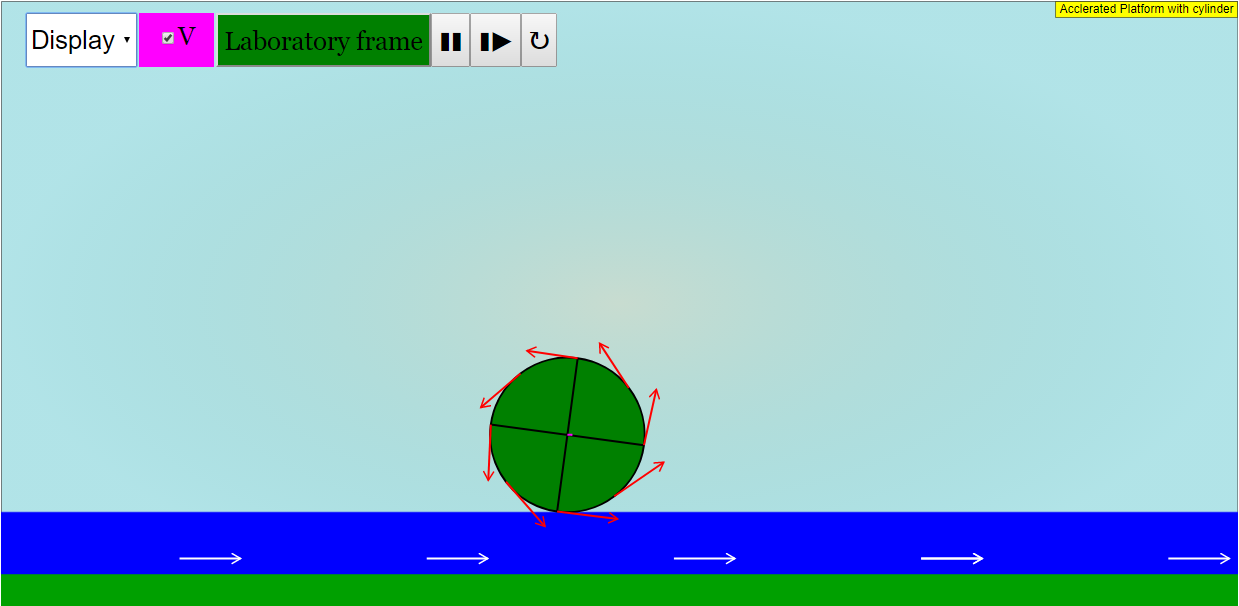
- Interactive Physics Learning: The core theme is promoting active learning in physics through interactive simulations. The applet allows users to explore and visualize abstract concepts in dynamics and rotational motion. The use of JavaScript and HTML5 allows for embedding the simulation directly into webpages: <iframe width="100%" height="100%" src="https://iwant2study.org/lookangejss/02_newtonianmechanics_3dynamics/ejss_model_platform/platform_Simulation.xhtml " frameborder="0"></iframe>
- Dynamics and Rotational Motion: The applet specifically targets these areas of physics, suggesting it likely involves concepts like forces, acceleration, torque, angular velocity, and related principles.
- Accessibility and Open Educational Resources: The resource is part of an open educational resource (OER) initiative, making it freely available for educational use. The license mentioned is "Creative Commons Attribution-Share Alike 4.0 Singapore License", though commercial use of the underlying EasyJavaScriptSimulations Library requires a separate license.
- Teacher and Student Focus: The resource is designed with both teachers and students in mind, providing instructions, sample learning goals, and potentially supporting materials for educators.
3. Key Features and Functionality
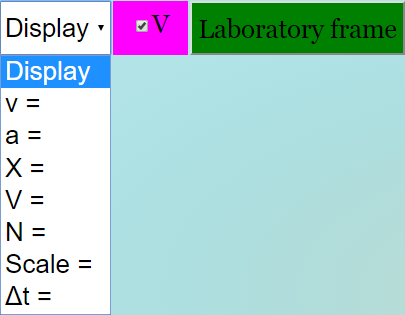
- Interactive Controls: The applet features interactive controls that allow users to manipulate variables and observe the resulting changes in the simulation. The instructions mention a "Combo Box and Options" section: "Toggling the respective options will give you their functions Display gives you a checkbox Options v, a, X, V, N, Scale and dt gives editable fieldboxes".
- Visualizations: The simulation provides visual representations of the physical phenomena being modeled, helping users to develop a deeper understanding.
- Play/Pause/Step/Reset: Standard simulation controls to allow for controlled exploration. "Plays/Pauses, steps and resets the simulation respectively."
- Full-Screen Mode: Provides an enhanced viewing experience. "Double click anywhere on the screen to toggle full screen."
- Customizable Display: "Display gives you a checkbox Options v, a, X, V, N, Scale and dt gives editable fieldboxes".
- Embeddable: The simulation can be easily embedded into web pages, providing a seamless learning experience.
4. Sample Learning Goals (from context)
While the specific learning goals for this applet are not provided in the extracted text, the surrounding context and title suggest potential learning goals could include:
- Understanding the relationship between force, mass, and acceleration on an accelerated platform.
- Visualizing the effect of different parameters on the motion of a cylinder.
- Exploring rotational motion concepts.
- Applying Newton's Laws of Motion in a dynamic system.
5. Instructions (Key Takeaways)
The provided instructions highlight the interactive nature of the applet, emphasizing the ability to:
- Use combo boxes and options to control different aspects of the simulation.
- Toggle full screen for better viewing.
- Control the simulation using play, pause, step, and reset buttons.
6. Related Resources and Context
The source document lists a large number of other related simulations and resources. These can be broadly categorized as:
- Physics Simulations: Covering a wide range of topics, including mechanics, electromagnetism, optics, waves, and more. Examples include "Earth and Bar Magnet JavaScript HTML5 Applet Simulation Model," "Faraday's Law JavaScript Simulation Applet HTML5," and "Projectile Motion with Comparison JavaScript HTML5 Applet Simulation Model."
- Mathematics Simulations: Focusing on mathematical concepts and problem-solving. Examples include "Graphs of Quadratic Functions of the form +/- (x -a)(x-b) : Self Assessment HTML5 JavaScript Simulation Model".
- Chemistry Simulations: Covering areas like balancing chemical equations and acid-base solutions. Examples include "Balancing Chemical Equations by PHET"
- Biology Simulations: Factors Affecting Photosynthesis JavaScript HTML5 Applet Simulation Model
- Educational Tools and Frameworks: Resources related to Easy JavaScript Simulations (EJS), Tracker (video analysis software), and other tools used in creating and deploying these interactive learning experiences.
- Interactive Games: Games like "Mini Magnetic Golf Game JavaScript Simulation Applet HTML5", "John Conway's Game of Life JavaScript HTML5 Applet", "Catch the Recyclables! An Interactive Recycling Game in EJS", "Math Battle: Add or Multiply? – A Fun, Interactive Math Game for Young Learners enhanced by GPTo3mini"
7. Authors/Credits
The applet is credited to Juan M. Aguirregabiria, Fremont Teng, and lookang.
8. Conclusion
The "Accelerated Platform with Cylinder JavaScript Simulation Applet HTML5" is a valuable resource for teaching and learning dynamics and rotational motion in physics. Its interactive nature, accessibility, and integration within a broader collection of OER materials make it a useful tool for educators seeking to engage students in active learning. The context highlights a strong emphasis on using simulations and interactive tools to enhance physics education within the Open Source Physics @ Singapore initiative.
Accelerated Platform and Cylinder Simulation: A Study Guide
I. Overview
This study guide focuses on the "Accelerated Platform with Cylinder JavaScript Simulation Applet HTML5" resource from Open Educational Resources / Open Source Physics @ Singapore. This simulation explores concepts in dynamics and rotational motion, allowing users to visualize and interact with an accelerated platform and a cylinder. The guide covers key functionalities, learning goals, related resources, and fundamental concepts.
II. Key Features and Functionalities
The applet provides an interactive environment for simulating and observing the behavior of a cylinder on an accelerated platform. Users can control various parameters and observe the resulting motion.
- Embeddable Iframe: The simulation can be embedded within webpages using an iframe tag.
- Combo Box and Options: Enables the user to toggle functions and editable field boxes for variables like velocity (v), acceleration (a), position (X), velocity (V - possible duplicate of 'v'), normal force (N), scale, and time step (dt).
- Full Screen Toggle: Double-clicking toggles full-screen mode for enhanced visualization.
- Control Buttons: Play/Pause, Step, and Reset buttons control the simulation flow.
III. Core Concepts
The simulation touches on the following key physics concepts:
- Dynamics: The study of forces and their effects on motion.
- Newton's Laws of Motion: These laws govern the relationship between force, mass, and acceleration.
- Rotational Motion: The motion of an object around an axis.
- Acceleration: The rate of change of velocity. This simulation specifically focuses on linear acceleration of the platform.
- Frames of Reference: The motion of the cylinder will differ depending on whether it is viewed from a stationary (inertial) frame or the accelerated frame of the platform.
- Forces (Normal Force, Friction): The forces acting on the cylinder, influencing its motion. The normal force supports the cylinder, and friction (static or kinetic) may cause it to rotate or slide.
- Kinematics: Describing the motion of objects without considering the forces that cause the motion (displacement, velocity, acceleration).
IV. Learning Goals (Inferred)
Based on the description and features, the following learning goals can be inferred:
- Understand the effect of acceleration on the motion of an object.
- Visualize and analyze rotational motion.
- Explore the relationship between forces and motion in a non-inertial (accelerating) frame of reference.
- Investigate the interplay between translational and rotational motion.
- Develop an intuitive understanding of dynamics concepts through interactive simulation.
V. Quiz (Short Answer)
- What are the main areas of physics explored by the "Accelerated Platform with Cylinder" simulation?
- How can the simulation be integrated into a webpage? Describe the HTML element used.
- Name three parameters that can be adjusted using the editable fieldboxes in the simulation.
- Explain the function of the "Step" button in the simulation.
- What kinematic quantities can the combo box and options tool change?
- What is the definition of dynamics, as it relates to this simulation?
- How might the motion of the cylinder appear different from the perspective of someone standing on the accelerated platform versus someone standing still?
- What are Newton's Laws of Motion, and how do they apply to the simulation?
- What is rotational motion, and how can it be observed in the simulation?
- What physics concepts does the full screen toggle display, and how is that activated?
VI. Quiz Answer Key
- The simulation primarily explores dynamics and rotational motion, with connections to kinematics and forces.
- The simulation can be embedded using an iframe element with the provided source URL.
- Velocity (v), acceleration (a), and time step (dt) are some parameters that can be adjusted. Other potential answers include: X, V, N, and Scale.
- The "Step" button advances the simulation by a single time increment, allowing for detailed observation.
- The combo box and options tool can manipulate variables for velocity, acceleration, and position.
- Dynamics is the study of forces and how they influence the motion of objects.
- From the accelerated platform, the cylinder's motion may appear more complex due to fictitious forces, while from a stationary perspective, the motion is governed by Newton's Laws.
- Newton's Laws relate force, mass, and acceleration; they govern the motion of the cylinder.
- Rotational motion is the movement of an object around an axis; this may be observed as the cylinder spins.
- The full screen toggle does not display any particular physics concepts, but maximizes the screen real estate for easier observation. It can be activated by double clicking the screen.
VII. Essay Questions
- Discuss the role of simulation in physics education, using the "Accelerated Platform with Cylinder" applet as an example. How does this type of interactive tool enhance learning compared to traditional methods?
- Explain how the simulation could be used to investigate the validity of Newton's Laws of Motion in non-inertial (accelerating) reference frames. What are the key considerations when analyzing motion in such frames?
- Design an experiment using the simulation to explore the relationship between the platform's acceleration and the resulting motion of the cylinder. What variables would you manipulate, and what data would you collect?
- The simulation includes controls for velocity, acceleration, position, normal force, scale, and time step. Discuss how changes to these values would impact the motion of the cylinder.
- Compare and contrast using this simulation with other methods for studying dynamics and rotational motion, such as traditional textbook problems, hands-on experiments with physical objects, or video analysis of real-world events. What are the strengths and weaknesses of each approach?
VIII. Glossary of Key Terms
- Dynamics: The branch of physics concerned with the study of forces and their effects on motion.
- Rotational Motion: The motion of an object around an axis or center.
- Acceleration: The rate of change of velocity with respect to time.
- Normal Force: The force exerted by a surface that is perpendicular to the surface.
- Kinematics: The branch of mechanics that describes the motion of points, bodies (objects), and systems of bodies without considering the forces that cause the motion.
- Inertial Frame of Reference: A frame of reference in which an object at rest remains at rest and an object in motion continues to move with constant velocity unless acted upon by a force.
- Non-Inertial Frame of Reference: A frame of reference that is accelerating or rotating with respect to an inertial frame. Fictitious forces are observed in non-inertial frames.
- Time Step (dt): The discrete increment of time used in the simulation to update the position and velocity of the objects.
- Simulation: A computer program that models a real-world system or phenomenon.
- Applet: A small application, often written in Java or JavaScript, that runs within another application, such as a web browser.
- HTML5: The latest evolution of the standard that defines HTML.
- JavaScript: A programming language commonly used to create interactive effects within web browsers.
- Iframe: An HTML element that embeds another HTML document within the current document.
Sample Learning Goals
[text]
For Teachers
Accelerated Platform with Cylinder JavaScript Simulation Applet HTML5
Instructions
Combo Box and Options








Toggling Full Screen
Play/Pause, Step and Reset Buttons

Research
[text]
Video
[text]
Version:
Other Resources
[text]
FAQ
What is the "Accelerated Platform with Cylinder JavaScript Simulation Applet HTML5"?
It is an interactive simulation model designed to help users understand dynamics and rotational motion concepts, likely involving an accelerated platform and a cylinder. It is built using JavaScript and HTML5, making it accessible through web browsers.
Where can I find and run this simulation?
The simulation is hosted at a specific URL: https://iwant2study.org/lookangejss/02_newtonianmechanics_3dynamics/ejss_model_platform/platform_Simulation.xhtml. You can embed it in a webpage using an iframe.
What are some of the customizable options within the simulation?
Users can toggle options such as displaying velocity (v), acceleration (a), position (X), velocity vectors (V), normal force (N), scaling, and time step (dt). These options can be adjusted through editable fieldboxes.
How can I control the simulation?
The simulation provides standard controls such as Play/Pause, Step, and Reset buttons. Double-clicking on the screen allows toggling between full-screen mode.
What are some related resources available on the Open Source Physics @ Singapore platform?
The platform offers numerous other interactive simulations and resources related to physics, including topics like magnetism, electromagnetism, optics, mechanics, waves, and circuits. It also extends to other subjects, such as biology, chemistry, and mathematics.
What is the purpose of Open Source Physics @ Singapore?
The platform aims to provide open educational resources, particularly interactive simulations, to enhance the learning and teaching of physics and other STEM subjects. It promotes inquiry-based learning and allows customization of the simulations.
What is Easy JavaScript Simulations (EJS) and how is it related to this simulation?
EJS is a tool used to create the JavaScript simulations available on the platform. It allows for building interactive physics models. The license for commercial use of EJS requires separate agreement with the University of Murcia.
How can these simulations be used in an educational setting?
These simulations can be used by both teachers and students to explore and understand various physics concepts. Teachers can use them as demonstrations or interactive tools in their lessons. Students can use them for self-directed learning and exploration. Many simulations also integrate with learning management systems like the Singapore Student Learning Space (SLS), often requiring a password