{source}
<?php  require_once JPATH_SITE.'/TTcustom/TT_contentparser.php';\(parameters = array("topicname" => "04waves_12generalwaves", "modelname" => "ejss_model_wave_movingimpulse");echo generateSimHTML(\)parameters, "EJSS");
?>
{/source}
1. Introduction:
This briefing document provides an overview of the "Moving Impulse JavaScript Simulation Applet HTML5" resource found on the Open Educational Resources / Open Source Physics @ Singapore website. The resource is an interactive simulation designed for educational purposes, likely within the realm of physics, specifically dealing with wave phenomena. This document will outline the key features, intended functionality, and context of this resource based on the information available on the webpage.
{source}<iframe style="border-radius:12px" src="https://open.spotify.com/embed/episode/53Z5Pd6m6rzEuAVxQZZpWu?utm_source=generator" width="100%" height="352" frameBorder="0" allowfullscreen="" allow="autoplay; clipboard-write; encrypted-media; fullscreen; picture-in-picture" loading="lazy"></iframe>{/source}
2. Main Themes and Important Ideas/Facts:
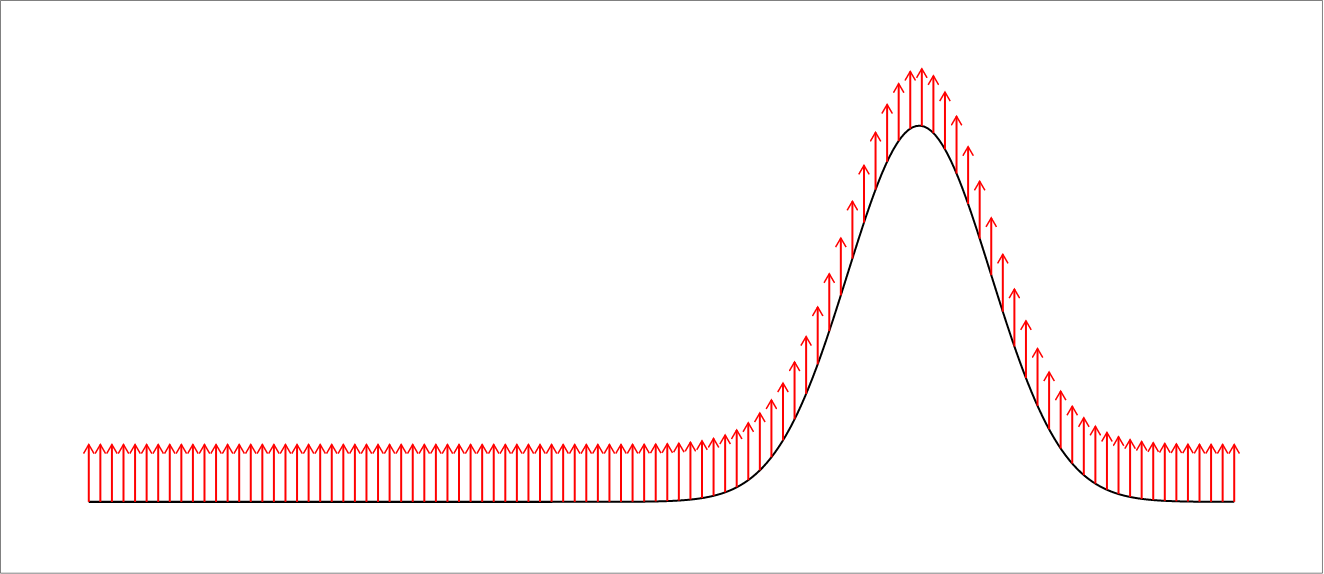
- Interactive JavaScript Simulation: The core of the resource is a web-based simulation built using JavaScript and HTML5. This allows for easy embedding and accessibility within web browsers without the need for additional plugins. The title itself, "Moving Impulse JavaScript Simulation Applet HTML5," clearly indicates the technology and the likely behavior being modeled: the propagation of an impulse wave.
- Educational Resource: The resource is explicitly located within the "Open Educational Resources / Open Source Physics @ Singapore" platform and listed under "Interactive Resources" and potentially "Mathematics" (given its inclusion in the breadcrumbs alongside an optimization activity). This strongly suggests its primary purpose is for teaching and learning.
- Wave Phenomena: The resource is categorized under "General Waves," indicating that it aims to demonstrate or explore the characteristics of wave propagation, specifically focusing on a moving impulse.
- Ease of Embedding: The webpage explicitly provides an <iframe> code snippet, stating "Embed this model in a webpage:", followed by the code. This highlights the intention for educators to easily integrate this simulation into their online learning materials.
- User Controls: The webpage outlines several basic user controls for interacting with the simulation:
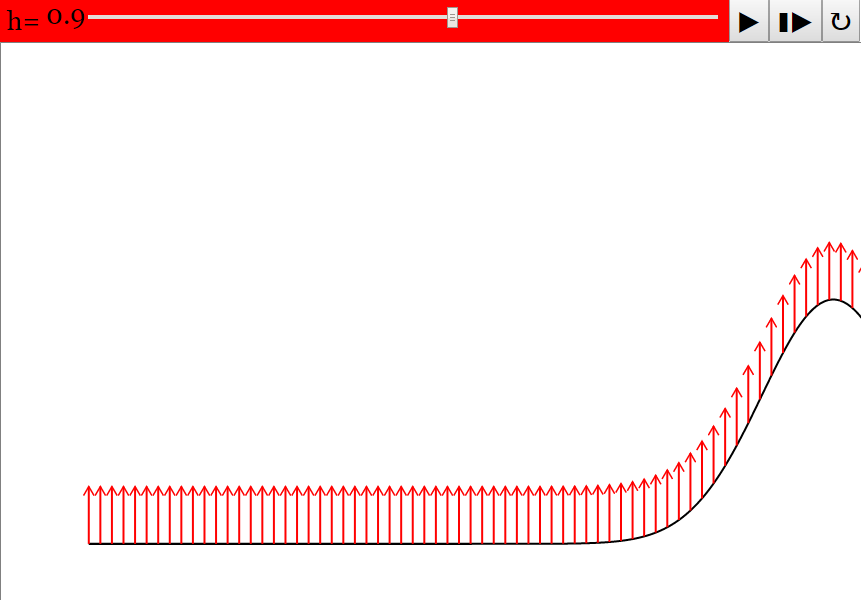
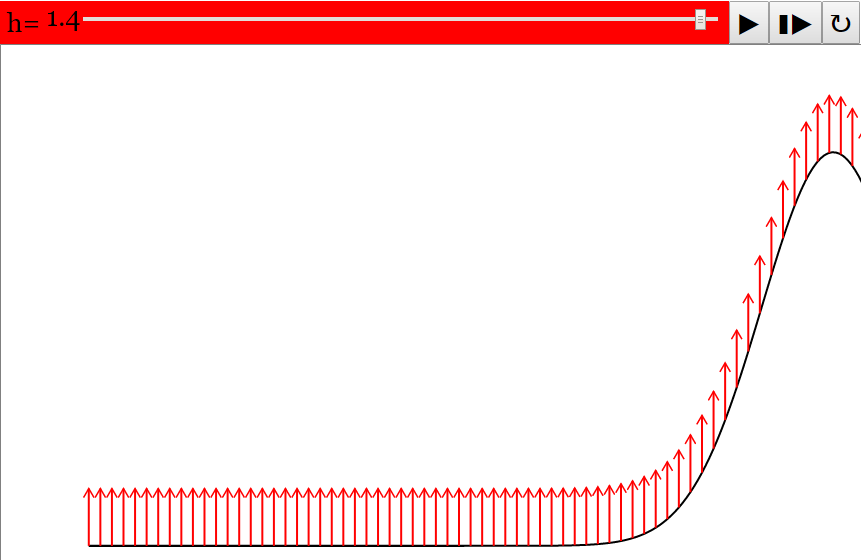
- Height Slider: "Adjusts the height of the wave." This suggests the ability to manipulate the amplitude of the impulse.
- Toggling Full Screen: "Double tap anywhere in the panel to toggle full screen. Only works when the simulation is Paused." This provides a way to maximize the viewing area for better engagement.
- Play/Pause, Step and Reset Buttons: "Plays/Pauses, steps and resets the simulation respectively." These are standard controls for interactive simulations, allowing users to control the flow of the animation, examine it frame by frame, and start over.
- Credits: The resource acknowledges the creators: "Fu-Kwun Hwang - Dept. of Physics,National Taiwan normal Univ.; Fremont Teng; Loo Kang Wee." This provides attribution and potential points of contact or further expertise.
- Sample Learning Goals (Mentioned but Content is Missing): The presence of a "Sample Learning Goals" section with "[texthttps://iwant2study.org/lookangejss/04waves_12generalwaves/ejss_model_wave_movingimpulse/wave_movingimpulse_Simulation.xhtml " frameborder="0">" - This clearly demonstrates the ease with which the simulation can be integrated into other online platforms.
- "Adjusts the height of the wave. (Moving the slider left) (Moving the slider right)" - This describes the functionality of one of the interactive controls.
- "Plays/Pauses, steps and resets the simulation respectively." - This explains the basic manipulation options for the simulation's progression.
- "Contents are licensed Creative Commons Attribution-Share Alike 4.0 Singapore License ." - This highlights the open nature of the educational content.
4. Potential Use Cases:
- Visualizing the propagation of a single disturbance or impulse wave in a medium.
- Demonstrating the relationship between the initial height (amplitude) of the impulse and its subsequent behavior.
- Providing an interactive tool for students to explore basic wave concepts.
- Integrating into online physics or mathematics lessons focusing on wave motion.
5. Limitations Based on Available Information:
- The specific learning goals, research basis, and potential video explanations associated with the simulation are not provided on the visible portion of the webpage.
- The underlying physics model and the parameters that can be manipulated beyond the height are not detailed.
- Specific instructions for students or pedagogical guidance for teachers on how to use the simulation effectively are absent.
6. Conclusion:
The "Moving Impulse JavaScript Simulation Applet HTML5" appears to be a valuable open educational resource for visualizing wave impulses. Its embeddability and basic user controls make it a potentially useful tool for educators. However, the lack of readily available learning goals, teacher support materials, and detailed descriptions of the simulation's parameters limits a full understanding of its pedagogical scope and potential. Further exploration of the linked simulation itself would be necessary to gain a deeper understanding of its capabilities and effectiveness.
Study Guide: Moving Impulse JavaScript Simulation Applet HTML5
Description: This study guide is designed to review your understanding of the "Moving Impulse JavaScript Simulation Applet HTML5" resource provided by Open Educational Resources / Open Source Physics @ Singapore. It includes a quiz, essay questions, and a glossary of key terms to aid your learning.
Quiz
Answer the following questions in 2-3 sentences each.
- What is the primary function of the "Moving Impulse JavaScript Simulation Applet HTML5" as suggested by its title?
- Where on the webpage is the interactive simulation of the moving impulse located? How can a user directly interact with it on another webpage?
- Identify two adjustable parameters or controls available within the simulation applet as described in the "Instructions" section. What effect does each have on the simulation?
- What does the "Toggle Full Screen" function do, and under what condition does it operate?
- Describe the functions of the "Play/Pause," "Step," and "Reset" buttons in the simulation.
- Who are credited with the development of this specific simulation applet?
- Under which broader category within the "Interactive Resources" section of the website is this simulation applet listed?
- Besides this moving impulse simulation, list two other simulation applets mentioned on the same webpage under the "Reflection From Wall Simulator JavaScript Simulation Applet HTML5" heading.
- What type of educational resource is the Easy JavaScript Simulation Library, as indicated in the licensing information at the bottom of the page?
- What is the license under which the contents of the Open Educational Resources / Open Source Physics @ Singapore website are shared? What does this license allow others to do?
Answer Key
- The primary function of the applet is to simulate the movement of an impulse, likely visualizing how a brief disturbance propagates through a medium. This allows users to observe the characteristics of a moving impulse.
- The interactive simulation is embedded within an iframe on the webpage itself. Users can embed this model in their own webpage by using the provided iframe code.
- Two adjustable parameters are the "Height Slider," which modifies the amplitude or vertical displacement of the wave, and the "Play/Pause" button, which starts and stops the animation of the impulse.
- The "Toggle Full Screen" function allows the user to view the simulation in full screen mode. This feature only works when the simulation is in the "Paused" state.
- The "Play/Pause" button starts and stops the continuous animation of the moving impulse. The "Step" button advances the simulation by a single frame. The "Reset" button returns the simulation to its initial conditions.
- Fu-Kwun Hwang from the Dept. of Physics, National Taiwan Normal University; Fremont Teng; and Loo Kang Wee are credited with the development of this moving impulse simulation applet.
- This simulation applet is listed under the "General Waves" subcategory, which falls under the broader category of "Interactive Resources" and then "Mathematics."
- Two other simulation applets mentioned are the "Reflection From Wall Simulator JavaScript Simulation Applet HTML5" and the "Wave in 2D of Particles and Springs JavaScript Simulation Applet HTML5."
- The Easy JavaScript Simulation Library is described as an open-source library for creating interactive physics simulations. Its commercial use requires reading a specific license and contacting This email address is being protected from spambots. You need JavaScript enabled to view it..
- The contents are licensed under the Creative Commons Attribution-Share Alike 4.0 Singapore License. This license allows others to share and adapt the material, provided they give appropriate credit and share their contributions under the same license.
Essay Format Questions
- Discuss the potential pedagogical benefits of using interactive simulations like the "Moving Impulse JavaScript Simulation Applet HTML5" in teaching and learning about wave phenomena. Consider different learning styles and the role of active engagement.
- Based on the limited information provided about the "Moving Impulse JavaScript Simulation Applet HTML5," hypothesize about the underlying mathematical or physical concepts it might be designed to illustrate. Explain your reasoning.
- Analyze the structure and organization of the Open Educational Resources / Open Source Physics @ Singapore website. How does the presentation of resources like the moving impulse simulation contribute to its accessibility and potential impact?
- Compare and contrast the different types of interactive resources listed on the webpage, beyond just the wave simulations. What does the variety suggest about the educational goals of the platform?
- Explore the implications of the Creative Commons licensing applied to the content on this website for educators and learners. How does this licensing model facilitate the sharing and adaptation of educational materials?
Glossary of Key Terms
- Applet: A small application, often written in Java or JavaScript, designed to run within another application, typically a web browser.
- HTML5: The latest evolution of the standard that defines the structure and content of the World Wide Web. It enables rich multimedia experiences without the need for plugins.
- JavaScript: A high-level, often just-in-time compiled programming language that conforms to the ECMAScript specification. It is commonly used in web browsers to make web pages interactive.
- Simulation: A computer-based model of a real-world system or process, used to study its behavior and characteristics. Interactive simulations allow users to manipulate parameters and observe the resulting changes.
- Impulse: In physics, an impulse is the integral of a force F over the time interval Δt for which it acts. It is a quantity that describes the effect of a net force acting over a period of time. In the context of waves, it refers to a short burst of energy or disturbance.
- Open Educational Resources (OER): Teaching, learning, and research materials that are in the public domain or have been released under an open license that permits no-cost access, use, adaptation, and redistribution by others with no or limited restrictions.
- Open Source: Software for which the original source code is made freely available and may be redistributed and modified.
- iframe: An HTML element that creates an inline frame, which is used to embed another HTML document within the current HTML document.
- Pedagogical: Relating to teaching or education.
- Licensing (Creative Commons): A set of public copyright licenses that enable the free distribution of an otherwise copyrighted work. They are used when an author wants to give people the right to share, use, and build upon a work they have created.44
Sample Learning Goals
[text]
For Teachers
Moving Impulse JavaScript Simulation Applet HTML5
Instructions
Height Slider

Toggling Full Screen
Play/Pause, Step and Reset Buttons

Research
[text]
Video
[text]
Version:
Other Resources
[text]
Frequently Asked Questions about the Moving Impulse JavaScript Simulation Applet HTML5
1. What is the Moving Impulse JavaScript Simulation Applet HTML5?
This is an interactive simulation tool, built using HTML5 and JavaScript, designed to visualize and explore the concept of a moving impulse wave. It allows users to manipulate parameters and observe the resulting wave motion in real-time within a web browser.
2. Where can I find and use this simulation?
The simulation can be embedded into any webpage using the provided iframe code: <iframe width="100%" height="100%" src="https://iwant2study.org/lookangejss/04waves_12generalwaves/ejss_model_wave_movingimpulse/wave_movingimpulse_Simulation.xhtml " frameborder="0"></iframe>. You can access and interact with the simulation directly through this embedded frame on any website where it has been implemented.
3. What controls can I use to interact with the simulation?
The simulation provides several interactive elements:
- Height Slider: This slider allows you to adjust the vertical amplitude or height of the impulse wave. Moving the slider left or right will decrease or increase the wave's height, respectively.
- Toggling Full Screen: By double-tapping anywhere within the simulation panel, you can toggle between the embedded view and a full-screen display. This feature is only functional when the simulation is paused.
- Play/Pause Button: This button controls the animation of the moving impulse. Clicking it will start or stop the wave's propagation.
- Step Button: When the simulation is paused, the step button allows you to advance the simulation by a single time increment, providing a frame-by-frame view of the wave's movement.
- Reset Button: This button resets the simulation to its initial conditions, effectively restarting the wave motion from its starting point with default parameters.
4. What are the potential learning goals associated with this simulation?
While specific learning goals are indicated as "[texthttps://www.um.es/fem/EjsWiki/Main/EJSLicense and contact This email address is being protected from spambots. You need JavaScript enabled to view it. directly.