Need Chrome for all devices except iOS not supported yet, Mac can but need to use Chrome.
New 202105 16 version 🆕 updated to use LED and sunlight to calibrate
{source}
<?php  require_once JPATH_SITE.'/TTcustom/TT_contentparser.php';\(parameters = array("topicname" => "04waves_13electromagneticspectrum", "modelname" => "ejss_model_spectrumanalyzer_2021_v21");echo generateSimHTML(\)parameters, "EJSS");
?>
{/source}
testing PWA
- ejss_pwa_spectrumanalyzer_2021_v21.zip
- One click on mobile install PWA app https://iwant2study.org/lookangejss/04waves_13electromagneticspectrum/ejss_pwa_spectrumanalyzer_2021_v21/
{source}
<?php require_once JPATH_SITE.'/TTcustom/TT_contentparser.php';\(parameters = array("topicname" => "04waves_13electromagneticspectrum", "modelname" => "ejss_model_spectrumanalyzer_2019_v21");echo generateSimHTML(\)parameters, "EJSS");
?>
{/source}
Using webpage and diffraction grating with 3D printed holder
(need to print yourself https://drive.google.com/file/d/1fUGUpJxKvVWYoVEh-YfhQ8FEo_uo7Mz9/view
to measure properties of light over a specific portion of the electromagnetic spectrum, typically used in spectroscopic analysis to identify materials
Briefing Document: Light Analyzer Data Logger JavaScript Simulation Applet HTML5
This document summarizes the key themes and information presented in the provided source, which describes a Light Analyzer Data Logger JavaScript Simulation Applet HTML5 developed by Open Educational Resources / Open Source Physics @ Singapore.
{source}<iframe style="border-radius:12px" src="https://open.spotify.com/embed/episode/11VP1C4HCsEcychm6HT941?utm_source=generator" width="100%" height="352" frameBorder="0" allowfullscreen="" allow="autoplay; clipboard-write; encrypted-media; fullscreen; picture-in-picture" loading="lazy"></iframe>{/source}
Main Themes:
- Spectroscopic Analysis using a Smartphone: The core idea is to use a smartphone's camera and a diffraction grating to perform spectroscopic analysis, identifying materials based on their light emission spectrum.
- Open Educational Resource: The applet and associated resources are intended for educational purposes and are freely available. This aligns with the goals of Open Educational Resources / Open Source Physics @ Singapore.
- Accessibility & Practicality: The resource focuses on making spectroscopy accessible using readily available materials like smartphones and 3D printed parts, along with downloadable software.
- Calibration and Comparison: The applet provides a calibration feature using fluorescent light and allows users to compare the obtained spectrum with known spectra from a database to identify the light source.
- Multiple Versions and Resources: The page provides a range of applet versions, suggesting ongoing development and refinement. It also links to external resources for building a physical spectrometer and understanding spectroscopy.
Key Ideas and Facts:
- Functionality: The applet simulates a light analyzer, enabling users to analyze light properties and identify materials through spectroscopic analysis. It measures properties of light over a specific portion of the electromagnetic spectrum.
- Technical Requirements: Chrome is recommended for use on most devices (except iOS), and the applet is built using JavaScript and HTML5.
- Calibration Process: The applet requires calibration using a known light source (e.g., fluorescent lamp) to establish a reference spectrum. The procedure involves steps using a diffraction grating setup with the smartphone camera. The steps are: "click calibrate...click identify...click confirm...click compare".
- Identification Process: After calibration, users can point the camera at an unknown light source, capture its spectrum, and compare it to a database of known spectra (e.g., Helium, Mercury, Neon) for identification.
- Required Materials: The process involves using a smartphone, a diffraction grating, a 3D-printed holder (optional), and various light sources (discharge lamps, handphone, diffraction grating setup 3D printed , rubber).
- Slit Width: The documentation mentions the effect of slit width (1mm vs. 2mm) on the spectrum: "Bigger slit = brighter but less defined (wider peaks)".
- Embeddable Model: The simulation can be embedded into webpages using an iframe code snippet, facilitating its integration into online learning platforms. For example: <iframe width="100%" height="100%" src="https://iwant2study.org/lookangejss/04waves_13electromagneticspectrum/ejss_model_spectrumanalyzer_2021_v21/spectrumanalyzer_2021_v21_Simulation.xhtml " frameborder="0"></iframe>
- PWA version: There is a Progressive Web App (PWA) version of the applet available. "One click on mobile install PWA app https://iwant2study.org/lookangejss/04waves_13electromagneticspectrum/ejss_pwa_spectrumanalyzer_2021_v21/"
- Supporting Resources: The page provides links to resources for building a physical spectrometer (e.g., Public Lab's SpectralWorkbench, instructions for 3D printing a holder).
- Multiple Versions Exist: Several versions of the applet are available, indicating ongoing development and potential improvements over time (e.g., different layouts, improved gas identification).
Quotes from the source:
- "to measure properties of light over a specific portion of the electromagnetic spectrum, typically used in spectroscopic analysis to identify materials" (Describing the function of the spectrometer)
- "Bigger slit = brighter but less defined (wider peaks)" (Explaining the effect of slit width).
- "...so it is possible to use the phone via our webpage to gather emission spectrum and even identify some of the common gases in our database." (Summarizing the applet's capability).
In Summary:
This project provides a valuable and accessible tool for learning about spectroscopy. By leveraging smartphones and readily available materials, it makes scientific investigation more accessible. The open-source nature of the project encourages further development and adaptation for various educational settings. The applet, combined with the linked resources, offers a comprehensive approach to understanding and applying spectroscopic principles.
Light Analyzer Study Guide
Key Concepts
- Electromagnetic Spectrum: The entire range of electromagnetic radiation, encompassing radio waves, microwaves, infrared, visible light, ultraviolet, X-rays, and gamma rays. Each part of the spectrum has different wavelengths and frequencies.
- Spectroscopy: The study of the interaction between matter and electromagnetic radiation. It is used to analyze the properties of materials based on their spectral patterns.
- Light Emission Spectrum: A spectrum of light emitted by a substance when it is heated or otherwise excited. The spectrum consists of discrete lines at specific wavelengths, which are unique to the element or compound.
- Diffraction Grating: An optical component with a periodic structure that splits and diffracts light into several beams traveling in different directions. The spacing of the grating determines the angles of diffraction, allowing for the separation of light by wavelength.
- Calibration: The process of adjusting an instrument or model to accurately measure against a known standard, ensuring the reliability of results.
- Line Emission: Discrete wavelengths of light emitted by excited atoms as they return to a lower energy state. These lines appear as bright lines in a spectrum and are specific to each element.
- PWA (Progressive Web App): A type of application software delivered through the web, built using common web technologies. It works on any platform that uses a standards-compliant browser.
- HTML5: A markup language used for structuring and presenting content on the World Wide Web. It includes features that support multimedia and interactive elements.
- JavaScript: A programming language commonly used to create interactive effects within web browsers.
Quiz
Answer the following questions in 2-3 sentences each.
- What is the purpose of using a diffraction grating in the light analyzer setup?
- Why is it important to calibrate the light analyzer with a known light source?
- Explain the difference between a continuous spectrum and a line emission spectrum.
- How can the light analyzer be used to identify different gases?
- What is the significance of using a 1 mm slit versus a 2 mm slit in the spectrometer setup?
- What is a PWA and what are the benefits of using it to deploy the light analyzer app?
- Explain the process of using the light analyzer to identify an unknown light source.
- What does the app use to allow users to compare light sources?
- How does the application use a smartphone's camera?
- Briefly discuss the different versions of the light analyzer that were developed.
Quiz Answer Key
- A diffraction grating splits light into its component wavelengths, allowing for the separation and analysis of the spectrum of light. It is used to create an interference pattern which allows the spectrum to be visually analyzed.
- Calibration ensures that the light analyzer accurately measures and displays the spectrum of light. This is vital for correctly identifying unknown light sources by comparing them to known standards.
- A continuous spectrum contains all wavelengths of light, while a line emission spectrum shows only discrete wavelengths emitted by excited atoms. Line emission spectra is useful for identifying the elements present in a light source.
- By analyzing the unique line emission spectrum of a gas, the light analyzer can identify the gas based on the specific wavelengths present in the spectrum. Each gas has a unique spectral fingerprint.
- A smaller slit (1 mm) produces sharper, more defined peaks in the spectrum but with less brightness. A larger slit (2 mm) results in brighter but less defined (wider) peaks.
- A Progressive Web App (PWA) is a web application that can be installed on devices like a native app, offering features like offline access and push notifications. They use a standard web browser to deliver the application to users.
- The process involves calibrating the device with a known light source, then pointing the camera with the diffraction grating at the unknown source. The app then analyzes the resulting spectrum and compares it to a database of known spectra.
- The application compares the results from the user's camera with pictures from an internet resource. This is done to confirm the source of the light being analyzed.
- The application uses the smartphone's camera to capture the light source after the light has passed through the diffraction grating. This allows it to analyze the specific portion of the electromagnetic spectrum and create data logs.
- The source mentions multiple versions being made, citing the 2018 version and multiple versions made in 2019. The different versions were created to improve functionality and adjust the layout.
Essay Questions
- Discuss the applications of the light analyzer tool in educational settings for teaching concepts related to light, electromagnetic spectrum, and spectroscopy.
- Analyze the advantages and limitations of using a smartphone-based spectrometer compared to traditional laboratory spectrometers.
- Explain the importance of calibration in scientific instruments, using the light analyzer as an example. Discuss the potential sources of error if the instrument is not properly calibrated.
- Evaluate the use of open educational resources like the light analyzer simulation in promoting STEM education and accessibility to scientific tools.
- Describe the scientific principles behind how a diffraction grating works and how it is used in the light analyzer to separate light into its constituent wavelengths.
Glossary
- Wavelength: The distance between two successive crests or troughs of a wave, typically measured in meters or nanometers.
- Frequency: The number of complete oscillations of a wave per unit of time, typically measured in Hertz (Hz).
- Spectrometer: An instrument used to measure the properties of light over a specific portion of the electromagnetic spectrum.
- Electromagnetic Radiation: Energy that travels and spreads out as it goes; includes visible light, radio waves, X-rays, etc.
- Emission Spectrum: The spectrum of frequencies of electromagnetic radiation emitted due to an atom or molecule making a transition from a high energy state to a lower energy state.
- 3D Printing: A process of making three dimensional solid objects from a digital file.
- Open Source: Denoting software for which the original source code is made freely available and may be redistributed and modified.
- Data Logger: An electronic device that automatically records data over time.
- Simulator: A device or computer program that models the behavior of a physical or abstract system.
 https://itunes.apple.com/us/app/light-analyzer/id1431659002?mt=8
Resources to make the spectrometer work
https://publiclab.org/sites/default/files/8.5x11mini-spec3.8.pdf SpectralWorkbench.org
https://publiclab.org/wiki/smartphone-spectrometer Smartphone spectrometer How to 3D Print Edited by Joseph Tan Jit Bin (NUSHS)
For Teachers
- navigate to the website https://sg.iwant2study.org/ospsgx/index.php/interactive-resources/physics/04-waves/03-electromagnetic-spectrum/643-datalogger and click on the latest thumbnail
- prepare the physical apparatus needed

- discharge lamps, handphone, diffraction grating setup 3D printed , rubber


- on the handphone it should look like this, agree to let Chrome mobile take video and sound if prompted

- fix the diffraction grating using a rubber to the back camera of the phone as shown


- fix a lamp on the discharge lap setup and turn it on, say first lamp is Helium

- point the camera with the diffraction grating on the table, make sure the fluorescent lamp on the room is able to the captured through the grating as a reference light spectrum source pattern

- click calibrate

- after clicking calibrate, the display will show the fluorescent lamp spectrum as the light from the fluorescent lamp came through the diffraction grating intot he camera to produce this image

- click identify
- after identify, point the camera with the diffraction grating as a new light source say the Helium lamp discharge

- click confirm button
- after confirm,

- click compare to compare with our results from the internet as possible answers.
- while doing the new light, make sure not to shift the diffraction grating position from the camera on the phone else, need to re-calibrate with fluorescent light again
- Next light source say mercury, click identify

- aim the camera through the diffraction grating to get a light emission spectrum and click identify

- after identify, the screen may say something like mercury found
- click compare and see the line emission lines from phone (above) to the picture resource from internet (below)

- next, try Neon lamp

- click on the identify and aim the camera on the lamp

- click compare to see the result from the camera (above) and the resource of the internet (below)

- so it is possible to use the phone via our webpage to gather emission spectrum and even identify some of the common gases in our database.


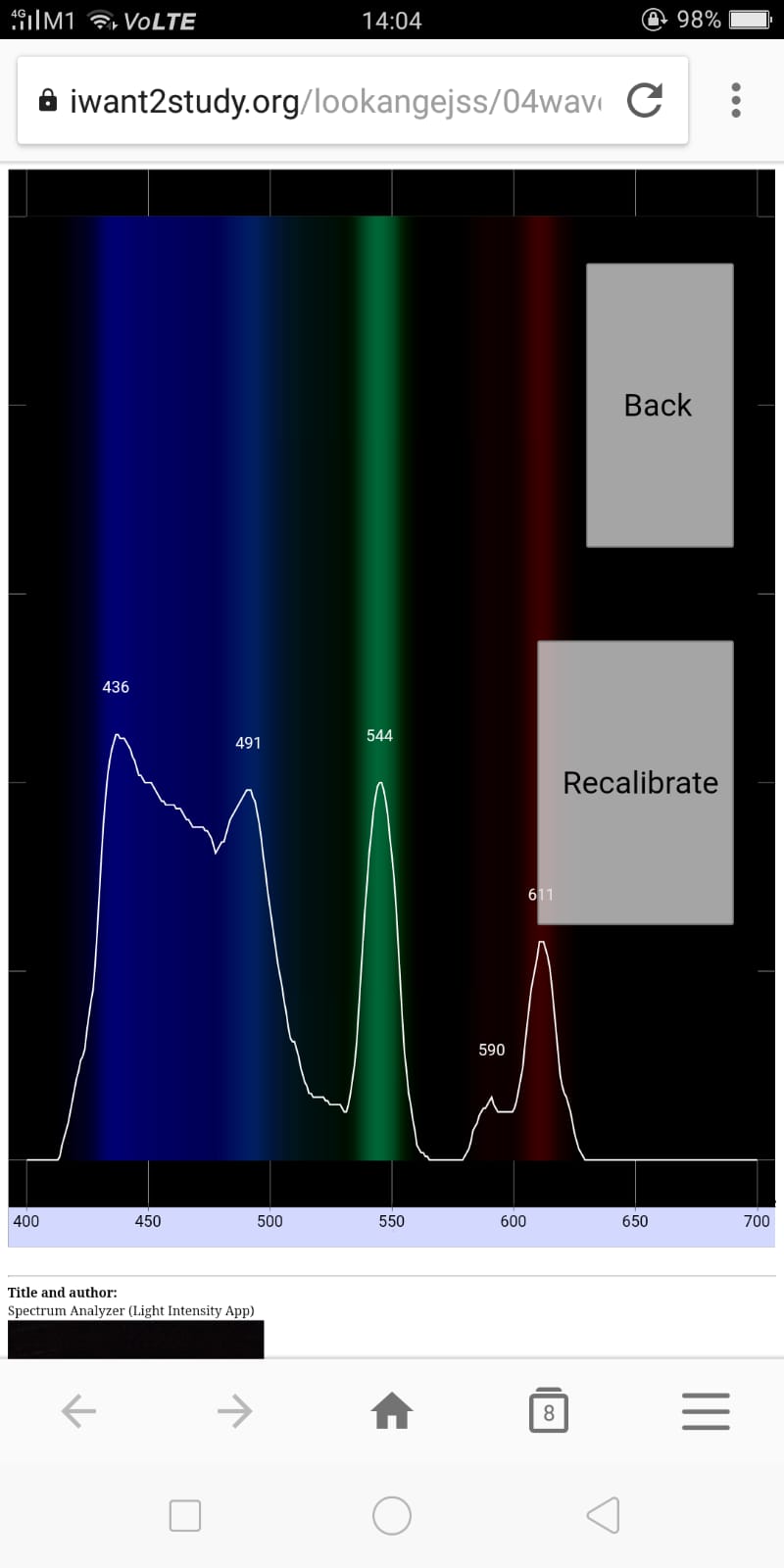 |
| 1 mm slit https://sg.iwant2study.org/ospsgx/index.php/643 |
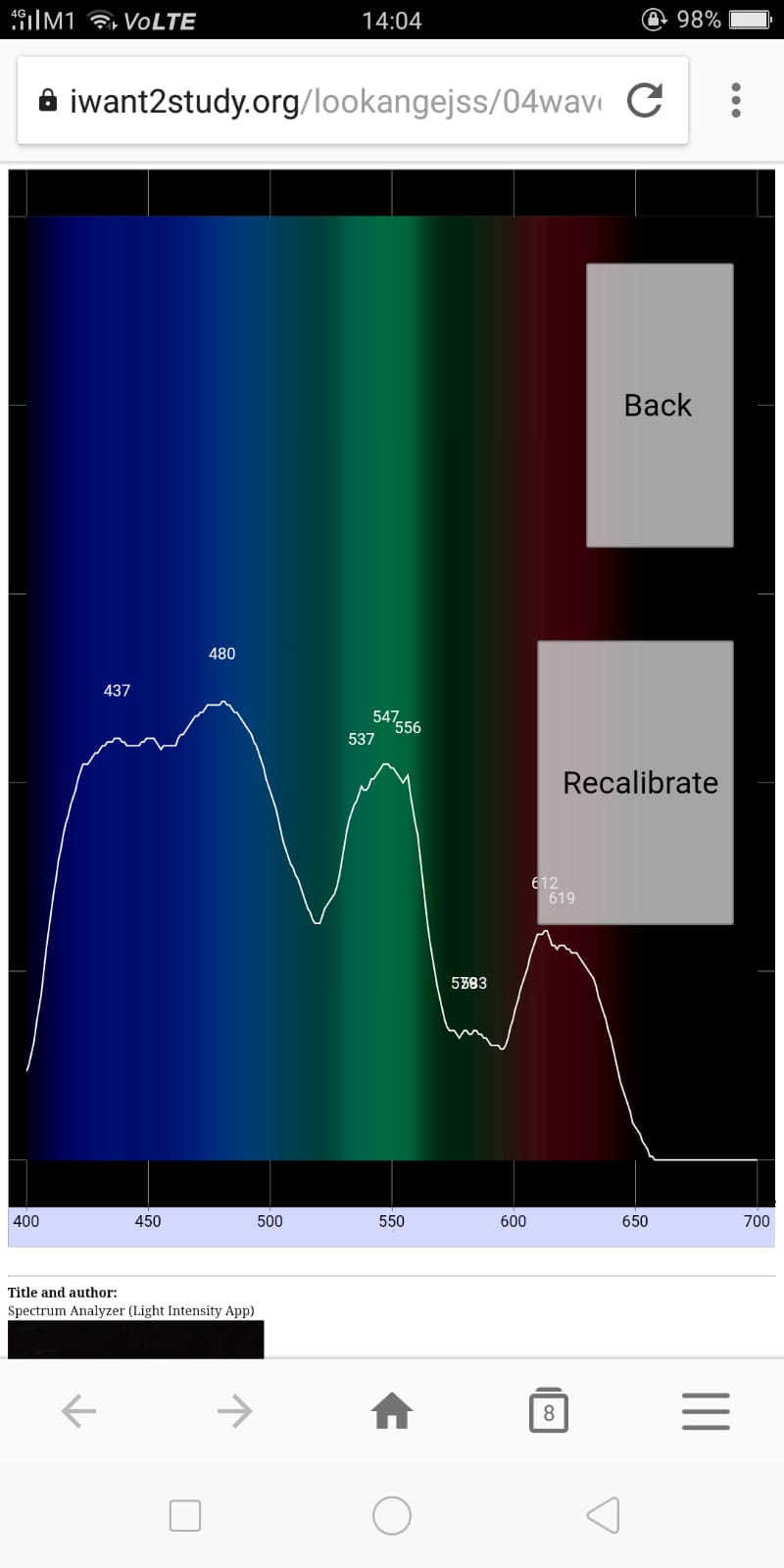 |
| 2 mm slit Bigger slit = brighter but less defined (wider peaks) https://sg.iwant2study.org/ospsgx/index.php/643 |
Video
{source}
<iframe width="560" height="315" src="https://www.youtube.com/embed/XQiUvY94uMc" frameborder="0" allow="accelerometer; autoplay; encrypted-media; gyroscope; picture-in-picture" allowfullscreen></iframe>
{/source} https://www.youtube.com/watch?v=XQiUvY94uMc
{source}
<iframe width="560" height="315" src="https://www.youtube.com/embed/pVV14jZyAqg" frameborder="0" allow="accelerometer; autoplay; encrypted-media; gyroscope; picture-in-picture" allowfullscreen></iframe>
{/source} https://www.youtube.com/watch?v=pVV14jZyAqg
https://www.youtube.com/watch?v=hZkVYuw4pJ4 {source}
<iframe width="560" height="315" src="https://www.youtube.com/embed/hZkVYuw4pJ4" frameborder="0" allow="accelerometer; autoplay; encrypted-media; gyroscope; picture-in-picture" allowfullscreen></iframe>
{/source} Making your Foldable Paper Cellphone Spectrometer by Marysusan Noll
Version:
- prototype: https://iwant2study.org/lookangejss/00workshop/2017FelixPaco/day4/ejss_model_dataLogger/dataLogger_Simulation.xhtml
- https://iwant2study.org/lookangejss/04waves_13electromagneticspectrum/ejss_model_dataLogger/
-
looking for the old 2018 version? https://iwant2study.org/lookangejss/04waves_13electromagneticspectrum/ejss_model_spectrumanalyzer/spectrumanalyzer_Simulation.xhtml Use this instead.
-
2019 version 2: https://iwant2study.org/lookangejss/04waves_13electromagneticspectrum/ejss_model_spectrumanalyzer_2019_v2/
-
2019 version 3: https://iwant2study.org/lookangejss/04waves_13electromagneticspectrum/ejss_model_spectrumanalyzer_2019_v3/
-
2019 v4: https://iwant2study.org/lookangejss/04waves_13electromagneticspectrum/ejss_model_spectrumanalyzer_2019_v4/
-
https://iwant2study.org/lookangejss/04waves_13electromagneticspectrum/ejss_model_spectrumanalyzer_2019_v7/
-
https://iwant2study.org/lookangejss/04waves_13electromagneticspectrum/ejss_model_spectrumanalyzer_2019_v9/
-
https://iwant2study.org/lookangejss/04waves_13electromagneticspectrum/ejss_model_spectrumanalyzer_2019_v10/
-
-
https://iwant2study.org/lookangejss/04waves_13electromagneticspectrum/ejss_model_spectrumanalyzer_2019_v13/
-
https://iwant2study.org/lookangejss/04waves_13electromagneticspectrum/ejss_model_spectrumanalyzer_2019_v14/ identify gas more correctly before change layout
-
https://iwant2study.org/lookangejss/04waves_13electromagneticspectrum/ejss_model_spectrumanalyzer_2019_v15/ before changing to landscape again
-
Other Resources
https://taimienphi.vn/ has reviewed our app in their website. https://taimienphi.vn/download-light-analyzer-90041 Taimienphi.vn is a website specializing in software review related to computer software, mobile applications as well as enclosed tutorials. We have a good reputation and reach the largest number of visitors in the mentioned field in Vietnam
FAQ
- What is the Light Analyzer Data Logger JavaScript Simulation Applet HTML5?
- It's an interactive simulation tool, accessible via a web browser (Chrome recommended), that allows users to analyze light and its spectrum. It leverages a mobile device's camera in conjunction with a diffraction grating (typically a 3D printed one attached to the phone's camera) to act as a spectrometer. It is designed to measure properties of light over a specific portion of the electromagnetic spectrum, typically used in spectroscopic analysis to identify materials.
- What are the key components needed to use the Light Analyzer Applet?
- You need a device with a camera (ideally a smartphone), a web browser (Chrome is recommended for most devices except iOS), a diffraction grating, a light source (such as discharge lamps or sunlight), and potentially a 3D-printed holder for the diffraction grating. You also need to access the web-based simulation itself.
- How do I set up the Light Analyzer for use?
- Navigate to the webpage hosting the applet.
- Prepare the physical apparatus: light source, diffraction grating, and phone.
- Attach the diffraction grating to the phone's camera using a rubber band or a 3D-printed holder.
- Calibrate the system using a known light source (like a fluorescent lamp).
- Identify unknown light sources by pointing the camera (with the grating) at them.
- Compare the captured spectrum with reference data.
- What is the calibration process and why is it important?
- Calibration involves using a known light source (like a fluorescent lamp) to establish a reference spectrum. This step is crucial because it allows the applet to account for the specific characteristics of the diffraction grating and camera being used, ensuring more accurate identification of unknown light sources. Without calibration, the applet wouldn't have a baseline to compare new spectrums with.
- How does the applet identify different light sources?
- The applet captures the light spectrum produced by the diffraction grating and compares it to a database of known spectra of different gases and materials. The applet then determines and shows the result on the webpage.
- What is the purpose of the different slit sizes mentioned (1mm, 2mm)?
- The slit refers to an optional physical component used to collimate the light entering the spectrometer. A smaller slit (1mm) results in more defined, narrower peaks in the spectrum, but the light intensity is lower. A bigger slit (2mm) results in a brighter spectrum but with less defined, wider peaks.
- Are there different versions of this applet?
- Yes, there are multiple versions of the applet available, including older versions (e.g., 2018, 2019) and newer, updated versions (e.g., 2021). These versions may have slightly different features or interfaces.
- Where can I find additional resources to build and use the spectrometer?
- The document links to several resources, including instructions for 3D printing a spectrometer, using SpectralWorkbench, and a link to purchase diffraction gratings. These resources can assist in building the physical components necessary for using the applet.