{source}
<?php  require_once JPATH_SITE.'/TTcustom/TT_contentparser.php';\(parameters = array("topicname" => "04waves_13light", "modelname" => "ejss_model_mirror2");echo generateSimHTML(\)parameters, "EJSS");
?>
{/source}
1. Overview:
This document reviews the "3D Mirage JavaScript Simulation Applet HTML 5" interactive resource hosted by Open Educational Resources / Open Source Physics @ Singapore. The resource appears to be a physics simulation designed to demonstrate the principles of light and mirages using HTML5 and JavaScript. It's part of a larger collection of open educational resources (OER) focused on physics education.
{source}<iframe style="border-radius:12px" src="https://open.spotify.com/embed/episode/1lfCG2sgSNwtTlcNCko8gF?utm_source=generator" width="100%" height="352" frameBorder="0" allowfullscreen="" allow="autoplay; clipboard-write; encrypted-media; fullscreen; picture-in-picture" loading="lazy"></iframe>{/source}
2. Main Themes and Important Ideas/Facts:
- Interactive Physics Simulation: The core of the resource is a JavaScript-based applet simulating a 3D mirage. The applet allows users to manipulate parameters (presumably angles of incidence, etc.) and observe the resulting ray formations.
- Light and Optics: The simulation focuses on the physics of light, specifically how mirages are formed through reflection or refraction (this isn't explicitly stated but implied by the title and the ability to manipulate angles).
- HTML5 and JavaScript: The applet is built using HTML5 and JavaScript, making it accessible through web browsers without the need for plugins like Flash. This aligns with modern web development standards.
- Open Educational Resource (OER): The resource is explicitly identified as an OER, emphasizing its availability for free use, adaptation, and sharing.
- Ease of Use and Integration: The resource is designed to be easily embedded in web pages using an iframe: <iframe width="100%" height="100%" src="https://iwant2study.org/lookangejss/04waves_13light/ejss_model_mirror2/mirror2_Simulation.xhtml " frameborder="0"></iframe>.
- Instructional Support: Instructions are provided on how to interact with the simulation, including dragging arrows to adjust angles, using play/pause/reset buttons, and toggling fullscreen mode.
3. Key Quotes and Supporting Evidence:
- On Interactivity: "Step 1) Drag the Arrows to the desired angle Step 2) Release the arrows and watch as the rays are formed in the border." (This highlights the interactive element, allowing students to actively explore the concepts.)
- On Embedding: "Embed this model in a webpage: " (This showcases the ease with which educators can incorporate the simulation into their online learning environments).
4. Target Audience:
- Teachers: The "For Teachers" section suggests the resource is intended to support physics instructors.
- Students: The simulation is designed to help students visualize and understand the physics of mirages and light.
5. Related Resources:
The page also links to a wide variety of other physics and math simulations and resources, including:
- Other light and wave simulations (e.g., "Wave Superposition JavaScript HTML5 Applet Simulation Model", "Michelson Interferometer JavaScript HTML5 Applet HTML5")
- Simulations covering mechanics, electromagnetism, and thermodynamics
- Interactive games and quizzes for math and science learning
- Resources related to the Student Learning Space (SLS), a Singaporean educational platform
6. Creators/Contributors:
- The applet is credited to: Fu-Kwun Hwang, Fremont Teng, and lookang.
7. Licensing and Usage:
- The content is licensed under a Creative Commons Attribution-Share Alike 4.0 Singapore License. This permits sharing and adaptation with proper attribution.
- Commercial use of the EasyJavaScriptSimulations library requires a separate license obtained from This email address is being protected from spambots. You need JavaScript enabled to view it..
8. Potential Applications:
- Classroom demonstrations of optical phenomena.
- Interactive homework assignments or lab activities.
- Self-directed learning for students exploring optics.
- Integration into online physics courses.
9. Areas for Further Exploration:
- The "Sample Learning Goals" and "Research" sections are marked with "[text]," indicating that specific content is missing or needs to be added. Further documentation on learning goals would be beneficial.
- A deeper explanation of the underlying physics model would improve comprehension.
3D Mirage Simulation Study Guide
I. Key Concepts
- 3D Mirage: An optical illusion that creates a three-dimensional image of an object, often appearing to float in space. This is typically achieved through the use of mirrors or lenses.
- JavaScript Simulation Applet: An interactive program written in JavaScript that simulates a physical phenomenon, in this case, a 3D mirage.
- HTML5: The latest version of Hypertext Markup Language, used for structuring and presenting content on the World Wide Web. It provides enhanced capabilities for interactive elements and multimedia.
- Open Educational Resources (OER): Freely accessible, openly licensed teaching, learning, and research resources that can be used for educational purposes.
- Open Source Physics (OSP): A project focused on creating and sharing open-source simulations and other resources for teaching and learning physics.
- Kinematics: The branch of mechanics concerned with the motion of objects without reference to the forces that cause the motion.
- Reflection: The change in direction of a wavefront at an interface between two different media so that the wavefront returns into the medium from which it originated.
II. Quiz (Short Answer)
Answer each question in 2-3 sentences.
- What is the purpose of the 3D Mirage JavaScript Simulation Applet?
- What programming language is used to create the simulation applet?
- Name two ways to interact with the 3D Mirage JavaScript Simulation Applet.
- What does OER stand for, and why is it important in education?
- What is the role of mirrors in creating a 3D mirage?
- What is HTML5, and how does it contribute to the functionality of the simulation?
- How can the Play/Pause button be used in the simulation?
- How might the 3D mirage simulation applet be used in a science classroom?
- What is the focus of Kinematics within the field of physics?
- Describe how to Embed the 3D Mirage JavaScript Simulation Applet into a webpage.
Quiz Answer Key
- The 3D Mirage JavaScript Simulation Applet demonstrates the principles of reflection and the creation of a 3D mirage effect through interactive manipulation. It allows users to visualize how light rays interact with mirrors to form an image.
- The simulation applet is written in JavaScript, a popular programming language for creating interactive web content. JavaScript allows for real-time calculations and dynamic updates within the browser.
- Users can interact with the simulation by dragging the arrows to change the angles of the mirrors, and also by using the Play/Pause and Reset buttons to control the animation.
- OER stands for Open Educational Resources, which are materials offered freely for anyone to use, reuse, adapt, and share. They promote equitable access to quality educational content.
- Mirrors are used to reflect light in specific ways. With proper placement, those reflections converge to create the visual effect of a three-dimensional image.
- HTML5 is the standard markup language for structuring and presenting content on the web. It provides the necessary structure and features to support interactive simulations like this one.
- The Play/Pause button is used to start or stop the simulation.
- The applet might be used to teach the principles of reflection, optics, and image formation. By experimenting with the applet, students can develop a better understanding of these scientific principles.
- Kinematics focuses on the motion of objects, describing their displacement, velocity, and acceleration without considering the forces causing the motion.
- You can Embed the 3D Mirage JavaScript Simulation Applet into a webpage by copying and pasting the given iframe code into the HTML structure of the page. This embeds the simulation allowing users to interact with it directly within the webpage.
III. Essay Questions
- Discuss the advantages and limitations of using simulations, like the 3D Mirage applet, as educational tools in physics.
- Explain how the principles of reflection are used in the 3D Mirage Simulation Applet to create the illusion of a three-dimensional image.
- Analyze the role of Open Educational Resources (OER) in promoting access to quality science education, using the provided resource as an example.
- Describe the specific interactions a user can have with the 3D Mirage JavaScript Simulation Applet and how these interactions contribute to a deeper understanding of the underlying physics principles.
- Evaluate the potential impact of interactive simulations, such as the 3D Mirage Applet, on student engagement and learning outcomes in physics education.
IV. Glossary of Key Terms
- Applet: A small application, often written in Java or JavaScript, designed to run within another application, such as a web browser.
- Simulation: A computer-based model of a real-world system or process, used to study its behavior and characteristics.
- Reflection: The bouncing back of light or other waves from a surface. The law of reflection states that the angle of incidence is equal to the angle of reflection.
- Optical Illusion: A visual perception that differs from reality, caused by the way the human visual system processes information.
- Interactive: Allowing for two-way communication or action; responding to a user's input.
- Ray: A simplified representation of light traveling in a straight line.
- Model: A simplified representation of a system or phenomenon, used for understanding and prediction.
- Angle of Incidence: The angle between an incoming ray of light and the normal (perpendicular) to a surface.
- Angle of Reflection: The angle between a reflected ray of light and the normal to a surface.
- Normal: A line perpendicular to a surface at a given point.
Sample Learning Goals
[text]
For Teachers
3D Mirage JavaScript Simulation Applet HTML 5
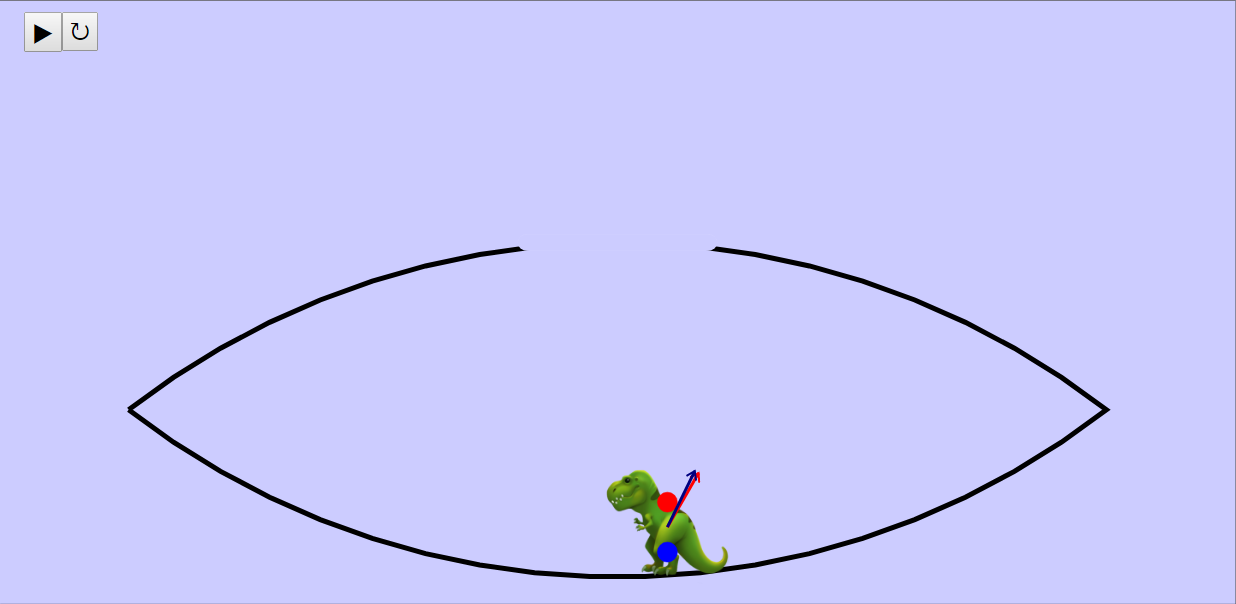
Instructions on using Simulation Applet
Dragging the Arrows
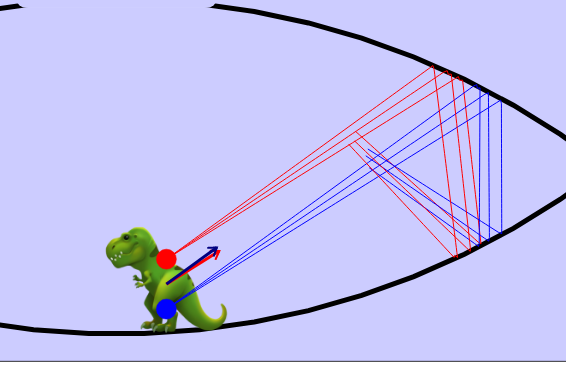
Play/Pause and Reset Button

Toggling Full Screen
Research
[text]
Video
[text]
Version:
Other Resources
[text]
What is the 3D Mirage JavaScript Simulation Applet HTML 5?
It's an interactive physics simulation, specifically designed to demonstrate and explore the principles behind mirages, likely using mirrors and light ray tracing. It allows users to manipulate parameters (presumably the angle of mirrors) and observe the resulting light behavior, helping them visualize how mirages are formed.
How do I use the 3D Mirage JavaScript Simulation Applet?
The simulation allows the user to drag the arrows to change the desired angle, then release them to see the rays formed. There are also play/pause and reset buttons to control the simulation. Double-clicking the panel toggles full screen mode.
What are some potential learning goals that can be achieved using this simulation?
While the specific learning goals aren't listed, the applet likely aims to help users understand the reflection of light, the conditions that create mirages, and how angles of incidence and reflection relate to image formation.
What subjects, other than physics, can this simulation be used for?
Although created for physics, the simulation applet can also be applied to mathematics (geometry and angles), environmental science (understanding atmospheric conditions that lead to mirages), and possibly even art (understanding perspective and image creation).
Who developed this simulation?
The simulation was developed by Fu-Kwun Hwang, Fremont Teng, and lookang.
Can this simulation be embedded in other webpages?
Yes, the provided HTML iframe code allows embedding the simulation within other web pages.
What other resources are available from Open Educational Resources / Open Source Physics @ Singapore?
The resource provides access to a wide range of interactive physics simulations and learning materials. Some examples include simulations on topics like kinematics, circuits, electromagnetism, optics, mechanics, and math related topics. These include simulations of the Photoelectric Effect, Ripple Tank Model, Free Fall, Projectile Motion, and more.