{source}
<?php  require_once JPATH_SITE.'/TTcustom/TT_contentparser.php';\(parameters = array("topicname" => "04waves_13light", "modelname" => "ejss_model_twolens2");echo generateSimHTML(\)parameters, "EJSS");
?>
{/source}
Briefing Document: Two Lens Simulator JavaScript Simulation Applet HTML5
Subject: Review of the "Two Lens Simulator JavaScript Simulation Applet HTML5" resource from Open Educational Resources / Open Source Physics @ Singapore.
{source}<iframe style="border-radius:12px" src="https://open.spotify.com/embed/episode/5VCf8NH3Wwa9ljEBaHsa7g?utm_source=generator" width="100%" height="352" frameBorder="0" allowfullscreen="" allow="autoplay; clipboard-write; encrypted-media; fullscreen; picture-in-picture" loading="lazy"></iframe>{/source}
Executive Summary:
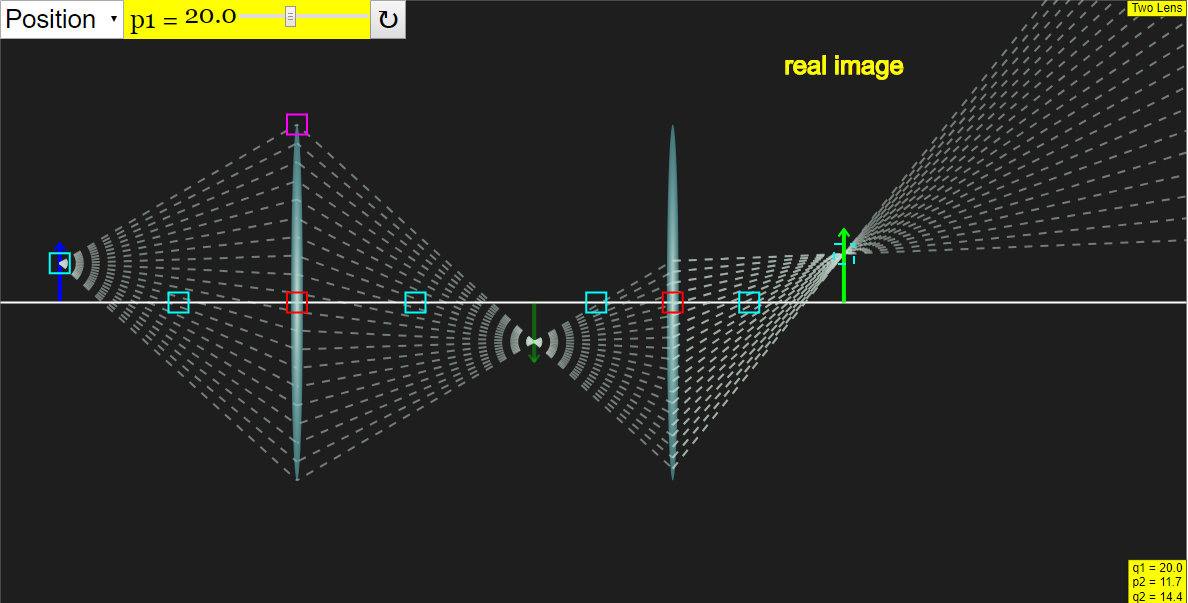
This document reviews a JavaScript simulation applet designed to help students learn about light and lenses. The applet, titled "Two Lens Simulator JavaScript Simulation Applet HTML5," is part of a larger collection of open educational resources focusing on physics education. The tool allows users to manipulate lens parameters and observe the resulting changes in light behavior. It's intended to be embedded in web pages and offers interactive features like sliders, checkboxes, and drag-and-drop functionalities. The resource is targeted toward teachers and students and is designed to be a versatile tool for exploring optical concepts.
Key Themes and Ideas:
- Interactive Physics Simulation: The core of the resource is an interactive JavaScript simulation that allows users to explore the behavior of light as it passes through two lenses. The simulation is designed to be visually engaging and responsive to user input.
- Open Educational Resource (OER): This applet is part of a larger initiative to provide free and openly accessible educational materials. The resource is licensed under Creative Commons Attribution-Share Alike 4.0 Singapore License, promoting sharing and adaptation.
- HTML5 Applet: The use of HTML5 makes the simulation accessible on a variety of devices (desktops, tablets, and potentially smartphones) without requiring specific plugins like Flash.
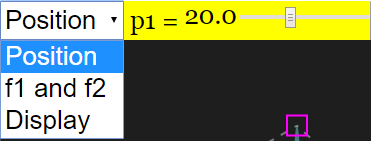
- Ease of Use and Customization: The applet offers multiple ways to interact with the simulation, including combo boxes, sliders, and checkboxes. The ability to drag boxes within the simulation allows for precise adjustments. The simulation can be reset to default conditions with a single click.
- Learning Goals & Teacher Support: The resource includes "Sample Learning Goals" and "For Teachers" sections, which provides guidance on how to effectively integrate the simulation into a lesson plan. This demonstrates a focus on pedagogical value and practical application.
- Embedding and Accessibility: The applet can be easily embedded into other webpages using an <iframe> tag, increasing its accessibility and portability.
- Wide range of other resources: The site appears to contain a vast library of interactive simulations and resources covering a wide range of physics and math topics, useful for teachers.
Important Features and Functionalities:
- Interactive Elements: The applet uses various interactive elements, including:
- Combo Boxes: Allow selection from predefined options.
- Sliders: Enable continuous adjustment of parameters like lens position and focal lengths.
- Checkboxes: Toggle display options.
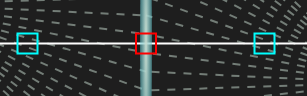
- Draggable Boxes: Allow manipulation of the position along the x and/or y axis.
- Full-Screen Toggle: Double-clicking anywhere on the panel allows users to toggle full-screen mode.
- Reset Button: Resets the simulation to its initial state.
- Embedding: The resource can be embedded into a webpage:
- <iframe width="100%" height="100%" src="https://iwant2study.org/lookangejss/04waves_13light/ejss_model_twolens2/twolens2_Simulation.xhtml " frameborder="0"></iframe>
Quotes:
- "Dragging the boxes will adjust accordingly. Most boxes move along the x-axis." (Describes a key interaction method.)
- "Double clicking anywhere on the panel will do the job." (Refers to the full-screen toggle functionality.)
- "Resets the Simulation" (Describes the functionality of the reset button.)
- "Combo Box, Sliders and Check Boxes Toggling through the combo box will give you their respective options Position and f1 and f2 options gives sliders While display gives check boxes"
Potential Use Cases:
- Classroom demonstrations of lens behavior.
- Interactive homework assignments.
- Self-paced learning for students.
- Lab activities involving optical principles.
License and Attribution:
- The resource is licensed under Creative Commons Attribution-Share Alike 4.0 Singapore License.
- Commercial use of EasyJavaScriptSimulations Library requires reading the EJS license and contacting This email address is being protected from spambots. You need JavaScript enabled to view it..
- Credits: Fu Kwun Hwang; Fremont Teng; lookang.
Two Lens Simulator Study Guide
I. Key Concepts
- Lenses: Transparent optical devices that refract light, converging or diverging light rays to form an image.
- Converging Lens (Convex): A lens that bends light rays inward, causing them to converge at a focal point. These lenses can form both real and virtual images.
- Diverging Lens (Concave): A lens that bends light rays outward, causing them to diverge. These lenses always form virtual, upright, and reduced images.
- Focal Length (f): The distance from the lens to its focal point. For a converging lens, f is positive; for a diverging lens, f is negative.
- Object Distance (do): The distance from the object to the lens.
- Image Distance (di): The distance from the image to the lens. A positive di indicates a real image, while a negative di indicates a virtual image.
- Magnification (M): The ratio of the image height (hi) to the object height (ho), or -di/do. A positive M indicates an upright image, while a negative M indicates an inverted image.
- Real Image: An image formed by the actual convergence of light rays. Real images can be projected onto a screen.
- Virtual Image: An image formed by the apparent convergence of light rays. Virtual images cannot be projected onto a screen; they can only be seen by looking through the lens.
- Ray Tracing: A technique for determining the path of light rays through an optical system.
- Simulation: A computer program that models a real-world system, allowing users to explore and experiment with different parameters.
II. Quiz (Short Answer)
- What is the primary function of a lens in an optical system?
- Describe the difference between a converging and a diverging lens in terms of how they bend light rays.
- What is the focal length of a lens and how does it relate to image formation?
- Explain the difference between a real image and a virtual image.
- How is magnification calculated, and what does the sign of the magnification tell you about the image?
- Briefly describe how ray tracing can be used to predict image formation by a lens.
- What are the adjustable parameters in the "Two Lens Simulator JavaScript Simulation Applet HTML5"?
- How can the simulation applet be embedded in a webpage?
- What does it mean when the simulation refers to "dragging the boxes" and adjusting accordingly?
- What is the purpose of the reset button in the simulation?
III. Quiz Answer Key
- A lens refracts light to converge or diverge light rays, forming an image of an object.
- A converging lens bends light rays inward, while a diverging lens bends light rays outward.
- Focal length is the distance from the lens to the point where parallel light rays converge (converging lens) or appear to diverge from (diverging lens), and it determines the lens's focusing power.
- A real image is formed by the actual convergence of light rays and can be projected onto a screen, whereas a virtual image is formed by the apparent convergence of light rays and cannot be projected.
- Magnification (M) is calculated as hi/ho or -di/do. A positive M indicates an upright image, while a negative M indicates an inverted image.
- Ray tracing involves drawing specific rays that pass through a lens to determine the location and characteristics of the image formed by the lens.
- The adjustable parameters include position and focal length (f1 and f2) of the lenses, which can be altered using sliders and combo boxes.
- The simulation applet can be embedded by using the iframe code provided on the page and inserting it into the HTML source of the webpage.
- "Dragging the boxes" allows users to change the position of the object and lenses along the x and y axes, influencing how light refracts and thus, altering the image.
- The reset button returns all parameters in the simulation to their default values, providing a clean slate for experimentation.
IV. Essay Questions
- Discuss the properties of converging and diverging lenses, explaining how their shapes affect the way they bend light and the types of images they produce. Include examples of real-world applications for each type of lens.
- Explain the thin lens equation (1/f = 1/do + 1/di) and the magnification equation (M = -di/do). Describe how these equations can be used to predict the location, size, and orientation of images formed by lenses.
- Describe the process of ray tracing for a single lens. Explain the significance of principal rays and how they are used to locate the image formed by a lens.
- Using the "Two Lens Simulator JavaScript Simulation Applet HTML5," discuss how changing the focal lengths and positions of the two lenses affects the final image. Provide specific examples and explain the underlying principles.
- Discuss the limitations of using simulations in the context of learning science. What are the benefits of using simulations like the "Two Lens Simulator JavaScript Simulation Applet HTML5" and what are the potential drawbacks?
V. Glossary of Key Terms
- Refraction: The bending of light as it passes from one medium to another.
- Optical Axis: An imaginary line passing through the center of the lens.
- Focal Point: The point at which parallel light rays converge after passing through a converging lens, or the point from which parallel light rays appear to diverge after passing through a diverging lens.
- Principal Rays: Specific rays used in ray tracing, such as the ray parallel to the optical axis and the ray passing through the center of the lens.
- Image: A reproduction of an object formed by a lens or mirror.
- Object: The item being viewed or imaged by a lens or mirror.
- JavaScript: A programming language commonly used to create interactive web content.
- Applet: A small application designed to run within another application, typically a web browser.
- HTML5: The latest version of HTML, the standard markup language for creating web pages.
- Simulation Applet: A simulation application that runs within a web browser.
- Parameters: Variables or settings that can be adjusted in a simulation.
Sample Learning Goals
[text]
For Teachers
Two Lens Simulator JavaScript Simulation Applet HTML5
Instructions on how to use Simulation Applet
Combo Box, Sliders and Check Boxes


Drag-able Boxes


Toggling Full Screen
Reset Button

Research
[text]
Video
[text]
Version:
Other Resources
[text]
Frequently Asked Questions
1. What is the Two Lens Simulator JavaScript Simulation Applet HTML5?
It is an interactive simulation applet designed to model the behavior of light passing through two lenses. It is created using JavaScript and HTML5 and is part of the Open Educational Resources / Open Source Physics @ Singapore project.
2. How can I use the Two Lens Simulator applet?
You can adjust various parameters using combo boxes, sliders, and checkboxes to change lens properties and positions. You can also drag boxes within the simulation to modify elements along the x and y-axis. Double-clicking on the panel toggles fullscreen mode and a reset button is also available.
3. What are some potential learning goals associated with this simulation?
The simulation can be used to explore concepts in optics, including refraction, focal length, image formation, and how lenses interact. It can be used to visualize how different lens configurations affect the path of light and the final image.
4. Where can I find other similar interactive simulations?
The Open Educational Resources / Open Source Physics @ Singapore website offers many other simulations covering diverse physics topics, such as mechanics, waves, electricity, magnetism, and quantum physics. Many are designed for use in the Singapore Student Learning Space (SLS).
5. Can I embed the Two Lens Simulator in my own webpage?
Yes, the provided iframe code allows you to embed the simulation in a webpage. This makes it easy to share the simulation with students or colleagues.
6. Who developed the Two Lens Simulator?
The simulation was developed by Fu Kwun Hwang, Fremont Teng, and lookang.
7. What subjects are covered by the different simulations and resources available?
The resources cover a very broad range of topics, including Physics, Mathematics, Chemistry and even interdisciplinary topics. Within Physics, simulations span from foundational kinematics to electromagnetism, optics, quantum mechanics, and more. The simulations seem geared toward primary through upper secondary and even early tertiary education.
8. What license governs the use of these simulations?
The content is licensed under the Creative Commons Attribution-Share Alike 4.0 Singapore License. For commercial use of the EasyJavaScriptSimulations Library, consult the specified link and contact This email address is being protected from spambots. You need JavaScript enabled to view it..