{source}
<?php  require_once JPATH_SITE.'/TTcustom/TT_contentparser.php';\(parameters = array("topicname" => "04waves_13light", "modelname" => "ejss_model_objectinwater2wee");echo generateSimHTML(\)parameters, "EJSS");
?>
{/source}
Briefing Document: Object In Water Simulator JavaScript Simulation Applet
Source: Excerpts from "Object In Water Simulator JavaScript Simulation Applet HTML5 - Open Educational Resources / Open Source Physics @ Singapore" website.
Overview: This document describes an interactive JavaScript simulation applet designed for educational purposes, specifically focusing on the physics of light refraction in water. It's part of a larger collection of Open Educational Resources (OER) provided by Open Source Physics @ Singapore. The document provides instructions on how to use the simulator, credits the developers, and lists related resources.
{source}<iframe style="border-radius:12px" src="https://open.spotify.com/embed/episode/0Szy1sJkiQQx1ZWQKBVkht?utm_source=generator" width="100%" height="352" frameBorder="0" allowfullscreen="" allow="autoplay; clipboard-write; encrypted-media; fullscreen; picture-in-picture" loading="lazy"></iframe>{/source}
Main Themes and Ideas:
- Interactive Physics Simulation: The core of the resource is a JavaScript simulation that allows users to explore the concept of an object submerged in water and how light refraction affects its perceived position.
- Open Educational Resource (OER): This is a freely available educational tool, encouraging its use and adaptation in teaching. This is emphasized by the Creative Commons Attribution-Share Alike 4.0 Singapore License.
- Focus on Kinematics and Optics: The resource falls under the "Motion & Forces" and "Kinematics" categories within physics, with a specific application to light and refraction. The simulator helps students visualize and understand the principles of light bending as it passes from water into the air.
- User Interactivity and Control: The simulation allows users to manipulate various parameters, including:
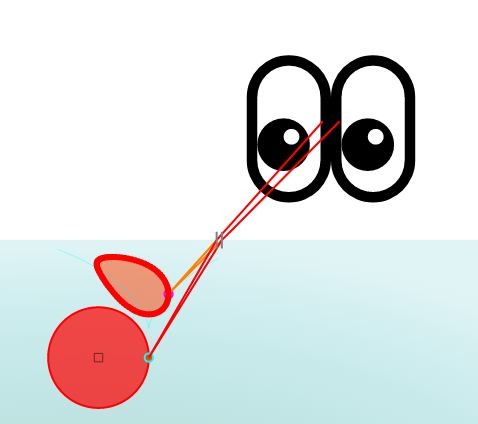
- "Drag-able Eyes and Object": This allows users to change the observation point and object position.
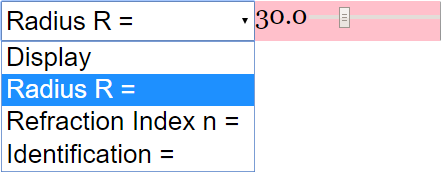
- "ComboBox and their functions": Provides options to toggle the display of selected parameters like radius, refraction index and identification.
- Ease of Embedding: The simulation is designed to be easily embedded into other webpages using an <iframe> tag, making it accessible for wider integration into online learning platforms.
- <iframe width="100%" height="100%" src="https://iwant2study.org/lookangejss/04waves_13light/ejss_model_objectinwater2wee/objectinwater2wee_Simulation.xhtml " frameborder="0"></iframe>
- Teacher-Focused Design: The resource explicitly includes a "For Teachers" section, suggesting that it's intended to be a teaching aid. A "Sample Learning Goals" section also exists, though the text of it is not provided.
- Part of a Broader Ecosystem: The document is embedded within a larger website offering a vast array of physics simulations and educational resources. The list of "Other Resources" demonstrates the breadth of topics covered.
- Credits and Attribution: The creators of the simulation are explicitly acknowledged ("Fu-Kwun Hwang; Fremont Teng; lookang"), reinforcing the principles of open source and proper attribution.
Key Facts and Details:
- Simulation Title: Object In Water Simulator JavaScript Simulation Applet HTML5
- Technology: Uses JavaScript and HTML5, making it accessible on modern web browsers without the need for plugins.
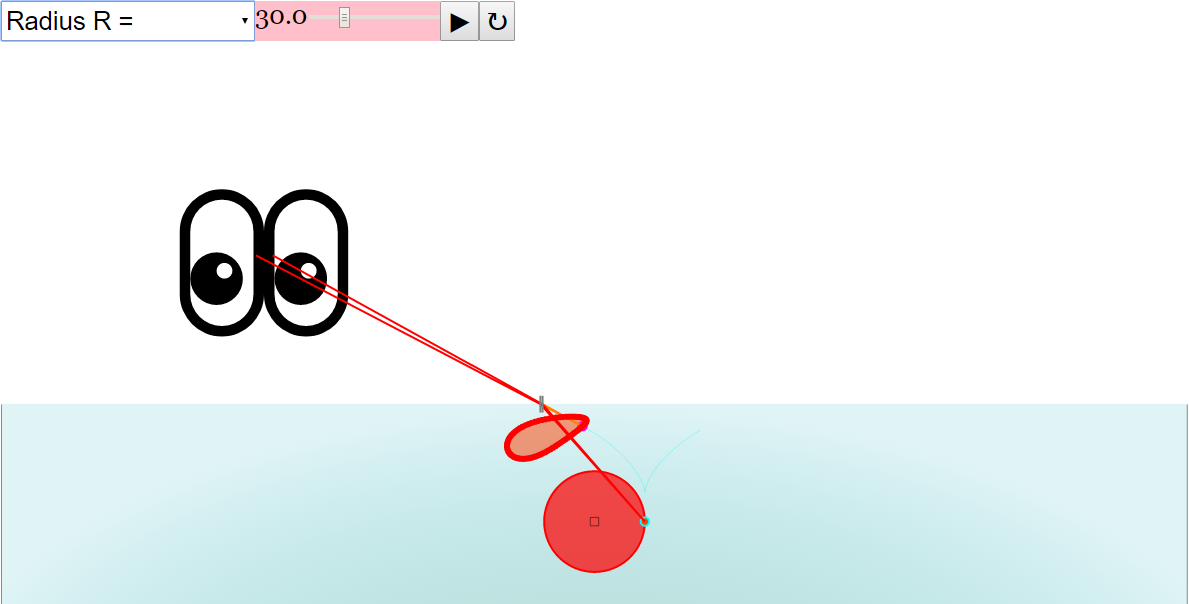
- Functionality: Simulates the refraction of light when viewing an object in water.
- Accessibility: Provides instructions on using the simulation, including how to toggle full screen and use play/pause/reset buttons.
- Related Resources: The website lists numerous other interactive simulations covering diverse topics from mechanics to electromagnetism.
- Licensing: Content is licensed under Creative Commons Attribution-Share Alike 4.0 Singapore License. Commercial use of the EasyJavaScriptSimulations Library requires separate licensing.
- Website provider: Open Educational Resources / Open Source Physics @ Singapore
Quotes:
- "Drag the centre of the two eyes, or some the small box in the red circle This will also change the motion of the eyes and circle as well, and adjust the field of sight accordingly." (Describes user interaction)
- "Click the Play Button to toggle full screen." (Describes basic functionality)
- "(Display Selected) (Radius Selected) (Refraction Index Selected) (Identification Selected)" (Describes combo box functions)
- "Object In Water Simulator JavaScript Simulation Applet HTML5" (Title of the applet)
Potential Use Cases:
- Physics education at the secondary or introductory college level.
- Visual aid for demonstrating refraction principles.
- Interactive component of online physics courses.
- Self-directed learning for students exploring optics.
In conclusion: The "Object In Water Simulator" is a valuable open-source tool for teaching and learning about refraction. Its interactive nature, ease of embedding, and clear instructions make it a useful resource for educators and students alike. Its place within a broader ecosystem of similar simulations further enhances its potential impact.
Object in Water Simulator: A Study Guide
I. Quiz
Answer the following questions in 2-3 sentences each, based on the provided source material.
- What type of resource is the "Object In Water Simulator"?
- What programming language is used for the simulator?
- Who are the listed credits for the simulator's development?
- What is the primary function of the combo box in the simulator?
- How can the user interact with the eyes and object in the simulation?
- How does the user toggle full screen in the simulation?
- What are some related simulations listed alongside the Object In Water Simulator? Give at least two.
- What Creative Commons license applies to the content?
- For commercial use of EasyJavaScriptSimulations Library, what should you do?
- What is one of the awards that Open Source Physics at Singapore Ministry of Education received?
II. Quiz Answer Key
- The "Object In Water Simulator" is a JavaScript Simulation Applet that uses HTML5. It is designed as an open educational resource.
- The simulator uses JavaScript. This is evident from its title and the file extensions associated with the applet.
- The credits for the simulator's development are Fu-Kwun Hwang, Fremont Teng, and lookang. These individuals are credited directly beneath the 'Credits' section.
- The combo box in the simulator allows the user to select different options for display, radius, refraction index, and identification. Toggling the combo box changes these settings.
- The user can interact with the eyes and object by dragging the center of the eyes or the small box in the red circle. This adjusts the field of sight accordingly, changing the motion of the eyes and circle.
- The user can toggle full screen by clicking the Play Button. This action switches the simulator between windowed and fullscreen modes.
- Some related simulations listed alongside the Object In Water Simulator include: Bus in Garage Relativity Length Lorentz Transformation JavaScript Simulation Applet HTML 5 and 🚚Drag the Monster Truck JavaScript Simulation Applet HTML5. Many more simulations are included.
- The content is licensed under the Creative Commons Attribution-Share Alike 4.0 Singapore License. This allows for sharing and adaptation with proper attribution.
- For commercial use of EasyJavaScriptSimulations Library, you should read https://www.um.es/fem/EjsWiki/Main/EJSLicense and contact This email address is being protected from spambots. You need JavaScript enabled to view it. directly.
- One of the awards that Open Source Physics at Singapore Ministry of Education received is the GOLD Innergy Award 2016 HQ. They also won the UNESCO King Hamad Bin Isa Al-Khalifa Prize for the Use of ICTs in Education.
III. Essay Questions
Consider the following essay questions and develop well-supported arguments, drawing from the provided source material and your understanding of the topics.
- Discuss the potential educational benefits of using interactive simulations like the "Object In Water Simulator" in physics education. How can these tools enhance student learning compared to traditional teaching methods?
- Analyze the importance of open educational resources (OER) in promoting accessible and equitable education. How does the "Object In Water Simulator" contribute to the OER movement, and what impact can this have on education in Singapore and beyond?
- Examine the role of collaborative development and open-source principles in creating effective educational simulations. How do the credits and licensing information for the "Object In Water Simulator" reflect these principles?
- Evaluate the user interface and interactive elements of the "Object In Water Simulator" in terms of their effectiveness in conveying complex physics concepts. What design features contribute to or detract from the user experience and learning outcomes?
- Compare and contrast the "Object In Water Simulator" with other listed simulations on the page, considering their intended learning objectives, target audiences, and technological approaches. What are the strengths and weaknesses of each simulation in addressing specific educational needs?
IV. Glossary of Key Terms
- JavaScript: A programming language commonly used to create interactive effects within web browsers. It allows developers to build dynamic and engaging user experiences.
- HTML5: The latest version of the Hypertext Markup Language, used for structuring and presenting content on the World Wide Web. HTML5 supports multimedia elements and complex web applications.
- Simulation Applet: A small, self-contained application designed to simulate a particular phenomenon or process, often used for educational or research purposes.
- Open Educational Resources (OER): Teaching, learning, and research materials that are freely available to the public for educational use, often licensed under creative commons licenses.
- Creative Commons License: A type of public copyright license that enables the free distribution of an otherwise copyrighted work.
- Applet: A small application, typically written in Java or another platform-independent language, that runs within another application, such as a web browser.
- Refraction Index: A measure of how much the speed of light (or other radiation) is reduced inside a medium, such as water. It affects how light bends when passing from one medium to another.
Sample Learning Goals
[text]
For Teachers
Object In Water Simulator JavaScript Simulation Applet HTML5
Instructions to use the Simulation Applet
ComboBox and their functions




Drag-able Eyes and Object
Toggling Full Screen
Play/Pause and Reset Buttons

Research
[text]
Video
[text]
Version:
[text]
Other Resources
[text]
FAQ
What is the "Object In Water Simulator JavaScript Simulation Applet HTML5"?
The "Object In Water Simulator" is an interactive simulation designed to help users understand the concept of light refraction when an object is submerged in water. It allows users to manipulate variables like the position of the observer's eyes and the properties of the object and water, enabling them to visualize how these changes affect what the observer sees.
Who created the Object In Water Simulator?
The simulator was created by Fu-Kwun Hwang, Fremont Teng, and lookang.
How can I interact with the Object In Water Simulator?
You can interact with the simulator by dragging the center of the eyes or the small box in the red circle, using combo boxes to select display options, radius, refraction index or identification, and using play/pause and reset buttons to control the simulation.
What are the learning goals associated with the Object In Water Simulator?
The specific learning goals for the simulator are described in the "[text]" section, but generally, the simulator aims to help users visualize and understand the principles of light refraction and how it affects the perception of objects in water.
Where can I embed this simulation?
You can embed this simulation into a webpage using the iframe code provided with the simulator.
What other resources are available on the Open Educational Resources / Open Source Physics @ Singapore website?
The website offers a wide range of interactive resources covering various physics topics, including kinematics, electromagnetism, quantum physics, waves, and more. It also features resources for mathematics and other subjects.
What kind of interactive resources are available other than simulators?
Besides simulators, the website includes interactive games, quizzes, virtual labs, and applets covering various subjects.
What educational levels do the resources on this website cater to?
The resources cater to a wide range of educational levels, including primary school, secondary school, junior college, and even university levels.