{source}
<?php  require_once JPATH_SITE.'/TTcustom/TT_contentparser.php';\(parameters = array("topicname" => "04waves_14sound", "modelname" => "ejss_model_musicalkeyboard");echo generateSimHTML(\)parameters, "EJSS");
?>
{/source}
Briefing Document: Musical Keyboard Simulator - Open Source Physics @ Singapore
1. Overview
This document summarizes the "Musical Key Board Simulator JavaScript Simulation Applet HTML5" resource available through Open Educational Resources / Open Source Physics @ Singapore. This is an interactive, web-based tool designed for educational purposes. It appears to be part of a larger collection of physics simulations and resources.
{source}<iframe style="border-radius:12px" src="https://open.spotify.com/embed/episode/6PLih3dmlcRjdClWtvGHRj?utm_source=generator" width="100%" height="352" frameBorder="0" allowfullscreen="" allow="autoplay; clipboard-write; encrypted-media; fullscreen; picture-in-picture" loading="lazy"></iframe>{/source}
2. Main Themes and Key Features
- Interactive Simulation: The core of the resource is a musical keyboard simulator built using JavaScript and HTML5. This makes it accessible through web browsers without the need for special plugins. The key feature is interactivity allowing users to play the keyboard virtually.
- Sound and Music Exploration: The simulation focuses on the production of sound, specifically music. Users can click keys or use their physical keyboard to play notes.
- Amplitude Control: A key element of the simulator is the ability to adjust the amplitude of the sound produced. This allows exploration of how amplitude affects the volume or loudness of sound.
- Ease of Use: The simulation is designed to be straightforward to use, with a simple interface including:
- An "Amplitude Slider" for volume control.
- A "Clickable Keyboard" to play notes.
- A "Reset Button" to return the simulation to its initial state.
- Embeddable Resource: The simulation is designed to be embedded within other web pages using an <iframe> tag. This makes it easy for educators to integrate the tool into their online learning materials.
- Part of a Larger Collection: The document makes it very clear that this is one resource among many available from Open Source Physics @ Singapore. The list of "Other Resources" includes a wide variety of physics and math simulations, interactive games, and virtual labs.
3. Target Audience
- Teachers: The resource is explicitly aimed at teachers, with a dedicated "For Teachers" section. The listed "Sample Learning Goals" further reinforce this.
- Students: Implicitly, the simulation is designed for students learning about sound, music, and related physics concepts.
4. Key Information and Quotes
- Embedding the Model: The document provides the code to embed the simulator within a webpage:
- <iframe width="100%" height="100%" src="https://iwant2study.org/lookangejss/04waves_14sound/ejss_model_musicalkeyboard/musicalkeyboard_Simulation.xhtml " frameborder="0"></iframe>
- Instructions: The document specifies instructions for how to use the applet *Adjusts the amplitude of the sound. *Clicking on the music keys will play their respective music and sounds. This can also be done by pressing the buttons on your physical keyboard, if you have any. *Resets the simulation
5. Potential Applications in Education
- Demonstrating the Relationship between Amplitude and Sound: The amplitude slider provides a visual and auditory way to explore this concept.
- Exploring Musical Notes and Frequencies: While not explicitly stated, the keyboard simulation can be used to introduce or reinforce concepts related to musical notes, scales, and the underlying frequencies of sound waves.
- Interactive Learning: The hands-on nature of the simulation encourages active learning and experimentation.
6. Licensing and Credits
- Creative Commons License: The content is licensed under a Creative Commons Attribution-Share Alike 4.0 Singapore License, allowing for sharing and adaptation with proper attribution.
- Commercial Use: Commercial use of the EasyJavaScriptSimulations Library requires a separate license from the University of Murcia (Spain).
- Credits: The resource is credited to Fu-Kwun Hwang, Fremont Teng, and lookang.
7. Related Resources Mentioned
The document provides a long list of related resources, showing the breadth of the Open Source Physics @ Singapore project. A few noteworthy examples include:
- Simulations on waves, circuits, electromagnetism, optics, and mechanics.
- Virtual labs for various science topics.
- Interactive games for learning math and science.
- Tools for data fitting and analysis.
8. Overall Impression
The "Musical Key Board Simulator" appears to be a well-designed and accessible tool for teaching and learning about sound and music. Its embeddability, ease of use, and integration into a larger collection of educational resources make it a valuable asset for educators. The Creative Commons license encourages sharing and adaptation, further enhancing its potential impact.
Musical Keyboard Simulator Study Guide
I. Key Concepts
- Simulation: A digital representation of a real-world system or process, used for experimentation and learning.
- JavaScript Applet: A small application written in JavaScript that can be embedded in a webpage to provide interactive functionality.
- HTML5: The latest version of HTML, the standard markup language for creating web pages, enabling richer multimedia experiences.
- Amplitude: The maximum displacement or extent of a vibration or oscillation, in this context, related to the loudness of a sound.
- Interactive Learning: A method of education that encourages active engagement and participation from the learner through tools like simulations and games.
- Open Educational Resources (OER): Teaching, learning, and research materials that are freely available to anyone for educational purposes.
- Open Source Physics (OSP): A project dedicated to creating and disseminating open-source computational tools and resources for physics education.
- Kinematics: The branch of mechanics concerned with the motion of objects without reference to the forces that cause the motion.
- Sound: Vibrations that travel through a medium, such as air or water, and can be heard when they reach a person's or animal's ear.
II. Simulation Features
- Amplitude Slider: Controls the loudness (amplitude) of the sound produced by the simulation.
- Clickable Keyboard: Allows users to play notes by clicking on virtual keys.
- Physical Keyboard Integration: Enables users to play notes using their computer's physical keyboard.
- Reset Button: Returns the simulation to its initial state.
III. Applications in Education
- Interactive Physics Learning: Simulations provide a hands-on approach to understanding physics concepts related to sound and waves.
- Accessibility: Web-based simulations are accessible from any device with a browser, making learning more convenient.
- Experimentation: Users can easily experiment with different parameters (e.g., amplitude) to observe their effects.
- Engagement: Interactive elements like clickable keyboards and sliders enhance engagement and motivation.
- Open Source and Adaptable: As an OER resource, the simulator can be freely used, modified, and integrated into various teaching materials.
- Multimedia Learning: Integration of visuals and audio stimuli to enhance learning.
IV. Quiz
Answer the following questions in 2-3 sentences each.
- What is the primary purpose of the Musical Keyboard Simulator JavaScript Applet?
- How does the amplitude slider in the simulation affect the sound produced?
- Besides clicking on the virtual keys, what other input method can be used to play notes on the simulation?
- What is the function of the reset button in the Musical Keyboard Simulator?
- Explain how this simulation aligns with the principles of Open Educational Resources (OER).
- Describe one way a teacher could integrate this simulation into a lesson on sound waves.
- What are some advantages to using HTML5 simulations in the classroom?
- Name two other simulations from the Open Source Physics @ Singapore site.
- How does this simulation help students engage in interactive learning?
- Explain what kinematics is and its relevance, if any, to this simulation.
V. Quiz Answer Key
- The Musical Keyboard Simulator JavaScript Applet is designed to provide an interactive, visual, and auditory learning tool for understanding how musical notes and sounds are produced. It allows users to experiment with amplitude and play notes virtually.
- The amplitude slider controls the loudness of the sound produced by the simulation. Increasing the amplitude results in a louder sound, while decreasing it makes the sound quieter.
- Besides clicking on the virtual keys, the simulation allows users to play notes by pressing corresponding buttons on their physical keyboard. This provides an alternative and potentially more familiar input method.
- The reset button in the Musical Keyboard Simulator returns the simulation to its initial state. This allows users to start fresh and clear any changes they have made to the settings, such as the amplitude.
- This simulation aligns with OER principles by being freely accessible, modifiable, and redistributable. Its open-source nature allows educators to adapt it to their specific teaching needs without licensing restrictions.
- A teacher could integrate this simulation into a lesson on sound waves by demonstrating the relationship between amplitude and loudness. Students could experiment with the slider to observe how changes in amplitude affect the sound.
- HTML5 simulations are accessible on various devices without requiring special software, offering flexibility and convenience. They can provide interactive and engaging learning experiences that enhance understanding and retention.
- Two other simulations from the Open Source Physics @ Singapore site are "Wave Superposition JavaScript HTML5 Applet Simulation Model" and "Projectile Motion with System of Masses and Spring JavaScript HTML5 Applet Simulation Model by Darren Tan."
- This simulation provides students with hands-on experience by allowing them to play notes and adjust amplitude directly. This active participation fosters deeper understanding and engagement compared to passive learning.
- Kinematics is the study of motion without considering the forces causing it, but is not directly relevant to the Musical Keyboard Simulator. This is primarily about sound, which does not involve force.
VI. Essay Questions
- Discuss the advantages and disadvantages of using simulations in education, citing the Musical Keyboard Simulator as an example. How can educators maximize the benefits of simulations while mitigating potential drawbacks?
- Analyze the role of interactive elements in promoting student engagement with online learning resources. How does the Musical Keyboard Simulator effectively use interactivity to enhance learning about sound?
- Explain the significance of Open Educational Resources (OER) in modern education. How does the Musical Keyboard Simulator, as an OER, contribute to accessible and equitable learning opportunities?
- Compare and contrast the use of virtual simulations with traditional hands-on experiments in teaching physics concepts. In what situations might each approach be more effective?
- Evaluate the impact of multimedia learning (combining audio and visual elements) on student comprehension and retention. How does the Musical Keyboard Simulator leverage multimedia to facilitate learning about sound?
VII. Glossary of Key Terms
- Amplitude: The maximum displacement of a wave from its equilibrium position; in sound, related to loudness.
- Applet: A small application designed to run within another application, typically a web browser.
- HTML5: The latest evolution of the standard markup language used for creating web pages, supporting multimedia and interactive content.
- JavaScript: A programming language commonly used to create interactive effects within web browsers.
- Kinematics: The branch of mechanics that describes the motion of objects without considering the forces that cause the motion.
- Open Educational Resources (OER): Freely accessible, openly licensed educational materials that can be used, adapted, and shared.
- Open Source Physics (OSP): A collaborative effort to create and disseminate open-source computational tools and resources for physics education.
- Simulation: A computer-based model of a real-world system or process, used for experimentation and understanding.
- Sound: Vibrations that propagate through a medium (like air) and are perceived by the ear.
- Interactive Learning: An educational approach that emphasizes active participation and engagement from learners.
Sample Learning Goals
[text]
For Teachers
Musical Key Board Simulator JavaScript Simulation Applet HTML5
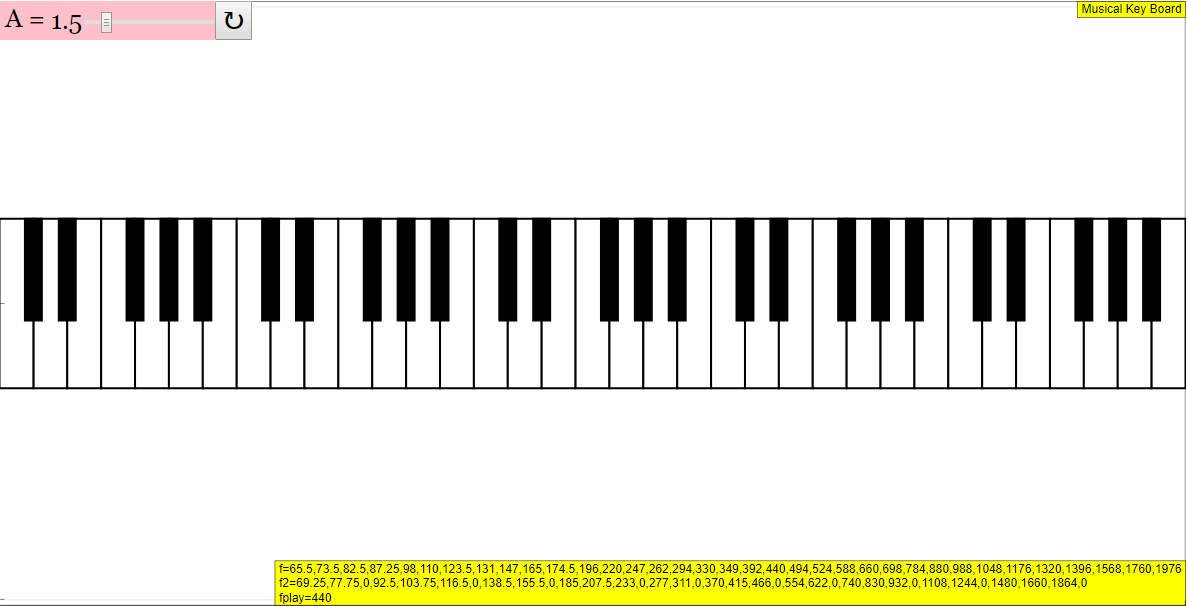
Instructions to using Simulation Applet
Amplitude Slider

Clickable Keyboard

Reset Button

Resets the simulation
Research
[text]
Video
[text]
Version:
Other Resources
[text]
FAQ
- What is the Musical Keyboard Simulator JavaScript Simulation Applet HTML5?
- It's an interactive, web-based tool that simulates a musical keyboard. Users can play notes by clicking on the keys on the screen or by using their physical keyboard (if supported), allowing them to explore sounds and musical pitches in a digital environment. The amplitude of the sound can also be adjusted using a slider.
- Where can I find other interactive simulations and learning resources on this website?
- The site offers a wide range of simulations and interactive resources, covering various topics in physics and mathematics, including kinematics, electromagnetism, optics, waves, circuits, mechanics, oscillations, quantum physics, and more. You can navigate to these resources through the "Interactive Resources" section, located under "Home" then "Physics." Many simulations are also listed under "Other Resources" within each applet.
- Is this resource free to use?
- Yes, the resources are generally free to use for educational purposes. The website specifies a Creative Commons Attribution-Share Alike 4.0 Singapore License for the content. For commercial use of the EasyJavaScriptSimulations Library, separate licensing terms apply and you would need to contact This email address is being protected from spambots. You need JavaScript enabled to view it. directly.
- Can I embed the Musical Keyboard Simulator on my own website?
- Yes, the site provides an embed code (iframe) that allows you to easily integrate the simulation into your own webpage.
- Are there any supporting materials for teachers using the simulator?
- Yes, there is a section labeled "For Teachers" that provides additional information and resources to help educators integrate the simulation into their lesson plans. Sample learning goals are provided, and presumably other lesson plans, activities, and video demonstrations exist, though links or text are not explicitly provided.
- What programming language is the Musical Keyboard Simulator written in?
- The simulation is written in JavaScript and HTML5, making it accessible through web browsers without the need for additional plugins. This aligns with the use of Easy JavaScript Simulations (EJSS) platform to convert Easy Java Simulations (EJS) into HTML5 apps.
- What other types of simulation applets are available on the Open Source Physics @ Singapore website?
- There are numerous simulation applets available, including those related to mechanics (e.g., projectile motion, collisions), electromagnetism (e.g., magnetic fields, circuits), optics (e.g., ray diagrams), waves (e.g., ripple tank, superposition), quantum physics (e.g., radioactive decay, atomic spectra), and thermodynamics (e.g. Black-body radiation). There are also applets related to mathematics (e.g. fractions, symmetry) and various interactive games.
- Who created the Musical Keyboard Simulator and the other resources on the website?
- The Musical Keyboard Simulator was created by Fu-Kwun Hwang, Fremont Teng, and lookang. The Open Source Physics @ Singapore project is a collaborative effort involving various educators, researchers, and developers. Other creators are listed within each applet.