{source}
<?php  require_once JPATH_SITE.'/TTcustom/TT_contentparser.php';\(parameters = array("topicname" => "05electricitynmagnetism_17AC", "modelname" => "ejss_model_sin2");echo generateSimHTML(\)parameters, "EJSS");
?>
{/source}
1. Introduction:
This briefing document reviews the information available on the Open Educational Resources / Open Source Physics @ Singapore website concerning their JavaScript Simulation Applet for "Average Power of Alternating Current." The document outlines the key features, purpose, and context of this educational tool based on the provided source.
{source}<iframe style="border-radius:12px" src="https://open.spotify.com/embed/episode/0aP7ge9ucRlqGTydNHTLSV?utm_source=generator" width="100%" height="352" frameBorder="0" allowfullscreen="" allow="autoplay; clipboard-write; encrypted-media; fullscreen; picture-in-picture" loading="lazy"></iframe>{/source}
2. Main Themes and Important Ideas:
- Interactive Learning Tool: The core theme is the availability of an interactive JavaScript simulation designed to help users understand the concept of average power in alternating current (AC) circuits. The listing under "Interactive Resources" and the embeddable iframe code clearly indicate its nature as a hands-on learning tool.
- Accessibility and Embeddability: The provision of an iframe embed code signifies that this simulation is designed to be easily integrated into other webpages and online learning platforms. This promotes wider accessibility and utilization of the resource. The fact that it is an HTML5 applet suggests cross-platform compatibility.
- <iframe width="100%" height="100%" src="https://iwant2study.org/lookangejss/05electricitynmagnetism_17AC/ejss_model_sin2/sin2_Simulation.xhtml " frameborder="0"></iframe>
- Open Educational Resource (OER): The context of the website, "Open Educational Resources / Open Source Physics @ Singapore," explicitly positions this simulation as an OER. This implies that the resource is freely available for educational purposes, potentially with specific licensing terms (as mentioned at the end).
- Focus on AC Circuits: The title itself clearly indicates the specific topic addressed by the simulation: the average power in alternating current. This suggests that users can manipulate parameters relevant to AC circuits and observe the resulting average power. The location of the embed link within a path containing "05electricitynmagnetism_17AC" further reinforces this focus.
- User Interface Elements: The description under "Instructions" highlights key interactive elements of the simulation:
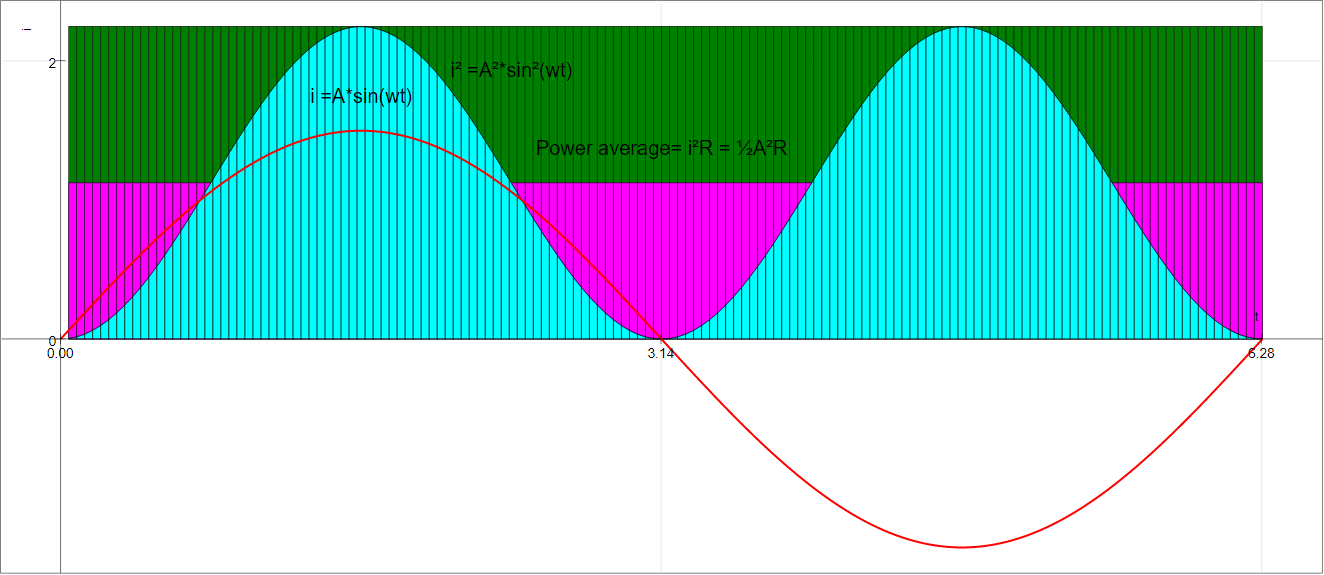
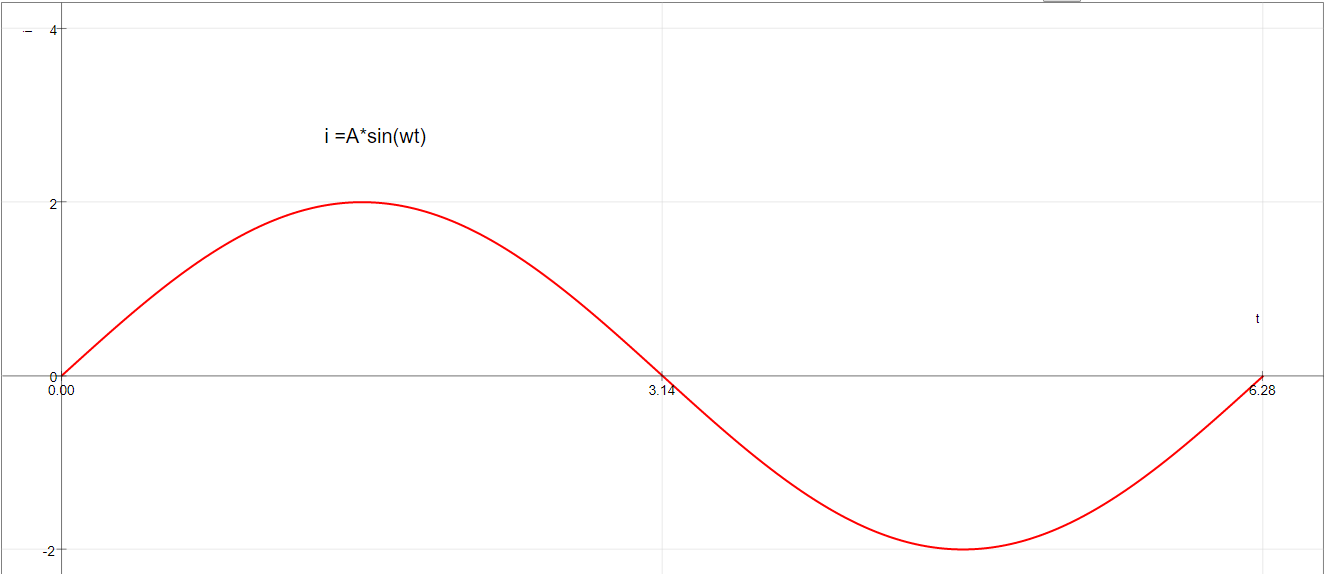
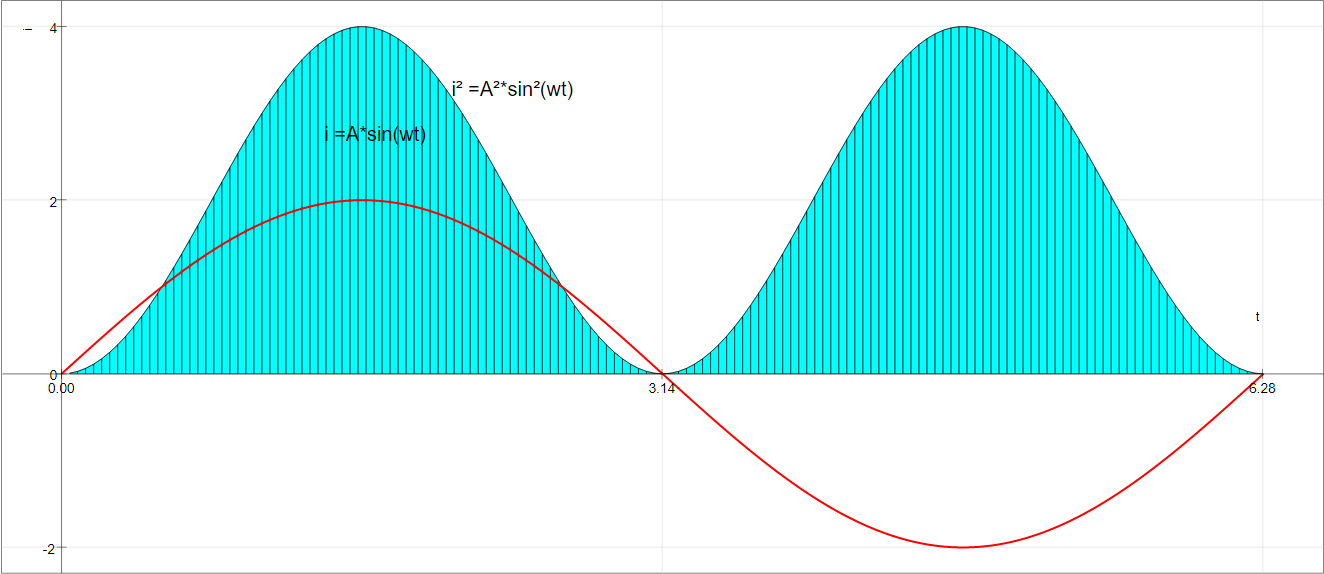
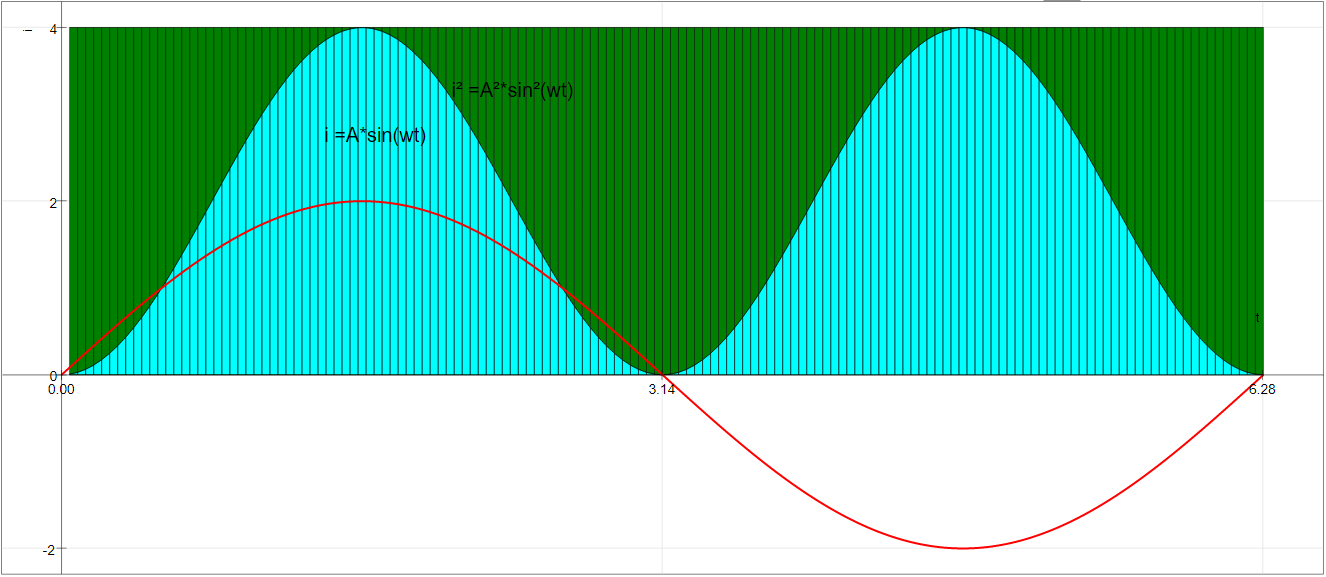
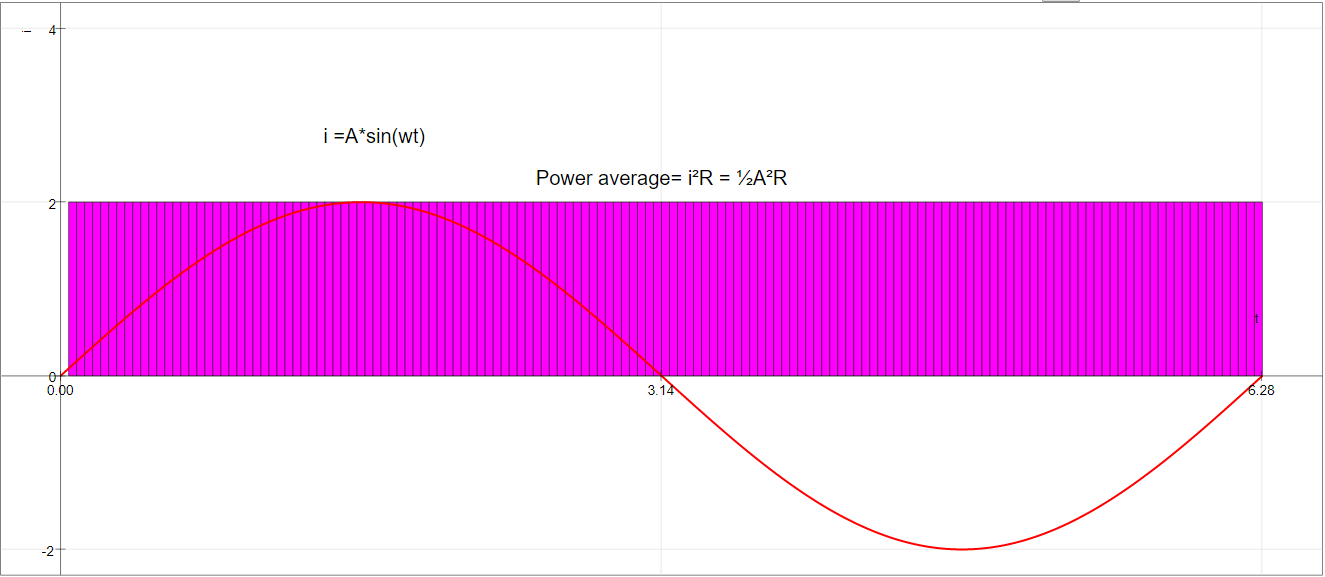
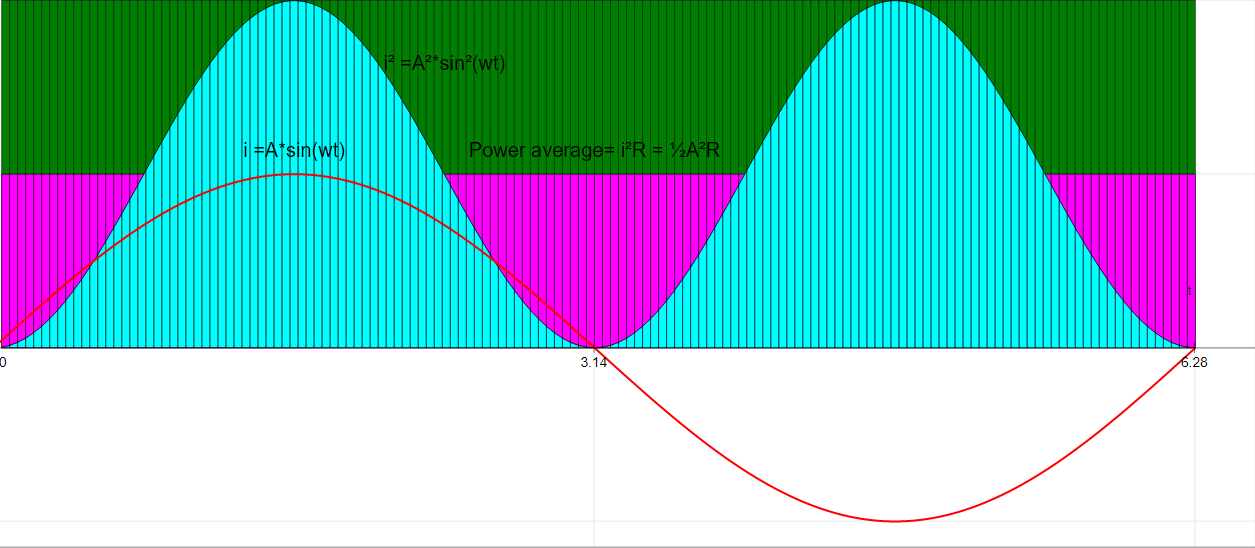
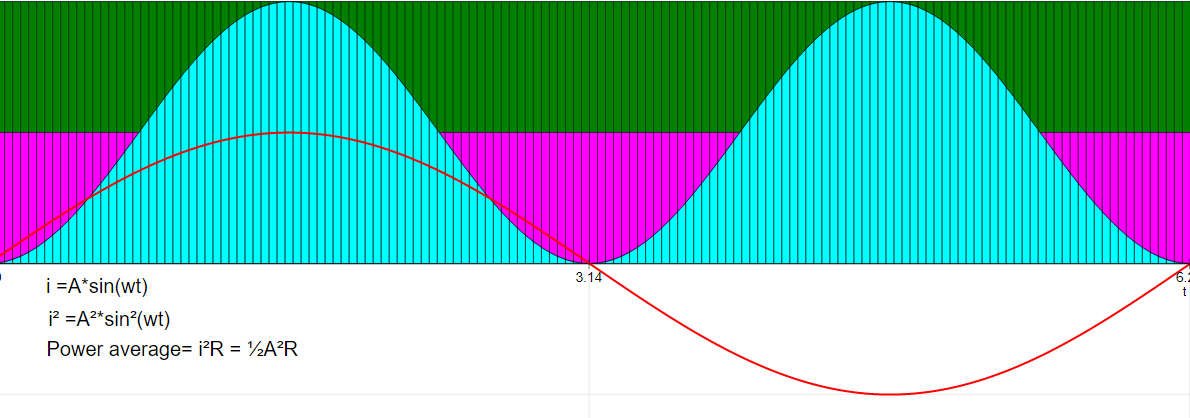
- Combo Box (Steps): This suggests different visual representations or stages within the simulation to guide understanding.
- Amplitude Slider: This allows users to directly manipulate the amplitude of the AC waveform and observe its effect on average power.
- Drag-able Text: This provides flexibility for users to annotate or label parts of the simulation for better comprehension.
- Reset Button: A standard feature for allowing users to easily restart the simulation with default settings.
- Toggle Full Screen: Enhances the user experience by allowing for a more immersive interaction.
- Credits and Development: The "Credits" section acknowledges Fu-Kwun Hwang, Fremont Teng, and Loo Kang Wee as contributors to the development of this simulation. This provides context and attribution for the work.
- Potential Learning Goals (Implicit): While the "Sample Learning Goals" section is empty ("[text]"), the existence of this category suggests that the simulation is intended to help students achieve specific learning objectives related to average power in AC circuits.
- For Teachers: The dedicated "For Teachers" section implies that the resource is specifically designed to be useful in an educational setting, likely providing guidance or pedagogical suggestions for instructors (although the content is not provided in the excerpt).
- Related Resources: The "Other Resources" section links to a GeoGebra applet by Tan Seng Kwang, potentially offering a complementary or alternative visualization related to AC concepts. The extensive list of other simulations on the page indicates the breadth of physics topics covered by the Open Source Physics @ Singapore project.
- Licensing Information: The footer states that the "Contents are licensed Creative Commons Attribution-Share Alike 4.0 Singapore License." This is a crucial piece of information for educators and users regarding the terms of use, sharing, and adaptation of the resource. It also mentions a separate license for commercial use of the "EasyJavaScriptSimulations Library."
3. Key Facts:
- Type: JavaScript Simulation Applet (HTML5)
- Topic: Average Power of Alternating Current (AC)
- Developers: Fu-Kwun Hwang, Fremont Teng, Loo Kang Wee
- Platform: Open Educational Resources / Open Source Physics @ Singapore
- Key Interactive Features: Combo box (steps), amplitude slider, drag-able text, reset button, toggle full screen.
- Embeddable: Yes, via iframe code.
- License: Creative Commons Attribution-Share Alike 4.0 Singapore License (for content); separate license for commercial use of EasyJavaScriptSimulations Library.
4. Conclusion:
The "Average Power of Alternating Current Simulator" is an interactive, web-based tool designed for learning about AC power concepts. Its embeddable nature, user-friendly interface elements, and open educational resource status make it a valuable asset for both students and educators. The provided excerpt highlights the focus on visual and interactive exploration of average power in AC circuits, facilitated by adjustable parameters and step-by-step visualizations. Further information within the simulation itself and any accompanying teacher resources (not provided in the excerpt) would likely offer more specific learning objectives and pedagogical guidance.
Average Power of Alternating Current Simulator Study Guide
Description: This study guide is designed to help you review your understanding of the Average Power of Alternating Current Simulator JavaScript Simulation Applet HTML5 resource. It includes a quiz, essay questions, and a glossary of key terms.
Quiz
Answer the following questions in 2-3 sentences each.
- What is the primary function of the Average Power of Alternating Current Simulator?
- Describe what the "Amplitude Slider" control allows a user to do within the simulation.
- What are the "Steps for Combo Box" intended to show users of the simulation?
- Explain the purpose of the "Drag-able Text" feature in the simulator.
- What action does the "Reset Button" perform when activated?
- Based on the surrounding links, what is the broader website likely focused on providing?
- Who are credited with the development of this specific simulation?
- What type of license governs the use of the content on this website?
- What is Easy JavaScript Simulations (EJS) and how does it relate to this simulator, based on the provided text?
- Briefly describe one potential educational application of this alternating current simulator for teachers or students.
Quiz Answer Key
- The primary function of the Average Power of Alternating Current Simulator is to provide an interactive visual representation of alternating current and allow users to explore factors affecting its power. It likely demonstrates how the average power is calculated and influenced by parameters like amplitude.
- The "Amplitude Slider" control allows the user to adjust the maximum value or peak of the alternating current wave. By manipulating this slider, users can observe how changes in amplitude affect the visual representation of the AC signal, and potentially its average power.
- The "Steps for Combo Box" are designed to guide users through different visual stages or aspects of the alternating current simulation. Toggling through these steps likely reveals various components, calculations, or representations related to average power.
- The "Drag-able Text" feature allows users to move textual elements within the simulation panel. This feature likely provides flexibility for users to position labels, annotations, or data displays in a way that enhances their understanding or presentation.
- The "Reset Button" returns the simulation to its initial default state. This action typically involves setting all adjustable parameters, such as amplitude, back to their original values and potentially clearing any user-placed text or modifications.
- Based on the title "Open Educational Resources / Open Source Physics @ Singapore," the broader website is likely focused on providing freely accessible educational materials and physics-related simulations, tools, and resources for learning and teaching.
- Fu-Kwun Hwang, Fremont Teng, and Loo Kang Wee are credited with the development of this Average Power of Alternating Current Simulator JavaScript Simulation Applet HTML5.
- The content on the website is licensed under the Creative Commons Attribution-Share Alike 4.0 Singapore License. This means that others are free to share and adapt the work, provided they give appropriate credit and distribute any derivative works under the same license.
- Easy JavaScript Simulations (EJS) is a library or tool used to create interactive physics simulations, as indicated by its mention in the context of the license and other resources. This AC simulator was likely built using EJS, allowing it to run in a web browser using HTML5 and JavaScript.
- This simulator could be used by teachers to visually demonstrate the concept of average power in AC circuits, allowing students to manipulate the amplitude and observe its effect. Students could use it to explore the relationship between the AC waveform and its average power in an interactive and engaging way.
Essay Format Questions
- Discuss the potential benefits of using interactive JavaScript simulations, such as the Average Power of Alternating Current Simulator, as a pedagogical tool in physics education. Consider aspects like student engagement, conceptual understanding, and active learning.
- Based on the limited information provided about the simulator's features (Amplitude Slider, Steps Combo Box, Drag-able Text, Reset Button), hypothesize about the specific concepts related to average power in alternating current that this simulation aims to illustrate.
- Considering the open educational resources nature of the website, discuss the importance and implications of openly licensed educational materials like this AC simulator for accessibility and collaboration in education globally.
- Explore the relationship between the technical aspects mentioned (JavaScript, HTML5, Applet) and the user experience of the Average Power of Alternating Current Simulator. How do these technologies contribute to its accessibility and functionality?
- Given the variety of other physics simulations listed on the website, speculate on the range of topics and educational levels that Open Educational Resources / Open Source Physics @ Singapore aims to support. Provide specific examples from the list to support your answer.
Glossary of Key Terms
- Alternating Current (AC): An electric current that periodically reverses direction and changes its magnitude continuously with time. It is commonly represented by a sinusoidal waveform.
- Average Power: The mean value of the instantaneous power over a complete cycle of an AC signal. For a sinusoidal AC circuit, it is often expressed in terms of RMS values of voltage and current and the phase angle between them.
- Amplitude: The maximum extent of a vibration or oscillation, measured from the position of equilibrium. In the context of an AC waveform, it is the peak value of the current or voltage.
- JavaScript: A high-level, often just-in-time compiled language that conforms to the ECMAScript specification. It is a programming language that makes web pages interactive.
- HTML5: The latest evolution of the standard that defines HTML. It describes the structure of web pages and includes technologies that enable richer web applications and multimedia without the need for plugins.
- Applet: A small application, especially one intended to perform a single task and often run within a larger application (like a web browser). In this context, it refers to the interactive simulation itself.
- Open Educational Resources (OER): Teaching, learning, and research materials that are freely available for use, adaptation, and sharing, often under an open license.
- Open Source Physics (OSP): A project and community focused on creating and disseminating open-source computational tools and resources for physics education.
- Simulation: A computer-based model of a real-world system or process, used to explore its behavior and characteristics through interactive manipulation of variables.
- Interactive: Allowing for real-time input and response between the user and the system, enabling active exploration and learning.
Sample Learning Goals
[text]
For Teachers
Average Power of Alternating Current Simulator JavaScript Simulation Applet HTML5
Instructions
Steps for Combo Box

Amplitude Slider

Drag-able Text
Toggle Full Screen
Reset Button

Research
[text]
Video
[text]
Version:
Other Resources
https://ggbm.at/hwhn5ppn by Tan Seng Kwang
Frequently Asked Questions about the Average Power of Alternating Current Simulator
1. What is the purpose of the Average Power of Alternating Current Simulator? The simulator is an interactive JavaScript applet designed as an open educational resource to help users visualize and understand the concept of average power in alternating current (AC) circuits. It allows for dynamic manipulation of AC wave parameters and observation of their effects.
2. How can I access and use this simulation? The simulation is embedded as an iframe and can be accessed through the provided link: https://iwant2study.org/lookangejss/05electricitynmagnetism_17AC/ejss_model_sin2/sin2_Simulation.xhtml. Users can interact with the simulation directly on the webpage where it is embedded.
3. What interactive elements are available in the simulator? The simulator includes several interactive elements: * Combo Box (Steps): Toggling through the steps reveals different visual representations of the simulation, likely illustrating the calculation or components related to average power. * Amplitude Slider: This allows users to adjust the amplitude of the AC waveform and observe how it affects the average power. * Drag-able Text: Users can reposition text labels within the simulation panel for better clarity or organization. * Reset Button: This button resets the simulation to its initial default settings. * Full Screen Toggle: Double-clicking on the panel allows users to switch between the embedded view and a full-screen view for better focus.
4. What learning goals might this simulation help achieve? While specific learning goals are not detailed within the provided text, the nature of the simulator suggests it aims to help learners: * Visualize the waveform of alternating current. * Understand the concept of amplitude in AC signals and its relation to power. * Grasp the idea of average power in a time-varying AC circuit. * Potentially explore the mathematical relationship between instantaneous power and average power over a cycle.
5. Is this simulation suitable for teachers? Yes, the resource includes a section "For Teachers," indicating it is designed with educational use in mind. Teachers can use this simulator as a visual aid in their lessons on AC circuits and power, allowing students to explore the concepts interactively. The "Steps for Combo Box" feature suggests the simulation can break down complex concepts into manageable visual stages for teaching purposes.
6. Are there any supporting materials or related resources? The provided text mentions a related resource: a GeoGebra applet by Tan Seng Kwang accessible via a link. This suggests that the average power of AC might be explored through different interactive tools and perspectives within the Open Educational Resources / Open Source Physics @ Singapore platform.
7. Who developed this simulation? The "Credits" section attributes the development of this simulator to Fu-Kwun Hwang, Fremont Teng, and Loo Kang Wee.
8. What is the licensing for this simulation and the underlying Easy JavaScript Simulations Library? The content of the Open Educational Resources / Open Source Physics @ Singapore website, including this simulation, is licensed under the Creative Commons Attribution-Share Alike 4.0 Singapore License, allowing for sharing and adaptation with appropriate attribution. For commercial use of the EasyJavaScriptSimulations Library (which likely powers this applet), a separate license needs to be obtained by contacting This email address is being protected from spambots. You need JavaScript enabled to view it., as detailed in the provided link.