{source}
<?php  require_once JPATH_SITE.'/TTcustom/TT_contentparser.php';\(parameters = array("topicname" => "05electricitynmagnetism_18DC", "modelname" => "ejss_model_PotentialDifferenceFrem");echo generateSimHTML(\)parameters, "EJSS");
?>
{/source}
Briefing Document: Potential Difference JavaScript Simulation Applet HTML5
1. Overview:
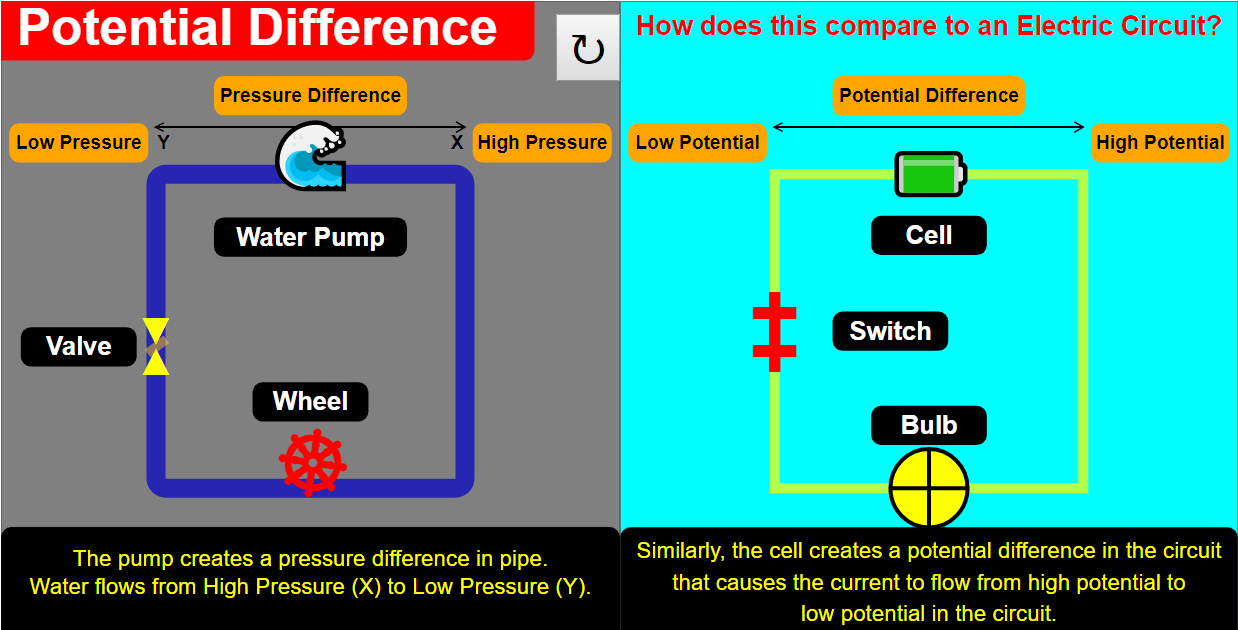
This document summarizes information about a JavaScript simulation applet designed to demonstrate the concept of potential difference in an electrical circuit, drawing an analogy to a water circuit. The applet is hosted by Open Educational Resources / Open Source Physics @ Singapore and is intended as an interactive learning tool.
{source}<iframe style="border-radius:12px" src="https://open.spotify.com/embed/episode/74V4EjrJ4B4SgtpXTh9B7G?utm_source=generator" width="100%" height="352" frameBorder="0" allowfullscreen="" allow="autoplay; clipboard-write; encrypted-media; fullscreen; picture-in-picture" loading="lazy"></iframe>{/source}
2. Main Themes and Key Ideas:
- Interactive Simulation: The core of the resource is an interactive HTML5 simulation. This allows students to actively engage with the concept of potential difference rather than passively reading about it. The simulation is accessible via an iframe embed, making it easy to incorporate into web pages:
- "<iframe width="100%" height="100%" src="https://iwant2study.org/lookangejss/05electricitynmagnetism_18DC/ejss_model_PotentialDifferenceFrem/PotentialDifferenceFrem_Simulation.xhtml " frameborder="0"></iframe>"
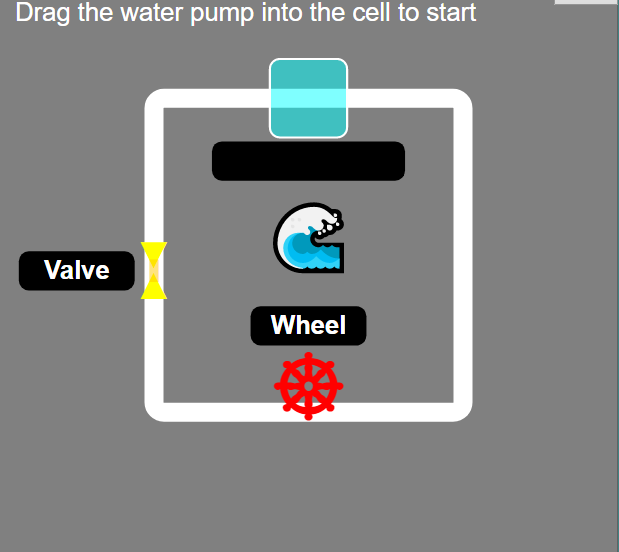
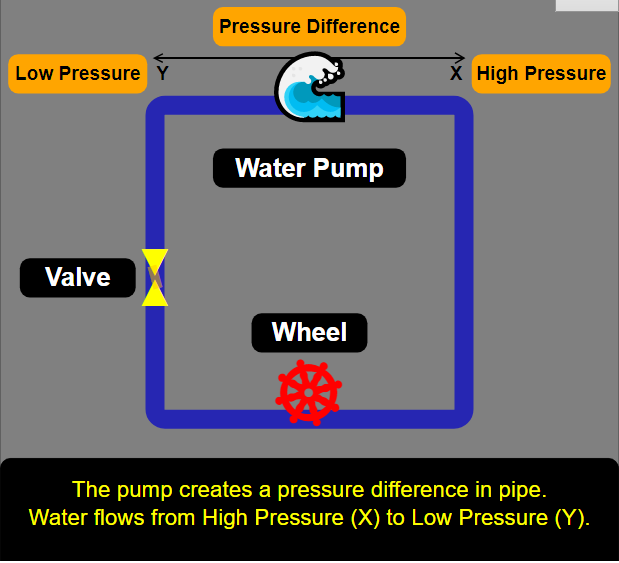
- Analogy to Water Circuit: The simulation uses the analogy of a water circuit to help students understand potential difference. This is a common and effective pedagogical approach for introducing electrical concepts. The instructions specifically mention: "Completing the water circuit will lead to the electric one. (Note that if you disrupt the water circuit, the electric circuit will disappear)" highlighting the direct relationship.
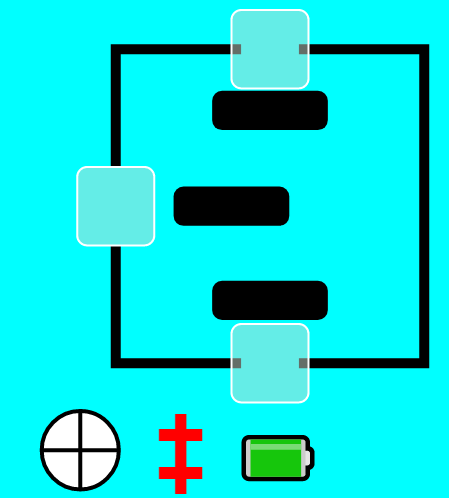
- Drag-and-Drop Interaction: The simulation utilizes drag-and-drop functionality for user interaction. Users can drag components (Water Pump, Bulb, Switch, Battery) into the circuit. Feedback is provided to the user, indicating whether the correct object has been placed, providing instant and direct feedback.
- Visual Animation and Explanation: Completing the circuit triggers an animation and popup texts with explanations. This provides a dynamic and visually engaging way to learn. The animation and explanatory text appear "By completing the circuit."
- Reset Functionality: The simulation includes a "Reset Button" to allow users to start over and experiment repeatedly.
- Open Educational Resource: The resource is part of the Open Educational Resources / Open Source Physics @ Singapore initiative, indicating a commitment to free and accessible educational materials. The content is licensed under a Creative Commons Attribution-Share Alike 4.0 Singapore License.
3. Intended Audience:
- Students: The primary audience is students learning about basic electricity and potential difference.
- Teachers: The resource includes a "For Teachers" section, suggesting that it is designed to be integrated into classroom instruction.
4. Potential Learning Goals:
- The document states "[text]" under the "Sample Learning Goals" section indicating this is a placeholder for the intended learning goals of the simulation. These would likely relate to understanding the definition of potential difference, its role in a circuit, and its relationship to current and energy.
5. Key Components and Features:
- Drag-able objects: Water Pump, Bulb, Switch, Battery
- Step-by-step instructions to guide students through the interaction.
- Immediate Feedback: Indication of correct or wrong object placement.
- Animation and Explanations: Visual reinforcement of the concept when the circuit is completed.
- Reset Button: For repeated experimentation.
6. Related Resources:
The page also lists numerous other interactive simulations and resources available from Open Educational Resources / Open Source Physics @ Singapore. These cover a wide range of physics and math topics and highlight the breadth of materials available from this source. Several are related to electricity and circuits, for instance:
- "Understanding Series Circuits JavaScript Simulation Applet HTML5"
- "Current In Series and Parallel Circuits JavaScript Simulation Applet HTML5"
- "Voltage In A Circuit JavaScript Simulation Applet HTML5"
- "Simple Electric Circuit JavaScript Simulation Applet HTML5"
7. Credits:
- The simulation is credited to Fremont Teng.
8. Conclusion:
The Potential Difference JavaScript Simulation Applet HTML5 is a valuable interactive tool for teaching and learning about potential difference. Its use of analogy, drag-and-drop interaction, and visual feedback makes it a potentially effective resource for students. Being part of the OER/OSP initiative further enhances its accessibility and utility for educators.
Sample Learning Goals
Potential Difference Simulation Study Guide
Key Concepts
- Potential Difference (Voltage): The difference in electric potential between two points in a circuit. It represents the amount of work required to move a unit charge from one point to the other.
- Electric Circuit: A closed loop path through which electric current can flow. It consists of components like batteries, wires, switches, and resistors (bulbs in this simulation).
- Water Circuit Analogy: The simulation uses the flow of water in a closed loop to represent the flow of current in an electrical circuit. This helps visualize the concept of potential difference and how it drives current.
- Battery: A source of electrical potential difference, providing the "push" that drives current through the circuit.
- Bulb: A component that converts electrical energy into light and heat, acting as a resistor in the circuit.
- Switch: A device used to open or close a circuit, controlling the flow of current.
- Current: The flow of electric charge through a circuit.
- Animation in Simulation: The visual representation of current flow and component behavior in the simulation.
- HTML5 Applet: Interactive simulations that can be embedded in webpages.
- Translucent Cells: Designated areas in the simulation where components can be dragged and placed.
Quiz
- What does the Potential Difference simulation demonstrate and what analogy does it use?
- Explain the function of the battery in the electrical circuit simulated.
- What is the purpose of the translucent cells in the simulation?
- Describe how the water circuit analogy helps in understanding the electrical circuit.
- How does the simulation indicate that the placed object is correct or wrong?
- What does completing the circuit in the simulation achieve?
- How does the reset button function within the simulation?
- What type of files are these simulations built with?
- What are the functions of the listed simulation components: water pump, bulb, switch and battery?
- Who is listed as the author of the program?
Answer Key
- The Potential Difference simulation demonstrates the potential difference across a circuit by using a water circuit as an analogy to electrical circuits. The water circuit is used to visually represent the flow of current.
- The battery in the simulation acts as a source of electrical potential difference, providing the "push" or energy that drives the electric current through the circuit.
- The translucent cells in the simulation are designated areas where users can drag and drop circuit components (like bulbs, switches, and batteries) to build the circuit.
- The water circuit analogy helps visualize the flow of current by using water moving in a closed loop. The water pump provides the potential difference similar to the battery.
- When an object is dragged into the translucent cell, the simulation displays the name of the object if placed correctly. If the object is incorrect, a "Wrong" text will appear.
- Completing the circuit in the simulation initiates an animation that visually represents the flow of current and provides explanatory pop-up texts to enhance understanding.
- The reset button allows users to revert the simulation back to its initial state.
- These simulations are built with HTML5 Applets.
- Water pump provides potential difference, bulb acts as a resistor, switch opens and closes the circuit and the battery stores the potential difference.
- Fremont Teng is listed as the author of the program.
Essay Questions
- Discuss the effectiveness of using the water circuit analogy to explain the concept of potential difference in electrical circuits. What are the strengths and limitations of this analogy?
- Explain how interactive simulations like the Potential Difference JavaScript Applet can enhance learning and engagement in physics education. Provide specific examples from the simulation to support your argument.
- Describe the role of each component (battery, bulb, switch) in the Potential Difference simulation and explain how their interaction demonstrates the fundamental principles of electric circuits.
- Analyze the user interface and design of the Potential Difference JavaScript Applet. How does the drag-and-drop functionality and visual feedback contribute to the overall learning experience?
- Compare and contrast the Potential Difference JavaScript Applet with traditional methods of teaching electric circuits (e.g., textbooks, lectures). What are the advantages and disadvantages of using simulations in physics education?
Glossary
- Applet: A small application, often written in Java or JavaScript, that runs within another application, typically a web browser.
- DC (Direct Current): Electrical current that flows in one direction only.
- HTML5: The latest evolution of the standard Hypertext Markup Language, used for structuring and presenting content on the World Wide Web.
- JavaScript: A programming language commonly used to create interactive effects within web browsers.
- Simulation: A computer-based representation of a system or process that allows users to explore its behavior under different conditions.
- Translucent: Allowing light, but not detailed images, to pass through; semi-transparent.
- Circuit: a complete and closed path around which a circulating electric current can flow.
- Voltage: an electromotive force or potential difference expressed in volts.
- Animation: the state of being full of life or vigor; liveliness.
- Current: A flow of electric charge.
For Teachers
Potential Difference JavaScript Simulation Applet HTML5
Instructions on how to use the Simulation Applet
Drag-able Objects




Reset Button

Research
[text]
Video
[text]
Version:
Other Resources
[text]
FAQ
What is the purpose of the Potential Difference JavaScript Simulation Applet?
The simulation is designed to demonstrate the concept of potential difference in a circuit, drawing an analogy to a water circuit to aid understanding. It's a visual and interactive tool for learning about this fundamental electrical concept.
What are the interactive elements in the Potential Difference simulation?
The simulation allows users to interact by dragging objects like a water pump, bulb, switch, and battery into a translucent cell to complete the circuit. Correct placement leads to animations and explanations, while incorrect placement displays an error message.
How does the simulation help in learning about circuits?
By allowing users to build both a water circuit and an electrical circuit, the simulation highlights the similarities and differences between these systems. This helps visualize the flow of current and understand the role of potential difference. Completing the water circuit leads to the electric one. Disrupting the water circuit makes the electric circuit disappear.
Is there a way to reset the simulation?
Yes, there is a reset button available within the simulation. Clicking this button will reset the simulation to its initial state, allowing users to start over.
What other related simulation resources are available from Open Source Physics @ Singapore?
There are numerous other simulations available, covering topics like series circuits, voltage in a circuit, current in series and parallel circuits, momentum and force in collisions, wave mechanics, electromagnetism, kinematics, dynamics, energy, optics, radioactivity, and even math games and virtual labs in other sciences. This also includes simulations converted from Easy Java Simulations (EJS) to JavaScript HTML5.
What subjects and grade levels are covered by the simulations?
The resources cover a wide range of subjects including physics, mathematics, biology, and chemistry, catering to various grade levels from primary school to junior college (high school). There are materials aimed at both teachers and students.
What is "Easy JavaScript Simulations (EJS)" and how is it related to these simulations?
Easy JavaScript Simulations (EJS) is a tool used to create many of these interactive simulations. EJS allows developers to build models and simulations that can be used for teaching and learning physics and other subjects. A number of the listed simulations were either created using EJS or converted from EJS to JavaScript HTML5.
Are the resources freely available for educational use?
The resources are licensed under the Creative Commons Attribution-Share Alike 4.0 Singapore License, which means they are generally free to use and share for non-commercial purposes, as long as attribution is given. Commercial use of EasyJavaScriptSimulations Library requires a separate license from the University of Murcia.