{source}
<?php  require_once JPATH_SITE.'/TTcustom/TT_contentparser.php';\(parameters = array("topicname" => "05electricitynmagnetism_20magnetism", "modelname" => "ejss_model_MagneticDipoleField3Dwee");echo generateSimHTML(\)parameters, "EJSS");
?>
{/source}
1. Main Theme: Interactive Learning of Magnetic Dipole Fields
The central theme is the provision of an interactive, web-based tool for visualizing and understanding magnetic dipole fields in three dimensions. The simulator aims to enhance learning by allowing users to directly manipulate parameters and observe the resulting magnetic field vectors and field lines.
Key Ideas and Facts:
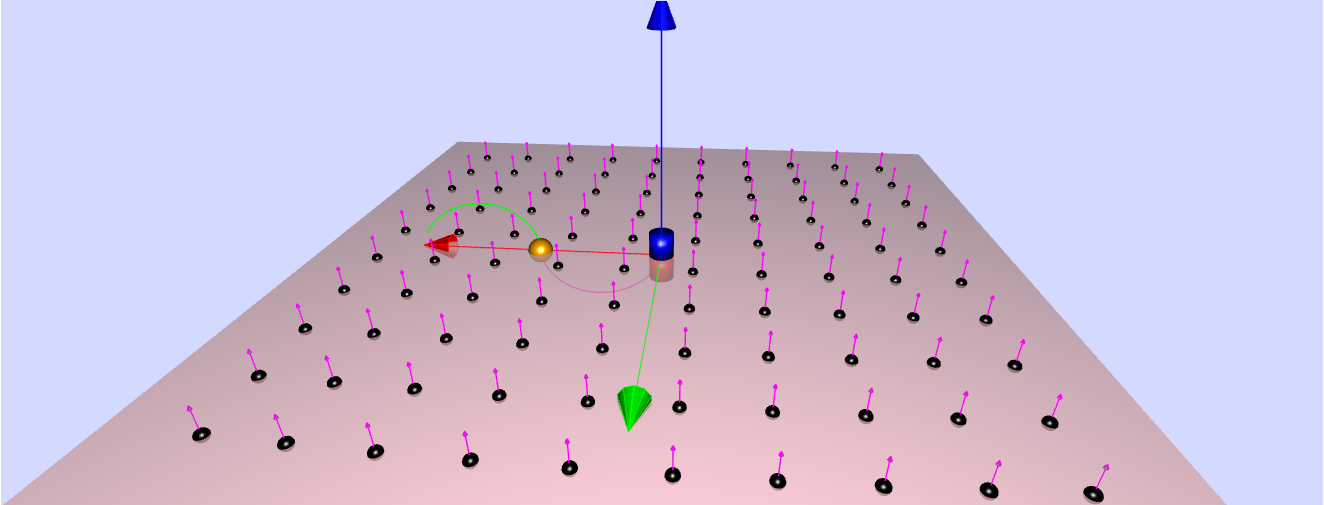
- Purpose: The model is designed to display the field lines and field vectors of a magnetic dipole situated at the origin and oriented along the z-axis. The "Intro Page" explicitly states: "The Magnetic Dipole Field Model displays the field lines and field vectors of a dipole located at the origin and oriented along the z-axis."
- Interactivity: Users can actively engage with the simulation. The description highlights the ability to "Drag the yellow handle in the 3D view to compute the B field passing through a point (x,y,z)." Users can also "Select the field option to show the field vectors in plane that passes through the dipole."
- Accessibility: The simulator is implemented as a "JavaScript Simulation Applet HTML5," making it accessible through web browsers without the need for additional plugins. The provision of an "Embed" code () indicates its intended use within other online resources.
- Open Educational Resource: The simulator is part of the "Open Educational Resources / Open Source Physics @ Singapore" project, emphasizing its commitment to freely available educational materials. The license mentioned in the first source, though not fully specified, suggests an open sharing model. The content is explicitly stated to be licensed under a "Creative Commons Attribution-Share Alike 4.0 Singapore License."
- Development Tool: The model was developed using "Easy Java Simulations (EJS) modeling tool version 4.3." This is explicitly stated in the "Credits" section: "The Magnetic Dipole Field Model was developed by Wolfgang Christian using the Easy Java Simulations (EJS) modeling tool version 4.3." This information allows educators with EJS to "examine and modify the model."
- Authorship: The simulator was created by Wolfgang Christian, Wee Loo Kang, and Fremont Teng, as credited in both sources.
- Learning Goals: The inclusion of "[Sample Learning Goals] [text]" and "[For Teachers] [text]" sections indicates that the resource is designed with pedagogical considerations in mind, though the specific learning goals and teacher resources are not provided in these excerpts.
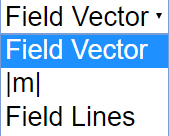
- User Interface Elements: The "Instructions" section details interactive elements such as "Combo Box and Functions," "Coordinates Sliders," "Toggling Full Screen," and "Play/Pause, Erase and Reset Buttons," providing insights into the user experience. Clicking the "Erase Button" will "clear all the traces in the simulation."
- Context within OSP@Singapore: The simulator is listed under the "Magnetism" section within the "Physics" interactive resources of the OSP@Singapore website, providing a clear categorization of the tool.
- Related Resources: The extensive list of "Other Resources" and links to numerous other physics simulations on the platform demonstrates the broader context of this tool within a rich collection of interactive learning materials. These range from basic mechanics to advanced electromagnetism and other scientific concepts. Examples include "Bar Magnet Field Line Simulator," "2 Bar Magnets on a level surface for Primary School Science," and simulations on topics like buoyancy, waves, and circuits.
2. Important Ideas and Facts:
- Mathematical Representation: The "About" section provides a simplified mathematical description of the dipole, stating that the position vector r is i x+ j y+ k z and the magnetic dipole moment m vector is k m. It also mentions that "Perform the dot product gives the following magnetic vector components," although these components are not explicitly listed in the excerpt.
- Extensibility and Modification: The mention of being able to "Open Ejs Model" from the pop-up menu if EJS is installed highlights the open-source nature and the potential for educators to customize the simulation for their specific needs. Links are provided to learn more about EJS and the OSP ComPADRE collection.
- Translations: The presence of a "Translations" section suggests an effort to make the resource accessible to a wider audience, although no specific translations are listed in the excerpt.
- Version Information: While the exact version number for this specific simulator isn't prominently displayed, the mention of "Easy Java Simulations (EJS) modeling tool version 4.3" provides a developmental context.
- Commercial Use: A separate note regarding commercial use of the EasyJavaScriptSimulations Library directs users to a specific license and contact information, indicating that while the educational content is openly licensed, the underlying library might have different terms for commercial applications.
3. Quotes:
- "The Magnetic Dipole Field Model displays the field lines and field vectors of a dipole located at the origin and oriented along the z-axis." (About section)
- "Drag the yellow handle in the 3D view to compute the B field passing through a point (x,y,z)." (About section)
- "Select the field option to show the field vectors in plane that passes through the dipole." (About section)
- "The Magnetic Dipole Field Model was developed by Wolfgang Christian using the Easy Java Simulations (EJS) modeling tool version 4.3." (Credits section)
- "Clicking on the Erase Button will clear all the traces in the simulation." (Instructions section)
- "Contents are licensed Creative Commons Attribution-Share Alike 4.0 Singapore License ." (Footer)
Conclusion:
The "Magnetic Dipole Field Vector and Field Lines Simulator" is a valuable open educational resource for teaching and learning about magnetic dipole fields. Its interactive nature, accessibility through web browsers, and the possibility for modification via EJS make it a flexible tool for educators. The simulator's placement within the extensive OSP@Singapore collection further enhances its utility by providing a broader context of related physics simulations. The documentation emphasizes user interaction and the underlying mathematical model, providing a foundation for understanding the behavior of magnetic dipole fields.
Study Guide: Magnetic Dipole Field Simulator
Overview: This study guide is designed to help you understand the concepts and functionalities presented in the "Magnetic Dipole Field Vector and Field Lines Simulator" resources. It focuses on the key features of the simulation and the underlying physics of magnetic dipole fields.
Key Concepts:
- Magnetic Dipole: A fundamental magnetic structure with a north and south pole, characterized by a magnetic dipole moment vector.
- Magnetic Field Lines: Imaginary lines that represent the direction and relative strength of a magnetic field. They emerge from the north pole and enter the south pole.
- Magnetic Field Vector: A vector quantity that specifies both the magnitude and direction of the magnetic field at a given point in space.
- Cartesian Coordinates (x, y, z): A three-dimensional coordinate system used to locate points in space.
- Position Vector (r): A vector that represents the location of a point in space relative to an origin.
- Magnetic Dipole Moment (m): A vector that characterizes the strength and orientation of a magnetic dipole. In this simulation, it is oriented along the z-axis.
- Simulation Controls: Interactive elements within the simulator, such as sliders, combo boxes, and buttons, that allow users to manipulate the visualization.
- Open Educational Resources (OER): Educational materials that are freely available for use, adaptation, and sharing.
- Easy Java Simulations (EJS): A software tool used to create interactive physics simulations.
Study Questions:
- What is a magnetic dipole, and how is it represented in the simulation?
- Describe the information conveyed by magnetic field lines. How are they visualized in the simulator?
- What does the magnetic field vector represent? How can you observe it in the simulation?
- Explain the role of Cartesian coordinates and the position vector in the context of the simulation.
- How is the magnetic dipole moment vector defined in this specific simulation? What is its orientation?
- Describe how you can interact with the simulation to explore the magnetic field at different points in space.
- What does the "field option" in the simulation allow you to visualize?
- What is Easy Java Simulations (EJS), and what is its significance in the development of this simulator?
- Identify three interactive controls available in the simulator and explain their functions.
- What is meant by "Open Educational Resources," and how does this apply to the provided simulation?
Quiz: Magnetic Dipole Field Simulator
Instructions: Answer the following questions in 2-3 sentences each.
- According to the simulation description, where is the magnetic dipole located, and along which axis is its moment oriented?
- What happens when you drag the yellow handle in the 3D view of the simulator? What quantity does this action help you compute?
- What is the purpose of selecting the "field option" in the Magnetic Dipole Field Simulator? What kind of visual representation does it provide?
- Who are credited as the developers of the Magnetic Dipole Field Model, and what modeling tool did Wolfgang Christian use?
- If you have EJS installed, how can you access and potentially modify the model for this simulation?
- Explain the function of the "Erase" button within the simulation controls. What does it clear from the view?
- Besides visualizing the magnetic dipole field, what other types of physics simulations are listed on the same webpage? Give two examples.
- What does the embed code provided allow users to do with the Magnetic Dipole Field Vector and Field Lines Simulator?
- According to the "About" section, what fundamental physical concept does this model primarily illustrate in three dimensions?
- What information can be found by exploring the "Other Resources" section listed on the webpage? Provide one specific example.
Answer Key: Magnetic Dipole Field Simulator Quiz
- The simulation places the magnetic dipole at the origin of the Cartesian coordinate system. Its magnetic dipole moment vector is oriented along the z-axis, as indicated by the k m notation.
- Dragging the yellow handle in the 3D view allows you to select a specific point in space with coordinates (x, y, z). This action computes and displays the magnetic B field vector passing through that chosen point.
- Selecting the "field option" displays the magnetic field vectors in a plane that passes through the magnetic dipole. This provides a visual representation of the magnetic field's direction and relative strength across that chosen plane.
- The Magnetic Dipole Field Model was developed by Wolfgang Christian, Wee Loo Kang, and Fremont Teng. Wolfgang Christian used the Easy Java Simulations (EJS) modeling tool version 4.3 for its development.
- If EJS is installed, you can access and modify the model by right-clicking within the program interface while the simulation is open and selecting "Open Ejs Model" from the pop-up menu.
- The "Erase" button in the simulation controls is used to clear all the traces left by the user's interactions, such as the paths traced by the yellow handle as it's dragged through the 3D view.
- The webpage lists numerous other physics simulations, including topics such as "Sound Analyzer JavaScript Simulation Applet HTML5" and simulations related to waves, buoyancy, and various aspects of electricity and magnetism.
- The embed code (the <iframe> tag) allows users to directly integrate and display the interactive Magnetic Dipole Field Vector and Field Lines Simulator within their own webpages.
- The "About" section states that the Magnetic Dipole Field Model displays the field lines and field vectors of a dipole in three dimensions, providing a 3D visualization of this fundamental magnetic concept.
- The "Other Resources" section provides links to other related simulations, such as "Need a Bar Magnet and Earth?" and "Need a Bar Magnet Field Line?", suggesting further explorations of magnetic phenomena.
Essay Format Questions: Magnetic Dipole Field Simulator
- Discuss the importance of interactive simulations, such as the Magnetic Dipole Field Vector and Field Lines Simulator, in enhancing the learning experience of abstract physics concepts like magnetic fields. Provide specific examples of how the features of this simulator contribute to this enhancement.
- Explain the relationship between magnetic field lines and magnetic field vectors. How does the Magnetic Dipole Field Simulator visually represent this relationship, and why is this visual representation crucial for understanding magnetic fields?
- Describe the concept of a magnetic dipole and its significance in physics. Based on the provided information, discuss how the simulation models a simplified magnetic dipole and what limitations this simplification might have in representing real-world magnetic sources.
- Analyze the role of Open Educational Resources (OER) in science education, using the Magnetic Dipole Field Vector and Field Lines Simulator as a case study. Discuss the benefits and potential challenges associated with using and adapting such resources.
- Based on the list of "Other Resources" and the variety of simulations available on the platform, discuss the interconnectedness of different physics concepts and how interactive simulations can help students explore these connections. Provide examples of how exploring related simulations could deepen understanding of magnetic fields.
Glossary of Key Terms: Magnetic Dipole Field Simulator
- Cartesian Coordinates: A system of coordinates that specifies each point uniquely in a plane or in three-dimensional space by a set of numerical coordinates, which are the signed distances to the coordinate axes.
- Dipole: A pair of equal and opposite electric charges or magnetic poles separated by a small distance. In this context, it refers to a magnetic dipole.
- Easy Java Simulations (EJS): A free, open-source software tool designed for creating interactive computer simulations, particularly for teaching science and mathematics.
- Field Lines: Imaginary lines used to visualize the direction and relative strength of a force field, such as a magnetic field. The closer the lines, the stronger the field.
- Field Vector: A vector quantity that describes the magnitude and direction of a field (e.g., magnetic field) at a specific point in space.
- Magnetic Dipole Moment: A vector that quantifies the strength and orientation of a magnetic dipole. Its direction is from the south pole to the north pole.
- Open Educational Resources (OER): Teaching, learning, and research materials in any medium – digital or otherwise – that reside in the public domain or have been released under an open license that permits no-cost access, use, adaptation, and redistribution by others with no or limited restrictions.
- Origin: The point where the coordinate axes of a coordinate system intersect, typically labeled as (0, 0) in 2D or (0, 0, 0) in 3D Cartesian coordinates.
- Position Vector: A vector that represents the displacement from the origin of a coordinate system to a given point.
- Simulation: A computer-based model of a real-world system or phenomenon that allows users to interact with and observe its behavior.
Sample Learning Goals
[text]
For Teachers
Magnetic Dipole Field Vector and Field Lines Simulator JavaScript Simulation Applet HTML5
Instructions
Combo Box and Functions



Coordinates Sliders
Toggling Full Screen
Play/Pause, Erase and Reset Buttons

Research
[text]
Video
[text]
Version:
Other Resources
- Need a Bar Magnet and Earth?
- Need a Bar Magnet Field Line?
- Need 2 Bars Magnet?
- Need a 3D visualization of a Bar Magnet Field Line?
- Need 2 Bar Magnets on a level surface for Primary School Science?
- Need Riveting and Rotating Paperclip and Magnet to demonstrate magnetism passes through non-magnetic materials
- Need Suspended Magnet with effects of Heating?
- Need Stacking Ring Magnets?
- Need More Simulations? Check this out!
Frequently Asked Questions: Magnetic Dipole Field Simulator
Q1: What does the Magnetic Dipole Field Vector and Field Lines Simulator demonstrate? The simulator visually represents the magnetic field produced by a theoretical magnetic dipole located at the origin of a 3D Cartesian coordinate system. It displays both the magnetic field lines, which indicate the direction of the magnetic force, and the magnetic field vectors, which show the magnitude and direction of the field at specific points in space. The dipole moment is oriented along the z-axis in this model.
Q2: How can I interact with the Magnetic Dipole Field Simulator? Users can interact with the simulator in several ways. There is a draggable yellow handle in the 3D view that allows you to compute and visualize the magnetic field vector at different spatial coordinates (x, y, z). You can also select an option to show the field vectors within a plane that passes through the dipole. Furthermore, coordinate sliders enable you to adjust the position of a point in 3D space to observe the corresponding magnetic field.
Q3: What are magnetic field lines and magnetic field vectors, as represented in this simulation? Magnetic field lines are visual representations of the magnetic field, indicating the direction that a north magnetic pole would move if placed in the field. They form closed loops originating from the north pole and entering the south pole (though a single dipole only has conceptual poles). Magnetic field vectors are arrows that depict the magnetic field at a specific point in space. The direction of the arrow indicates the direction of the magnetic force on a moving positive charge (or a north pole), and the length of the arrow represents the strength (magnitude) of the magnetic field at that point.
Q4: Who developed this Magnetic Dipole Field Simulator and using what tools? The Magnetic Dipole Field Model was developed by Wolfgang Christian using the Easy Java Simulations (EJS) modeling tool, version 4.3. The JavaScript/HTML5 version of the simulation, making it accessible in web browsers, is part of the Open Educational Resources / Open Source Physics @ Singapore project, with contributions from Wee Loo Kang and Fremont Teng.
Q5: Can I modify or examine the underlying model of the simulation? Yes, if you have the Easy Java Simulations (EJS) modeling tool installed (version 4.3 or later), you can examine and modify the model. This can be done by right-clicking within the simulation and selecting "Open Ejs Model" from the pop-up menu. Information about EJS is available at the provided links.
Q6: What are some of the learning goals or pedagogical uses for this simulation? While specific learning goals are not detailed extensively in the provided text, the simulation is clearly intended for educational purposes. It allows students to visualize an abstract concept – the magnetic field of a dipole – in an interactive 3D environment. This can help in understanding the spatial distribution and vector nature of magnetic fields, and how they vary with distance and direction from the dipole. The ability to drag a probe and observe the field vector at different points encourages exploration and quantitative understanding.
Q7: Are there other related simulations or resources available from Open Educational Resources / Open Source Physics @ Singapore? Yes, the provided text includes a very extensive list of other interactive physics simulations and resources available on the Open Educational Resources / Open Source Physics @ Singapore platform. These cover a wide range of topics in physics, mathematics, and even some interdisciplinary subjects, utilizing JavaScript/HTML5 applets for interactive learning. Several specific simulations related to magnetism, such as "Bar Magnet Field Line Simulator" and "3D Visualization of Magnetic Field From A Bar Magnet," are also listed.
Q8: How can this simulation be integrated into a webpage or other online learning environment? The simulation can be easily embedded into a webpage using the provided iframe code snippet. This allows educators to seamlessly integrate the interactive magnetic dipole field visualization into their online teaching materials, providing students with a direct and interactive way to explore this fundamental concept in electromagnetism.